

On this page
- How do the six AI code editors compare on security?
- How secure is Claude Code?
- How secure is Cursor?
- How secure is GitHub Copilot?
- How secure is OpenAI Codex?
- How secure is Devin Desktop?
- How secure is Google Antigravity?
- What should you require before rolling one out?
- What does no editor's built-in security cover?
- Frequently asked questions
- Which AI code editor is the safest?
- Is GitHub Copilot safe to use in regulated industries?
- Does Cursor run the agent's commands in a sandbox?
- Is Claude Code's sandbox on by default?
- Does OpenAI Codex have network access by default?
- Is Devin Desktop the same as Windsurf?
- Do these built-in features replace SAST and code review?
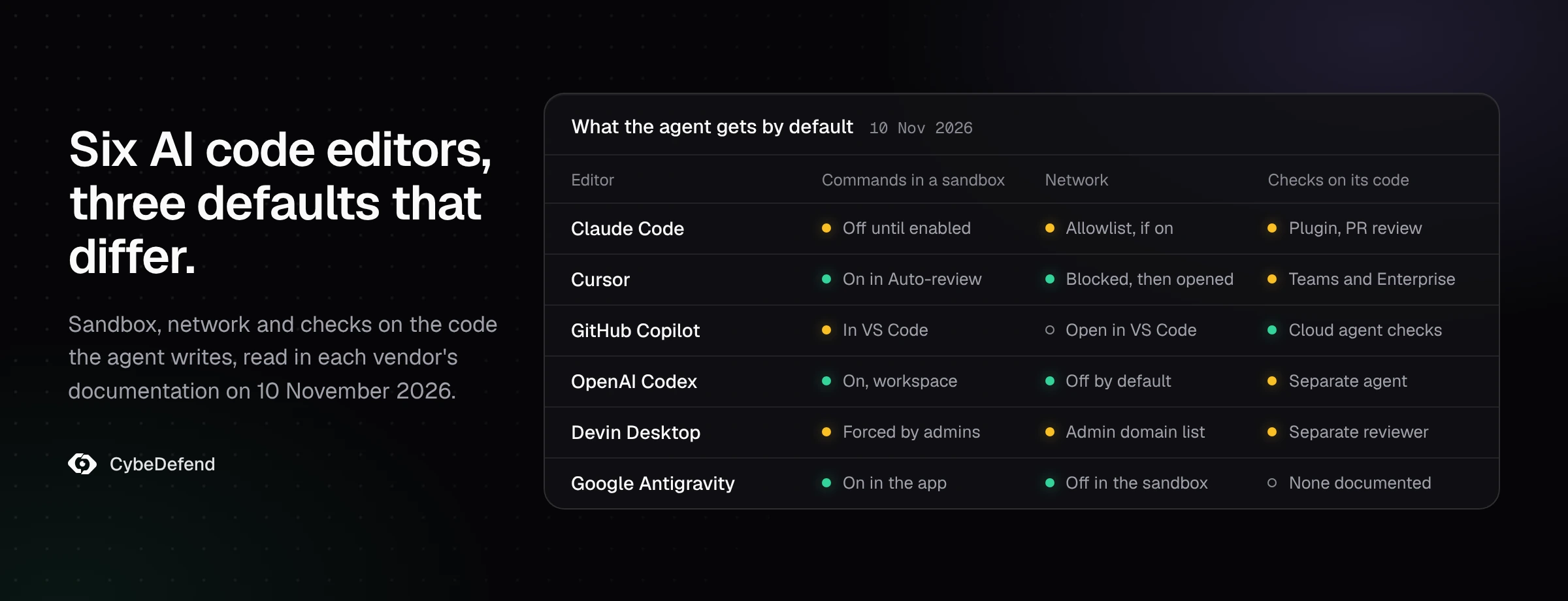
Every major AI code editor now ships real security features: approval prompts, allow and deny lists, admin policy and some form of sandbox. What separates them is four things a buyer can check: whether the agent's shell commands run inside an operating-system sandbox by default, whether the network is closed by default, whether an admin can enforce the policy so developers cannot loosen it, and whether the editor checks the code its agent writes. We read the documentation of six editors on 10 November 2026: Claude Code, Cursor, GitHub Copilot, OpenAI Codex, Devin Desktop and Google Antigravity. For the threat model behind these controls, start with our guide to AI coding agent security.
How do the six AI code editors compare on security?
The table reads each editor's documentation as published on 10 November 2026. "Sandbox" means an operating-system boundary around the shell commands the agent runs, not a cloud workspace.
| Editor | Agent commands in a sandbox | Network for those commands | Policy an admin enforces | Checks on code the agent writes |
|---|---|---|---|---|
| Claude Code | Off by default; macOS, Linux and WSL2 | Through a local proxy, allowed domains start empty | Managed settings developers cannot override | Security guidance plugin, /security-review, Code Review on pull requests (Team and Enterprise) |
| Cursor | On in Auto-review, the recommended mode; macOS and Linux | Blocked, then opened to package managers by default | Run mode policies in the Enterprise dashboard | Security Review on pull requests and a scheduled scanner (Teams and Enterprise) |
| GitHub Copilot | In VS Code, on supported Windows, macOS and Linux machines | Open by default in VS Code; the cloud agent sits behind a firewall | Enterprise policies on agent mode, MCP and auto-approval | The cloud agent runs CodeQL, secret scanning and a dependency check on its own code |
| OpenAI Codex | On, workspace write by default; macOS, Linux and Windows | Off by default | Managed configuration (requirements.toml) | Codex Security, a separate application security agent |
| Devin Desktop | Optional; admins can force it for local agent sessions | Domain allowlist and denylist set by admins | Team rules that override members and Bypass Permissions | Security in Devin Review, Cognition's pull request reviewer |
| Google Antigravity | On in the app's Default preset; off in the CLI and for business accounts until enabled | None for sandboxed commands by default | Allow, ask and deny rules on presets | None in the documentation we read |
Two patterns stand out. The sandbox is now standard, but whether it is on when a developer installs the editor differs from one tool to the next. And the checks on written code live, for four of the six, in a separate product or a paid tier, not in the editor itself.
How secure is Claude Code?
Claude Code decides what runs through permission modes. Since v2.1.283, auto mode is the starting mode for interactive terminal and VS Code sessions: "a separate classifier model reviews actions before they run". The other modes go from plan, which proposes and does not edit, to bypassPermissions, which Anthropic says to use "only" in isolated environments such as containers or VMs "without internet access". Allow, ask and deny rules can target tools, commands, paths, domains and MCP servers, and managed settings push them to every developer.
The sandbox is real but optional. "The sandbox is off by default": you turn it on with /sandbox or sandbox.enabled. It uses Seatbelt on macOS and bubblewrap on Linux and WSL2; on native Windows, commands run unsandboxed. Once on, sandboxed commands reach the network through a proxy whose allowed domains start empty, and managed settings can make the sandbox mandatory.
For the code itself, the security guidance plugin checks each edit against risky patterns, reviews each turn's diff with a separate model and reviews each commit Claude makes. Anthropic is clear on its limit: "None of the layers block writes or commits." Our article on Claude Code's risks and controls goes through each setting.
How secure is Cursor?
Cursor's agent reads files without approval, edits workspace files without approval except configuration files, and asks before terminal commands unless a run mode says otherwise. Auto-review is the recommended default: allowlisted commands run, other shell commands run in the sandbox when possible, and the rest go to a model classifier. Allowlist mode runs only what you listed. Run Everything removes the sandbox and the classifier. Cursor says run modes are "best-effort guardrails", not "a hard security boundary".
The sandbox uses Seatbelt on macOS and Landlock with seccomp on Linux, with kernel 6.2 or later; on an older kernel, Cursor falls back to asking. Inside it, the network is blocked, then opened by your network mode, which by default adds package manager and tooling domains to your own list. Writes stay in the workspace, and .git/config, .git/hooks, .vscode and .cursorignore are protected. Workspace Trust is off by default. Every MCP connection needs approval. Enterprise admins set run mode policies, protect the .cursor directory and restrict which sites the agent's browser opens.
Cursor's Security Review checks pull requests and a Vulnerability Scanner runs on a schedule, both on Teams and Enterprise. Is Cursor safe to use? covers the settings to change on day one.
How secure is GitHub Copilot?
Copilot has two agents to judge. In VS Code, the agent asks before terminal commands, with per-command auto-approve rules; Restricted Mode under Workspace Trust disables agents; agent sandboxing confines shell commands with operating-system isolation on supported Windows, macOS and Linux machines, with outbound network allowed by default. Enterprise policies can turn off agent mode, limit MCP servers to a registry and restrict auto-approval.
The cloud agent, which works on GitHub and opens pull requests, has the strictest review gates we found. Only users with write access can start it; it pushes to one branch; a human must review and merge its draft pull request; GitHub Actions workflows wait for approval; its internet access goes through a firewall. Before it finishes, it checks its own code with CodeQL, secret scanning and a lookup of new dependencies in the GitHub Advisory Database, without a GitHub Advanced Security licence. Since 9 June 2026, that validation also covers third-party agents working in your repositories, Claude and OpenAI Codex included.
For regulated teams, the evidence trail matters as much as the controls: the cloud agent's commits are signed, and session logs and audit log events are available to administrators. Our article on GitHub Copilot's risks and controls answers the regulated-industry question in detail.
How secure is OpenAI Codex?
Codex starts strict. In a version-controlled folder, the Auto preset lets the agent write in the workspace and ask for anything beyond it; outside version control, it starts read-only. "By default, the agent runs with network access turned off." The sandbox uses Seatbelt on macOS, bubblewrap with seccomp on Linux and WSL2, and a native sandbox on Windows. Inside a writable workspace, .git, .agents, .codex and .aws stay read-only.
Approval policies are on-request, never and granular, which keeps some categories interactive and rejects others; danger-full-access removes the sandbox. Admins enforce requirements through managed configuration, which can restrict approval policies, web search and the MCP servers allowed. OpenAI's application security agent, Codex Security, scans repositories, validates findings and proposes patches as a separate product. The flags that loosen all of this are in our article on Codex's sandbox and approval modes.
How secure is Devin Desktop?
Devin Desktop, Windsurf until June 2026, runs agent sessions in one of three modes: Code asks before each command, Smart lets "a fast model auto-approve commands it judges safe", and Bypass Permissions runs them unless the organization requires approval. Allow, ask and deny rules refine the modes, and "Deny rules have the highest priority."
Its strength is the admin side. Organization deny and ask rules override a member's own rules and Bypass Permissions. Admins cap the maximum autonomy level, force the Devin Sandbox on local agent and CLI sessions, set the domains that sandbox may reach, keep an allowlist of MCP servers, restrict models and deploy team-wide hooks. On Enterprise, an attribution check compares generated code with public code. Security in Devin Review, Cognition's pull request reviewer, reviews pull requests for vulnerabilities. Our guide to Devin Desktop's risks and controls lists the defaults to change.
How secure is Google Antigravity?
Antigravity sets terminal behaviour with four presets. Request Review always asks. Default, the default, allows commands in the sandbox and asks outside it. Auto checks commands outside the sandbox and asks for the risky ones. Turbo allows everything without a sandbox. Deny beats ask, and ask beats allow. Fetching a page and opening one in the browser both ask by default, and MCP tools ask on every preset but Turbo.
The sandbox blocks sensitive files such as ~/.ssh and .env, and "sandboxed commands run without network access by default". It runs on Linux, macOS and, since the August 2026 update of Windows 11 24H2, on Windows. Two exceptions matter to a company: in the CLI, the sandbox is off unless you enable it or use auto mode, and business and enterprise accounts, still on the previous settings, must turn it on by hand. Antigravity's sandbox protects your laptop, not your codebase explains the difference.
What should you require before rolling one out?
Whatever the editor, five settings turn its features into a policy:
- The sandbox on and enforced. Through managed settings or the admin dashboard, so a developer cannot switch it off in a hurry.
- The network closed, with an allowlist. Package registries and your own hosts, nothing else.
- Deny rules on secrets.
.env, keys, cloud credentials and the agent's own configuration files. - The bypass mode off.
bypassPermissions, Run Everything,danger-full-access, Bypass Permissions and Turbo are for disposable containers. - A check on the code before the commit. The editor's own review where it exists, your scanners where it does not, with the logs kept.
What does no editor's built-in security cover?
Three things stay with you. First, your company's own rules. The built-in reviews look for known vulnerability classes; whether a refund may exceed the amount paid, or which service may read customer data, is written nowhere they read. Claude Code's guidance file says so itself: its rules are "guidance for the reviewer, not deterministic guardrails". Second, one policy across editors. A team on Cursor, Claude Code and Copilot keeps three rule formats, three admin consoles and three logs. Third, the proof: each editor logs what its agent did in its own place.
That is where CybeDefend fits. VibeDefend installs with one command into Claude Code, Cursor, OpenAI Codex, Google Antigravity, Devin Desktop and GitHub Copilot, and serves each agent your team's business and security rules while it writes. Its guards check every tool call in Claude Code, Cursor, OpenAI Codex and Google Antigravity, and block file writes, file reads and shell commands in Devin Desktop; GitHub Copilot gets the rules, not the guards. Before the commit, a diff scan checks SAST, infrastructure as code and secrets.
Frequently asked questions
Which AI code editor is the safest?
None is safe by default in every setup. OpenAI Codex has the strictest defaults, with a workspace sandbox and the network off. GitHub Copilot's cloud agent has the strictest review gates and checks its own code. Claude Code and Devin Desktop give admins the deepest policy controls. The safest choice is the editor whose sandbox, network and policy your team will actually enforce.
Is GitHub Copilot safe to use in regulated industries?
It can be, with the controls on. Enterprise policies restrict agent mode, MCP servers and auto-approval; the cloud agent needs a human to review and merge, waits for approval before workflows run, signs its commits and leaves session logs and audit log events. What you must still show an auditor is your own policy: which repositories it may touch, and how its code is reviewed.
Does Cursor run the agent's commands in a sandbox?
Yes, in Auto-review, the recommended run mode, on macOS and on Linux with kernel 6.2 or later. Commands that cannot run in the sandbox go to a classifier. Run Everything turns both off.
Is Claude Code's sandbox on by default?
No. You enable it with /sandbox or the sandbox.enabled setting, on macOS, Linux or WSL2, and an admin can require it through managed settings. On native Windows, Claude Code runs commands without a sandbox.
Does OpenAI Codex have network access by default?
No. The agent runs with network access turned off until you enable it for the workspace-write sandbox.
Is Devin Desktop the same as Windsurf?
Yes. Windsurf became Devin Desktop in June 2026. Some admin settings still say "Windsurf Enterprise", and the controls described here apply to Devin Desktop.
Do these built-in features replace SAST and code review?
No. They limit what the agent can run and catch common vulnerabilities in what it writes. Your company's business rules, dependency risk across the whole codebase and the review of what reaches production still need their own checks.