

On this page
- Is Google Antigravity safe?
- What does the Antigravity sandbox actually block?
- Why does Antigravity say sandboxing is not supported on Windows?
- How do Antigravity permissions actually work?
- What does "allow all commands" actually allow?
- Are Antigravity skills safe to install?
- What about MCP servers and hooks?
- Does a GEMINI.md make the agent follow your rules?
- Does Google train on code written in Antigravity?
- The ten-minute pass, in order
- What we sell, stated plainly
- Frequently asked questions
- Is Google Antigravity safe?
- Is the Antigravity IDE safe to use on company code?
- Does Antigravity have a sandbox mode?
- Why is Antigravity sandboxing not supported on Windows?
- How do I skip permissions in Antigravity, and should I?
- Can Antigravity run terminal commands without asking me?
- Are Antigravity skills safe to install from GitHub?
- Can an MCP server run tools in Antigravity without approval?
- How do I enforce a rule in Antigravity?
- Does a GEMINI.md guarantee the agent follows my rules?
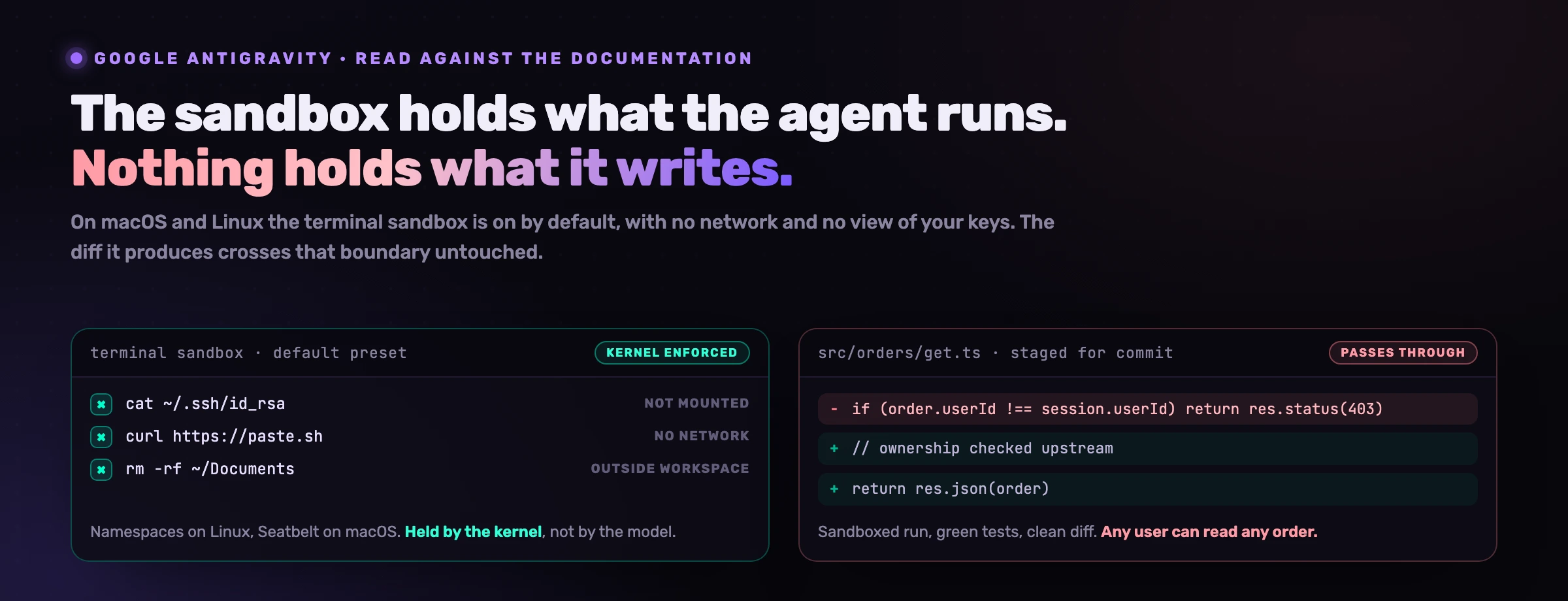
Google Antigravity ships a better default than most agentic IDEs, and that default protects the machine rather than the product. On macOS and Linux the agent's shell commands run inside a sandbox that is on by default, cannot read ~/.ssh or .env, and cannot reach a domain you have not approved. On Windows, as of 16 September 2026, none of that applies yet: Google's own documentation says the updated permission system is "currently available on macOS and Linux" and that Windows "will be updated to the unified permission system in a future release". And on every platform the sandbox holds what the agent runs. It says nothing about what the agent writes, which is the part that reaches your users.
Is Google Antigravity safe?
Safe against the failure people picture, undefined against the one that actually costs money. Three different questions hide inside the word, and Antigravity answers them very differently.
Can it wreck your laptop or walk off with your keys? On macOS and Linux, mostly no, by design and by default. Can it run something you did not intend? Only if you widen the rules yourself, and widening them is precisely what people are searching for. Can it write a vulnerability into your product, commit it, and watch the tests pass? Yes, and nothing in the product is aimed at that.
Start from what Google says the thing is. antigravity.google calls it an "agentic development platform" whose agents "execute shell commands directly". That is the risk surface stated by the vendor, and the rest of the documentation is an honest attempt to fence it.
What does the Antigravity sandbox actually block?
Four boundaries, each enforced by the operating system rather than by the model's good intentions.
Linux: kernel namespaces
The documentation is specific: "Kernel namespaces isolate the filesystem, hide host processes, and cut off networking." This is the same primitive that backs containers, so a command that escapes the agent's judgement still lands inside a box the kernel drew.
macOS: Seatbelt profiles
On macOS, "Seatbelt profiles (SBPL) restrict filesystem access and socket connections." Seatbelt is Apple's own sandbox language, the one that confines App Store applications, and it is the same mechanism Codex uses on the platform.
Credentials are invisible, not merely forbidden
"Sensitive files like ~/.ssh and .env are blocked, anything not explicitly mounted is invisible inside the sandbox." The distinction matters. A blocked read can be retried in another form. A path that was never mounted does not exist to retry.
Network on an allow-list
Inside the sandbox, "network access is limited to domains you've approved". Most exfiltration paths need the network to leave the box, which makes this the single most load-bearing default in the product.
The default preset joins those four together: "terminal commands run inside the isolated Terminal Sandbox with access restricted to your workspace and temp directories and no network access. Commands can run without manual approval in the sandbox."
Read that last sentence as the trade it is. Antigravity buys back the approval prompt, the one every developer clicks through by the fortieth time, by making the prompt unnecessary for the class of command that can only hurt a disposable directory. That is a better bargain than an agent that asks about everything and trains you to say yes.
Why does Antigravity say sandboxing is not supported on Windows?
Because the Windows build is still on the previous permission system. The sandbox page states that "Antigravity's updated permission system is currently available on macOS and Linux, where the sandbox is enabled by default", and both the sandbox and permissions pages carry the same note: Windows "will be updated to the unified permission system in a future release".
This is not a footnote for a team. The two platforms expose different switches with different names, which means a policy written on a Mac does not transfer to a Windows laptop even when someone copies it carefully.
There is a reading of that table where Windows looks stricter, and it is half right: asking about every unconfigured command is a real control. The half that is wrong is what happens when the answer is yes. On macOS a mistaken approval runs in a box with no network and no view of ~/.ssh. On Windows today it runs on your machine.
How do Antigravity permissions actually work?
Three verbs and a matcher. Rules are Deny, Ask or Allow, and "conflicting rules are strictly evaluated in priority order: Deny > Ask > Allow", so a Deny you wrote last quarter survives an Allow you add in a hurry today.
The matcher is where allow-lists usually fail, and this one is better than most. A command(git) rule "matches by exact word/token prefix literally by default", with regex: available when you need a pattern and command(*) when you have decided to stop reading. Then comes the paragraph that most write-ups about this product get backwards.
The documentation names the classic bypass itself: "certain shell constructs can hide arbitrary command execution behind an otherwise benign prefix", listing command and process substitution, $(...), backticks and <(...). And its response is to narrow rather than widen: "when Antigravity detects any of these (or cannot cleanly parse the command), it disables prefix matching for the entire command line: the command runs without prompting only if a rule matches the full line character-for-character."
What does "allow all commands" actually allow?
Everything a shell can express: inside the sandbox on macOS and Linux, and on your host on Windows. That is the honest answer to the most popular question in this product's search box, and the interesting part is the asymmetry between the two halves of it.
Worth saying plainly, because we sell a product in this category: our own command guard also matches literal text. Any allow-list built on string comparison, ours included, is a statement about the characters in a command rather than about its effect. In our own controlled study we logged thirteen false positives from those guards across thirty tickets, and we published that number rather than rounding it away. String matching is the right tool for a coarse boundary and the wrong tool for a decision you are betting the company on.
Which is why the ordering matters. The sandbox is a control because the kernel enforces it. The rule list is a convenience that shapes how often you are interrupted. If you turn the first one off to stop the second from bothering you, you have traded the control for the convenience.
Are Antigravity skills safe to install?
Nobody has said, and that is the finding. "Antigravity skills" is the first thing Google's own autocomplete offers after the product name in French, Spanish, German, Italian and Portuguese, usually followed by "antigravity skills github". People are already downloading these. The skills documentation contains no guidance whatsoever on reviewing, trusting or vetting one from a third party.
Here is what a skill is, from the same page. It lives at <workspace-root> for a workspace or ~ for every workspace. It requires a SKILL.md and may also carry scripts/, examples/ and resources/ subdirectories. And you "don't need to explicitly tell the agent to use a skill", because "it decides based on context".
Put those three facts in one sentence and you have a supply chain: a folder that arrives through a pull request, containing instructions and optionally executable scripts, which the agent reads and acts on without anyone asking it to.
The sandbox helps less here than people assume, and the reason is worth being precise about. The sandbox contains the commands a skill runs. It does not contain the instructions a skill gives. A SKILL.md that quietly steers the agent toward a permissive CORS policy, a missing ownership check or a logging line that prints the token produces a clean diff, a passing test suite and a completely successful, fully sandboxed run. We have written up that mechanism twice: once for instruction file injection through AGENTS.md and CLAUDE.md, and once for MCP tool poisoning, which is the same attack delivered through a tool description.
What about MCP servers and hooks?
Both are configured in the same .agents directory, and both ship a sane default.
MCP servers are declared in ~ or .agents, and "by default, unconfigured MCP tools run in Ask mode, requiring your approval before execution". That is the right default. It carries the same caveat as skills: the approval is on the call, and the poisoning is in the description, which the model has already read by the time you are asked anything.
Hooks are the more interesting half for a security team. They live in a hooks.json under ~/.gemini/config/ or .agents/, and they "allow you to run custom scripts or shell commands at specific points during Antigravity's execution loop": PreToolUse, PostToolUse, PreInvocation, PostInvocation and Stop. A PreToolUse hook can return "decision": "ask", which "prompts the user, but respects 'Always Allow' settings", or "force_ask", which "always prompts the user, ignoring cached permissions".
That second value is the only thing in the product that cannot be silently pre-approved by a tired click three weeks ago. If you have one rule you genuinely cannot afford to lose, it belongs behind force_ask.
Does a GEMINI.md make the agent follow your rules?
Not in the way the file's existence suggests. Global rules "live in ~/.gemini/GEMINI.md", workspace rules "live in the .agents/rules folder", and "rules files are limited to 12,000 characters each". What the documentation does not contain is any claim that the agent will follow them, and that reticence is earned.
We measured the equivalent file on another agent and published the result. Ninety autonomous runs, thirty developer tickets, one codebase, one model, and a single manipulated variable: how the agent could learn the platform's 49 business and compliance rules. A realistic hand-written rules section implemented 7 of 55 rule specifics exactly. No rules file at all implemented 7 of 55. The same score. The full method and the failures are in does Claude Code follow CLAUDE.md, and the mechanism is not specific to Anthropic: a document read once at session start is thirty thousand tokens away by the time the edit happens.
GEMINI.md is documentation. A Deny rule and a force_ask hook are controls. Do not file a rule in the first place when you needed the second.
Does Google train on code written in Antigravity?
The settings page states what is collected: "Antigravity collects interactions for use in evaluating, developing, and improving Antigravity and models that support Antigravity." The FAQ adds that "you may opt out of data collection at any point from the Settings panel", and defers everything else to the Terms of Service.
The enterprise posture is materially different and worth knowing before a security review asks. Google states that "enterprise prompts, responses, code, and telemetry are never stored outside your private environments" and that "your customer telemetry and model interactions are logged directly to the Google Cloud project corresponding to the license you select", with global, us and eu regions and VPC Service Controls available.
telemetry on the standard product, with a switch in Settings
where enterprise telemetry and model interactions are logged
retention period, in any documentation page we could read
We will not infer a retention period from documentation that does not state one, and neither should a vendor questionnaire. If the answer matters to your auditors, it comes from the Terms of Service and your Google contract, not from a blog post.
The ten-minute pass, in order
- Check your preset, not your intentions. On macOS and Linux, confirm you are on Default rather than Turbo. On Windows, set the Outside of Folder File Access Policy to Always Ask and turn Sandbox Mode on where the custom preset offers it.
- Grep for
.agents/before you trust a repository. Four paths in there are executable policy that arrives through a pull request:rules,skills,mcp_config.jsonandhooks.json. They deserve a reviewer, the same as a CI workflow does. - Never write
command(*). Write the five commands your project actually runs. The matcher is precise enough to make that worth the ten minutes. - Move the one rule you cannot lose out of prose. A
PreToolUsehook returningforce_askignores cached permissions. A line in GEMINI.md does not. - Decide the telemetry question once, in Settings, and write down what you decided and why. Someone will ask.
- Review the diff, because nothing above reviews the diff.
What we sell, stated plainly
Item six is our product, and the reason the other five are in this article is that they are free and you should do them first.
VibeDefend installs into the agent's environment rather than your repository. It fires on the hook surface described above, puts the rules relevant to the file being edited in front of the model immediately before the write, and scans what comes out. What it does not do is enforce. The deterministic half is the guard on the action; the rule in the context is an argument, and in our own study an agent overrode a rule that had been served to it thirteen times. We would rather name which of the two is a control than imply both are. The wider model is in AI coding agent security.
Frequently asked questions
Is Google Antigravity safe?
Safe against machine-level damage on macOS and Linux, and undefined against code-level defects everywhere. Shell commands run inside an operating-system sandbox that is enabled by default on those two platforms, with ~/.ssh and .env blocked and network access limited to domains you have approved. Nothing in that boundary examines the code the agent writes, so a fully sandboxed run can still commit a broken access check.
Is the Antigravity IDE safe to use on company code?
On macOS or Linux with the Default preset, the technical posture is reasonable and better than several competitors. Two questions decide it for a regulated team: whether your laptops are Windows, where the sandbox is not yet in place, and whether you are on the enterprise licence, where Google states that prompts, responses, code and telemetry "are never stored outside your private environments" and are logged to your own Google Cloud project.
Does Antigravity have a sandbox mode?
Yes, and it is on by default on macOS and Linux. Linux uses kernel namespaces that "isolate the filesystem, hide host processes, and cut off networking", macOS uses Seatbelt profiles that "restrict filesystem access and socket connections". Under the Default preset, commands run in that sandbox with access restricted to your workspace and temp directories, no network, and no manual approval needed.
Why is Antigravity sandboxing not supported on Windows?
Because the Windows build still runs the earlier permission system. Google's documentation states that the updated system is "currently available on macOS and Linux, where the sandbox is enabled by default", and that Windows "will be updated to the unified permission system in a future release". In the meantime Windows exposes a different set of controls: a Terminal Execution Policy, an Outside of Folder File Access Policy, and a Sandbox Mode toggle inside a custom preset.
How do I skip permissions in Antigravity, and should I?
There is no flag to carry over from Claude Code here, no --dangerously-skip-permissions equivalent on a command line. The supported routes are the Turbo preset and a command(*) allow rule, and on macOS or Linux both still run inside the sandbox, which is what makes them survivable. On Windows there is no such floor today. The better fix for approval fatigue is to allow the five commands your project actually runs, since rules match by exact token prefix and that list is short.
Can Antigravity run terminal commands without asking me?
Yes, under the Default preset on macOS and Linux, inside the Terminal Sandbox. That is the documented behaviour, not a misconfiguration: "commands can run without manual approval in the sandbox", where access is restricted to your workspace and temp directories with no network. On Windows, unconfigured commands still require manual approval.
Are Antigravity skills safe to install from GitHub?
Treat them as dependencies, because the documentation offers no trust model for them. A skill lives in .agents/skills/ or ~, requires a SKILL.md, may ship a scripts/ folder, and the agent "decides based on context" whether to use it without being told. The sandbox contains the commands a skill runs, not the instructions it gives, and a malicious instruction produces a clean diff.
Can an MCP server run tools in Antigravity without approval?
Not by default. The documentation states that "unconfigured MCP tools run in Ask mode, requiring your approval before execution", with configuration in ~ or .agents. The residual risk is not the execution but the tool description, which the model reads before you are prompted about anything.
How do I enforce a rule in Antigravity?
With a hook or a Deny rule, not with prose. A PreToolUse hook returning "force_ask" "always prompts the user, ignoring cached permissions", which makes it the one decision point that a previous Always Allow cannot bypass. Deny also beats everything else, since conflicting rules are evaluated strictly as Deny > Ask > Allow.
Does a GEMINI.md guarantee the agent follows my rules?
No, and Google's documentation never claims it does. Rules live in ~/.gemini/GEMINI.md or .agents/rules and are capped at 12,000 characters each. In our own 90-run controlled study on a comparable agent, a realistic hand-written rules section implemented 7 of 55 rule specifics exactly, the same score as having no rules file at all. Keep guessable conventions in the file and put arbitrary values, error codes and thresholds where the agent meets them at the moment of the edit.