

On this page
- What does claude --dangerously-skip-permissions actually do?
- Which permission modes does Claude Code have, and is bypass on by default?
- Can you turn on bypass permissions mid session, while Claude Code is running?
- Does --dangerously-skip-permissions work in the VS Code extension?
- Why does --dangerously-skip-permissions fail as root or with sudo?
- Does the sandbox still protect you when permissions are skipped?
- How do you stop Claude Code from asking for permission every time, without the flag?
- Which Claude Code guardrails still work when permissions are skipped?
- Has Claude Code really deleted a production database?
- Is Claude Code safe to use for work if nobody skips permissions?
- Frequently asked questions
- What is the Claude Code dangerously skip permissions command?
- Is --dangerously-skip-permissions enabled by default in Claude Code?
- Can I enable bypass permissions while Claude Code is running?
- How do I set defaultMode in Claude Code settings?
- How do I allow all commands in Claude Code without skipping permissions?
- Is Claude Code safe to use on a personal computer?
- Is Claude Code safe for enterprise use?
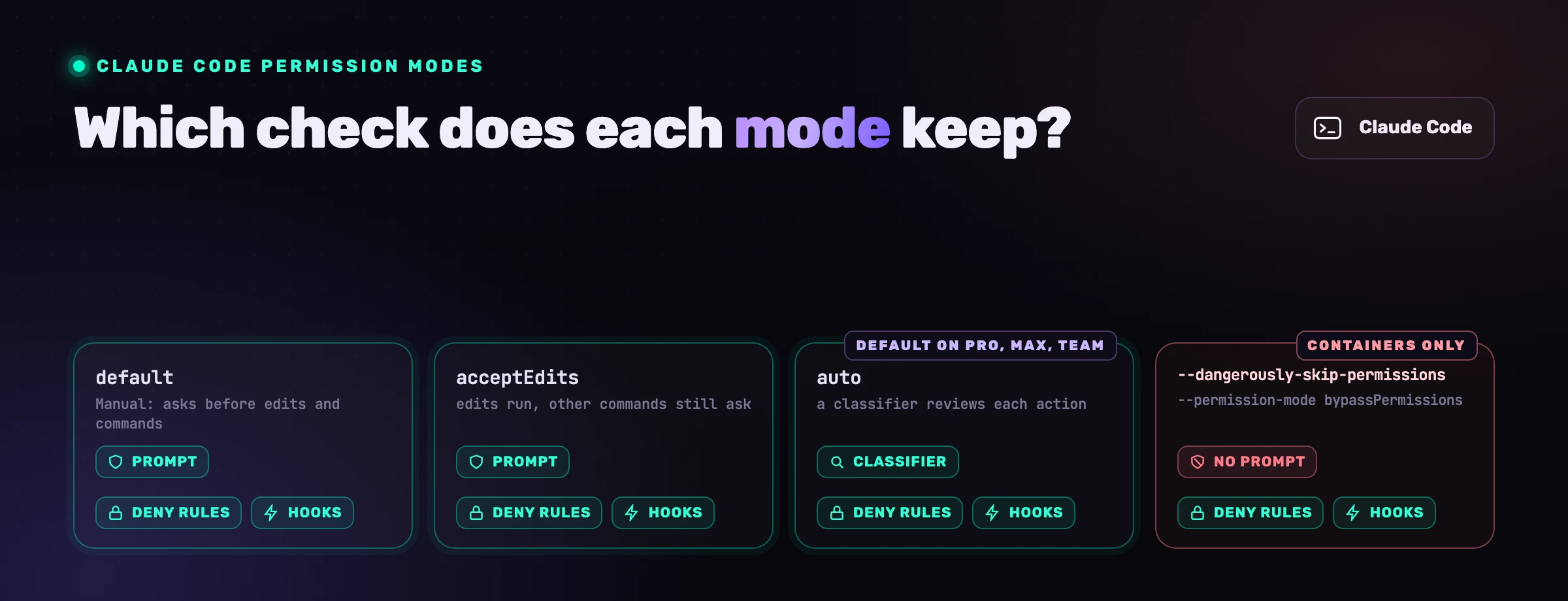
claude --dangerously-skip-permissions turns off the question Claude Code asks before it edits a file or runs a command. It is an alias for one of six permission modes: it cannot be switched on mid-session unless you planned for it, it refuses to start as root, and it leaves deny rules and hooks in place. Everything below was checked against Anthropic's documentation on 20 September 2026.
What does claude --dangerously-skip-permissions actually do?
It starts Claude Code in bypassPermissions mode. Anthropic's CLI reference calls the flag "Equivalent to --permission-mode bypass", and the permission modes page says the mode "disables permission prompts and safety checks so tool calls execute immediately, including writes to protected paths". File edits, shell commands, web fetches and MCP tools run as your user, unasked.
"Protected paths" is the part most write-ups skip. In every other mode, a write to .git, .vscode, .claude, .mcp.json or a shell profile such as .zshrc is prompted, classified or denied. In bypass mode the documentation's table says "Allowed". Another program executes those files later, the mechanism behind most sandbox escapes disclosed in 2026.
What it leaves in place:
| Control | With --dangerously-skip-permissions |
|---|---|
| Prompt before edits, commands, web fetches, MCP tools, protected-path writes | Gone |
| Plan mode's block on edits, in an interactive terminal | Not enforced |
deny rules | Still block, "in every mode, including bypassPermissions" |
ask rules | Still prompt |
PreToolUse hook that returns a deny | Still blocks |
rm or rmdir on /, ~, the working directory or its parents | Still asks you |
Starting as root or under sudo | Refused on Linux and macOS |
In a -p run nobody can answer, so calls that would still prompt are denied. Anthropic's warning fits in one line: "bypassPermissions offers no protection against prompt injection or unintended actions."
Which permission modes does Claude Code have, and is bypass on by default?
No. Claude Code has six permission modes and bypassPermissions is never the built-in default. On Pro, Max and Team plans a new terminal session starts in auto (from v2.1.228). On an Enterprise plan, a Console API key, Bedrock, Foundry, claude -p and the Agent SDK it starts in default, which the interface labels Manual.
| Mode | Runs without asking | Protected-path write | rm -rf ~ |
|---|---|---|---|
default (Manual) | Reads only | Prompted | Asks you |
acceptEdits | Reads, edits, mkdir, rm, mv, cp in the working directory | Prompted | Asks you |
plan | Reads, plus classifier-approved commands | Classifier or prompt | Asks you, or classifier |
auto | Everything, after a classifier reviews it | Classifier | Classifier |
dontAsk | Reads and pre-approved tools; the rest is denied | Denied | Denied |
bypassPermissions | Everything | Allowed | Asks you; refused after 2 minutes without an answer |
Since version 2.1.281, the prompt for a dangerous rm in bypass and auto mode no longer waits forever: after two minutes without an answer, Claude Code refuses the command and tells the model how to rewrite it, so an unattended session keeps going (changelog). CLAUDE brings the old behaviour back. Version 2.1.289 also closed a gap where a deny rule missed a command hidden behind a variable prefix, such as TZ=, when the sandbox auto-allowed commands.
The starting mode comes from the flag, then permissions in a settings file, then the built-in default. One detail matters if you clone repositories: the settings reference states that auto and bypassPermissions "don't take effect from project or local settings", then adds: "Before v2.1.257, bypassPermissions took effect from any file." On older versions a checked-in .claude could pick bypass mode for you, behind a warning dialog shown only once.
Can you turn on bypass permissions mid session, while Claude Code is running?
Only if the session was launched with bypass available. The documentation is explicit: "You can't enter bypassPermissions from a session you started without it enabled." To keep the option open, launch with --allow-dangerously-skip-permissions, which adds the mode to the Shift+Tab cycle after plan. A hook cannot grant it either.
That flag has a side effect. With bypass available in an interactive terminal, plan mode's blocks are no longer enforced: "Claude is still instructed to plan without editing, but a file edit or shell command it attempts during planning runs without prompting." Plan mode becomes an instruction to the model, no longer a block enforced by the client, except in -p runs, the Agent SDK and the VS Code chat panel.
Does --dangerously-skip-permissions work in the VS Code extension?
Yes, behind a switch that is off by default. The extension shows Bypass permissions in its mode indicator only after you enable the "Allow dangerously skip permissions" toggle (allow, default false), described as "Use it only in sandboxes with no internet access." Without it, a bypassPermissions default starts the conversation in Manual, and a repository cannot choose the starting mode.
Test the sandbox there. Issue #32814, filed on 10 March 2026, reported that the extension spawned the binary without --sandbox, so sandbox applied no Seatbelt profile. It was auto-closed as a duplicate four days later and we have not re-tested current builds: ask the agent to write outside the workspace and watch.
Why does --dangerously-skip-permissions fail as root or with sudo?
Because Claude Code refuses the combination on Linux and macOS. The error reads --dangerously-skip-permissions cannot be used with root, and the sandboxing page gives the reason: "root access combined with no permission prompts can modify any file or service on the system." The check is skipped "automatically inside a recognized sandbox".
People hit this in Docker, where processes run as root by default. The documented fix: "confirm remoteUser is set to a non-root account".
Does the sandbox still protect you when permissions are skipped?
Partly. The permission mode decides whether a tool call runs; the built-in sandbox limits what a Bash command can reach once it runs. They are independent, so sandboxed shell commands stay confined in bypass mode. But the sandbox covers only the shell. Anthropic's comparison page: "Built-in file tools, MCP servers, and hooks still run directly on your host."
With the sandbox on and permissions skipped, the operating system stops a shell command that appends to ~/.zshrc. It does not stop the Edit tool writing the same file: "Read, Edit, and Write use the permission system directly rather than running through the sandbox", and you just switched that system off. There is an escape hatch too: a command that fails in the sandbox may be retried with dangerously, and the retry "goes through the regular permission flow", which in bypass mode has no prompt left. Set sandbox to false.
Hence the documentation's rule: bypass sessions belong "inside a container, a VM, or the sandbox runtime", where file tools, MCP servers and hooks are inside the boundary too. Codex draws the line elsewhere, one flag removing approvals and sandbox together: see our Codex flags guide. Cursor splits the same choice into run modes, from Auto-review to Run Everything: see Cursor's YOLO mode in 2026.
The shortest route is Anthropic's Dev Container Feature, in .devcontainer, with no host secrets mounted:
{
  "image": "mcr.microsoft.com/devcontainers/base:ubuntu",
  "remoteUser": "vscode",
  "features": {
    "ghcr.io/anthropics/devcontainer-features/claude-code:1.0": {}
  }
}
npm install -g @devcontainers/cli
devcontainer up --workspace-folder .
devcontainer exec --workspace-folder . \
  claude -p "run the test suite and fix what fails" --dangerously-skip-permissions
Sign in inside the container once, or pass a scoped ANTHROPIC_API_KEY. You get a non-root user and a process boundary, not an egress policy: the reference container in the anthropics repository adds a default-deny firewall script. The dev container page warns that a bypassed session can still exfiltrate "anything accessible inside the container, including the Claude Code credentials stored in ~/.claude". Mount the repository, never your home directory.
How do you stop Claude Code from asking for permission every time, without the flag?
Use auto mode or write rules. Auto mode replaces the prompt with a classifier model and is already the default on Pro, Max and Team plans. Elsewhere, permissions.allow rules pre-approve the commands you run all day, acceptEdits stops the prompts on file edits, and the sandbox's auto-allow mode runs sandboxed shell commands unasked.
The case for fewer prompts comes from Anthropic. Its engineering post on auto mode of 25 March 2026 opens with: "Claude Code users approve 93% of permission prompts." A checkpoint that says yes 93 times in 100 is mostly habit. What matters is what replaces it, and for the flag the sandboxing page answers: "Nothing."
A ~ that drops most prompts and keeps the dangerous ones:
{
  "permissions": {
    "defaultMode": "acceptEdits",
    "disableBypassPermissionsMode": "disable",
    "allow": ["Bash(npm run *)", "Bash(git commit *)"],
    "ask": ["Bash(git push *)", "Bash(terraform *)"],
    "deny": [
      "Read(./.env)",
      "Read(./secrets/**)",
      "Read(~/.ssh/**)",
      "Read(~/.aws/**)",
      "Bash(curl *)"
    ]
  }
}
Rules are evaluated deny first, then ask, then allow. For "allow all", the documented pattern is a bare "Bash" in allow plus a PreToolUse hook that rejects the few commands you never want. The disable key is the one administrators look for: placed in managed settings it locks the whole team, and Claude Code "then rejects the --dangerously-skip-permissions flag".
Know the limit of Bash(...) rules. They match command text, and Anthropic's permissions page says a deny rule "covers the invocation Claude usually produces and isn't a security boundary around the program": Bash(rm *) stops rm -rf build/, not /bin/rm -rf build/ or bash -c 'rm -rf build.
Which Claude Code guardrails still work when permissions are skipped?
Three: deny rules, the critical-path check on rm, and PreToolUse hooks. The hooks guide states that these hooks "fire before any permission-mode check, in every permission mode", and that a hook returning a deny "blocks the tool even in bypassPermissions mode or with --dangerously-skip-permissions". The hook is the only one of the three that runs your own logic.
A minimal one, registered in ~:
{
  "hooks": {
    "PreToolUse": [
      {
        "matcher": "Bash",
        "hooks": [{ "type": "command", "command": "$HOME/.claude/hooks/guard.sh" }]
      }
    ]
  }
}
#!/bin/bash
# ~/.claude/hooks/guard.sh: exit 2 blocks the call, stderr goes back to Claude
CMD=$(jq -r '.tool_input.command')
if echo "$CMD" | grep -Eiq 'terraform[[:space:]]+destroy|drop[[:space:]]+(schema|database|table)|push[[:space:]].*--force'; then
  echo "Blocked: destructive command, ask the human to run it." >&2
  exit 2
fi
exit 0
Keep it in user or managed settings: in bypass mode the project's .claude directory is writable without a prompt, so the agent can edit a hook that lives in the repository.
Now the limits, because this guard matches text. The Cloud Security Alliance's GuardFall research note, published on 11 July 2026, bypassed the command guards of ten open-source coding agents out of eleven with five classes of shell injection. Claude Code was not in the test set, but the reasoning holds for any matcher: "A guard that inspects the pre-transformation string and a shell that executes the post-transformation string are, in effect, evaluating two different commands." Our own command guard errs in the other direction too. In our controlled study of 24 August 2026 it checked 1,769 shell commands and refused 17: one real catch, an agent reaching for a stored credential, three correct applications of policy, and 13 false positives that each cost the agent a turn, most of them the token nc matched inside a Python heredoc. A text guard is a tripwire for the common case. The boundary that holds when it misses is the container.
Has Claude Code really deleted a production database?
Yes, and the best-documented case did not involve the flag. On 26 February 2026 Claude Code ran terraform destroy against the production infrastructure of DataTalks.Club, taking the database, 2.5 years of course submissions and every automated snapshot with it. Founder Alexey Grigorev published the post-mortem on 6 March; AWS support restored the data about 24 hours later.
The agent announced its move: "I cannot do it. I will do a terraform destroy." Grigorev writes that it "looked logical", so "I didn't stop the agent". His post never mentions skipped permissions: a human was at the checkpoint, and the command went through because the rationale sounded right. His summary, also reported by Tom's Hardware: "I treated plan, apply, and destroy as something that could be delegated. That removed the last safety layer."
of permission prompts approved by Claude Code users (Anthropic, 25 March 2026)
issues titled rm -rf on the Claude Code tracker, 13 still open (GitHub API, 20 September 2026)
of real overeager actions missed by the auto mode classifier, by Anthropic's own count
A title search of the Claude Code tracker for rm -rf returns 65 issues on 20 September 2026, one titled "Claude Code executed rm -rf deleting entire home directory". These are user reports, not verified by us. Anthropic's own incident log, in the same post, includes "attempting migrations against a production database".
What would have helped, strongest first: no production credentials in the session and delete protection on the database, Grigorev's own fix; an ask rule on Bash(terraform *); the hook above; auto mode, whose default block list names terraform destroy.
Is Claude Code safe to use for work if nobody skips permissions?
Safer, and still incomplete. Some code runs before the permission system gets a say: CVE-2025-59536 let a project execute code before the startup trust dialog was accepted (fixed in 1.0.111), and Manifold's GitSpawn research of 1 September 2026 ran a repository's core.fsmonitor command "before the workspace-trust prompt was accepted". And permissions only decide whether an action may run; they never read the code the agent writes.
That second limit is why this article exists. Every control above decides what Claude Code may execute. None looks at what it writes. A Manual-mode session, every prompt read by an attentive engineer, can still commit an endpoint with no authorization check: a diff that compiles is not a permission event. Skipping permissions removes the last human checkpoint on actions. Keeping them adds no checkpoint on the code. Anthropic's security page leaves that part with you: "You're responsible for reviewing proposed code and commands for safety before approval."
That is where an agent-time control sits. VibeDefend runs as hooks in the same loop: it puts the rules relevant to a file in the model's context at the moment of the edit, feeds SAST, SCA, secrets, IaC and CI/CD findings back to the agent, and guards commands within the limits above. In the 24 August study, the agent with the layer implemented 57 of 64 graded rule specifics exactly (89%), against 8 of 65 (12%) with no tool. It also records a task where the rule was served thirteen times and the agent still dismantled its own safeguards: injection informs, it does not enforce. Details in Does Claude Code follow CLAUDE.md?, AI coding agent security and our Claude Code security guide.
Run the flag on purpose, in a container, as a non-root user, with deny rules, a hook and something reading the diff, and the setup is defensible. On a laptop, switch to auto mode, and talk to us about the part no permission mode covers.
Frequently asked questions
What is the Claude Code dangerously skip permissions command?
claude --dangerously-skip-permissions, or the equivalent claude --permission-mode bypass, with -p "<prompt>" for a non-interactive run. Anthropic restricts it to "isolated environments like containers, VMs, or dev containers without internet access".
Is --dangerously-skip-permissions enabled by default in Claude Code?
No. The built-in default is auto mode on Pro, Max and Team plans, Manual everywhere else. Bypass needs the flag, a user-level defaultMode, or an explicit toggle in the VS Code extension and the desktop app. Since v2.1.257 a repository's settings can no longer select it.
Can I enable bypass permissions while Claude Code is running?
Only if you launched the session with --allow-dangerously-skip-permissions, the flag itself, or a user-level defaultMode of bypassPermissions. Otherwise the mode never appears in the Shift+Tab cycle.
How do I set defaultMode in Claude Code settings?
Put "permissions": in ~. Values: default (alias manual), acceptEdits, plan, auto, dontAsk, bypassPermissions. auto and bypassPermissions are ignored from project and local settings, and the VS Code extension reads claude first.
How do I allow all commands in Claude Code without skipping permissions?
Add a bare "Bash" to permissions.allow and register a PreToolUse hook that rejects the commands you never want. Deny and ask rules still win. Auto mode is the lower-effort alternative, though Anthropic states it "does not guarantee safety".
Is Claude Code safe to use on a personal computer?
In Manual or auto mode, with deny rules on .env files, ~/.ssh and cloud credential folders, yes for everyday work. With permissions skipped on the host, no: the agent acts as your user, SSH keys and cloud credentials within reach. Use a container.
Is Claude Code safe for enterprise use?
The controls exist: a managed-settings (in /etc/claude-code/ on Linux) with disable, allow and allow, plus centrally enforced sandbox keys. They govern what the agent may execute. None reviews the code it produces: that remains your job.