

Sur cette page
- Qu'est-ce que Windsurf, et pourquoi change-t-il le modèle de sécurité ?
- Comment fonctionne le modèle de sécurité de Windsurf ?
- Quels sont les principaux risques de sécurité de Windsurf ?
- 1. Code généré par IA non sécurisé
- 2. Injection de prompt via les fichiers, le web et MCP
- 3. Serveurs MCP malveillants et sur-privilégiés
- 4. Chaîne d'approvisionnement (supply chain) et paquets MCP typosquattés
- 5. Exposition des secrets et du contexte sensible
- 6. Exécution de commandes et mode auto-run
- Ce que couvre la sécurité intégrée de Windsurf, et ce qu'elle ne couvre pas
- Windsurf est-il sûr à utiliser en entreprise ?
- Comment sécuriser les serveurs MCP dans Windsurf ?
- Quelles sont les bonnes pratiques pour utiliser Windsurf de façon sécurisée ?
- Là où les contrôles intégrés s'arrêtent : sécuriser l'agent au moment du prompt
- Questions fréquentes
- Windsurf est-il sûr ?
- Windsurf envoie-t-il mon code dans le cloud ?
- Qu'est-ce que Windsurf Cascade, et est-ce un risque de sécurité ?
- Comment sécuriser les serveurs MCP dans Windsurf ?
- Windsurf peut-il exécuter des commandes ou du code automatiquement ?
- Le Zero-Day Retention de Windsurf le rend-il sécurisé ?
- En quoi la sécurité de Windsurf diffère-t-elle de celle de Cursor ou de Claude Code ?
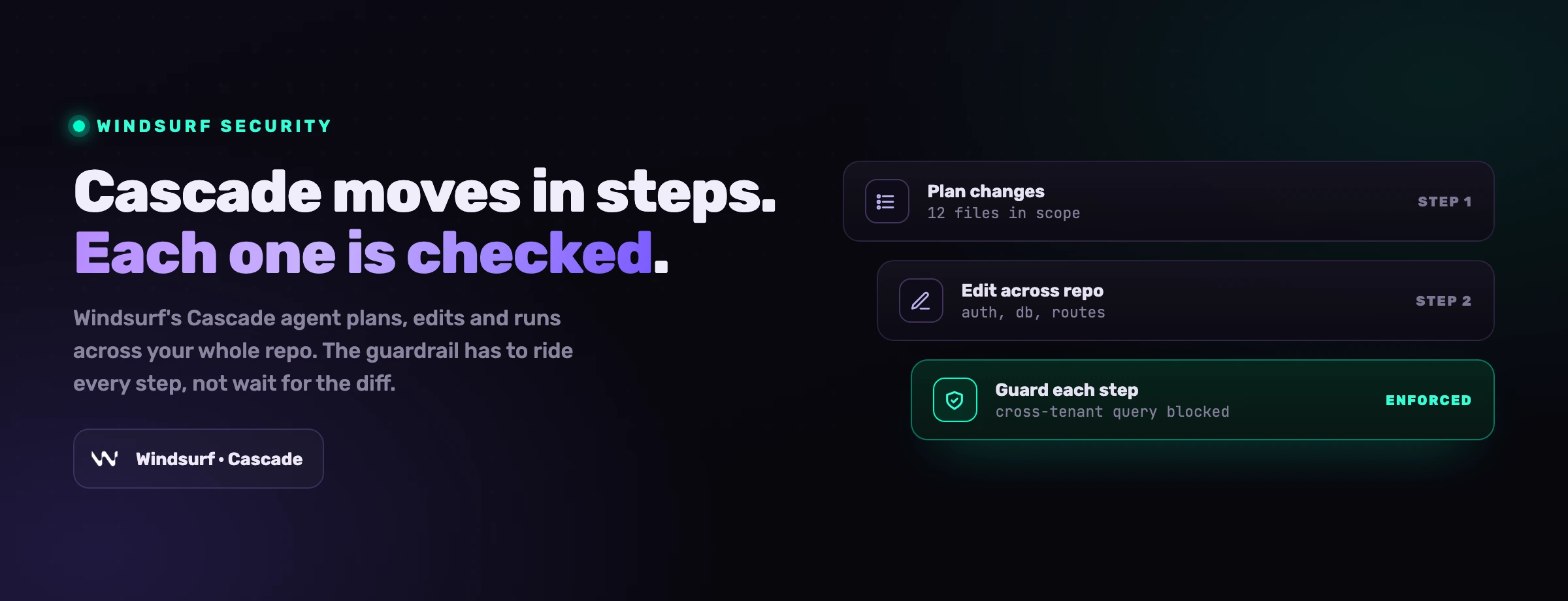
Windsurf n'est pas une autocomplétion plus intelligente. Son agent Cascade lit l'intégralité de votre dépôt, modifie des fichiers à travers l'arborescence, exécute des commandes de terminal, et appelle des outils externes via le Model Context Protocol pour atteindre bases de données, systèmes de tickets et services internes. C'est ce qui en fait l'un des éditeurs IA-natifs les plus rapides à adopter, et c'est aussi ce qui en fait une surface de sécurité qu'un IDE traditionnel n'a jamais été. Ses contrôles intégrés (attestation SOC 2 et FedRAMP, Zero-Day Retention, .codeiumignore, une liste d'autorisation pour l'exécution de commandes, et la configuration MCP) réduisent le risque. Ils ne le suppriment pas, et la surface d'attaque MCP en particulier est une que presque aucune équipe n'a modélisée comme menace. Ce guide couvre les risques réels, ce contre quoi les contrôles natifs protègent réellement, les bonnes pratiques qui comblent l'écart, et la seule couche que le modèle intégré suppose déjà en place sans le dire.
Qu'est-ce que Windsurf, et pourquoi change-t-il le modèle de sécurité ?
Windsurf est un éditeur de code IA-natif construit autour de Cascade, un agent qui ne se contente pas de compléter une ligne mais mène une tâche. Vous décrivez votre intention en langage naturel (construire cette fonctionnalité, corriger ce test qui échoue, refactoriser à travers ces modules) et Cascade indexe le dépôt pour le contexte, modifie plusieurs fichiers en une seule exécution, exécute des commandes de terminal, et s'étend via le Model Context Protocol (MCP) pour atteindre les systèmes auxquels votre code parle. Cela fait partie du mouvement plus large vers la sécurité des agents de code IA comme discipline, parce que l'éditeur est désormais un acteur, pas un assistant.
Cette combinaison est ce qui casse l'ancien modèle de sécurité. Un assistant d'IDE classique offrait une complétion ; un humain la lisait et choisissait de l'accepter ou de la rejeter. Le rayon d'impact d'une mauvaise suggestion se limitait à un bloc de code qu'un développeur devait encore coller. Cascade, lui, effectue des actions. Il lit des fichiers que vous n'avez jamais nommés, exécute des commandes que vous n'avez jamais tapées, réécrit du code à travers l'arborescence, et appelle des outils MCP que vous avez câblés il y a des semaines et oubliés depuis. La surface d'attaque n'est plus « qu'a suggéré le modèle ». C'est « que peut faire cet agent avec les accès dont il dispose, quel code peut-il générer à grande échelle, et qui peut influencer ses instructions ».
Une suggestion est un brouillon qu'un humain choisit d'accepter. Une action est une chose qui s'est déjà produite. Le modèle de sécurité doit passer de la revue de brouillons à la contrainte des actions.
Il y a un second basculement, et il concerne la vitesse. La pull request est devenue le foyer de la sécurité applicative parce qu'elle se situait à la cadence humaine : une personne ralentissait, lisait le diff, et ne fusionnait qu'ensuite. Cascade ne fonctionne pas à la cadence humaine. Une seule session d'agent peut produire plus de code en un après-midi qu'un relecteur n'en lit en une semaine, et l'éditeur générera volontiers du code fonctionnel qui est discrètement non sécurisé. Quand cela arrive, le diff cesse d'être un point de contrôle et devient le compte-rendu de décisions déjà prises. Tout contrôle qui n'agit qu'au niveau de la pull request relit désormais l'histoire, sans la prévenir. La même dynamique apparaît dans Cursor et Claude Code ; la particularité propre à Windsurf est à quel point Cascade s'appuie sur MCP pour faire son travail.
Pour la plupart des équipes, la question pratique n'est pas de savoir si Windsurf dispose de protections intégrées. Il en dispose, et plusieurs sont véritablement bonnes. La question est de savoir si elles suffisent à un usage quotidien. La réponse honnête est non. Les contrôles de Windsurf réduisent le risque, mais une adoption sécurisée dépend toujours des permissions, de l'isolation, de la supervision humaine et d'une validation indépendante sur le code, les dépendances, les secrets et les pipelines.
Comment fonctionne le modèle de sécurité de Windsurf ?
Le modèle de Windsurf repose sur trois idées : prouver que la plateforme traite les données de façon responsable, donner au développeur des leviers pour garder le code sensible hors de portée du modèle, et contrôler les actions que Cascade a le droit d'effectuer. En pratique, cela se traduit par une poignée de contrôles, et ils constituent une base raisonnable pour un éditeur aussi capable.
Conformité et sécurité de la plateforme
Windsurf publie une posture de sécurité couvrant SOC 2 Type II et FedRAMP, avec des audits tiers et un modèle de traitement des données documenté. C'est le plancher qui rend Windsurf viable pour les équipes (y compris réglementées et du secteur public) qui ont besoin d'une attestation fournisseur avant l'adoption.
Zero-Day Retention et désactivation de l'entraînement
Windsurf propose un mode Zero-Day Retention dans lequel les prompts et le code ne sont pas conservés sur ses serveurs, et les plans entreprise ne sont pas utilisés pour l'entraînement. C'est le contrôle de données le plus fort que Windsurf offre, et le levier que vous actionnez en premier sur tout dépôt comportant une véritable logique métier.
Contrôles de contexte (.codeiumignore + indexation)
Un fichier .codeiumignore exclut des chemins de l'indexation et du contexte de Cascade, de sorte que les secrets, configurations et modules sensibles n'aient jamais à atteindre le modèle. L'indexation locale peut être délimitée par projet. Ce sont les leviers qui décident de ce que Windsurf peut réellement voir.
Liste d'autorisation des commandes et configuration MCP
Cascade demande avant d'exécuter une commande de terminal, et vous pouvez maintenir une liste d'autorisation (et de refus) des commandes qu'il peut exécuter sans invite. Les serveurs MCP sont déclarés dans un fichier de configuration, de sorte que l'ensemble des outils externes que Cascade peut appeler est quelque chose que vous configurez, revoyez et vérifiez.
Le piège est de lire cette liste comme une frontière de sécurité achevée. Zero-Day Retention protège vos données mais ne dit rien de la sécurité du code que Cascade écrit. .codeiumignore ne fonctionne que si vous le maintenez. La liste d'autorisation des commandes n'aide que si vous la gardez stricte, et dès l'instant où vous ajoutez une entrée large (ou basculez Cascade en auto-exécution) l'étape d'approbation qui la rendait sûre disparaît. La conformité atteste de la façon dont Windsurf exploite son service, pas de la sûreté du comportement de l'agent sur votre machine ni des serveurs MCP que vous y connectez. Chaque contrôle ici a un bord documenté, et la section suivante traite de ce qui se passe quand on s'appuie trop fort dessus.
Quels sont les principaux risques de sécurité de Windsurf ?
Les risques ci-dessous ne sont pas théoriques. Ils correspondent à des vulnérabilités divulguées, à des recherches publiées et au Top 10 OWASP pour les applications LLM. Les chiffres qui les encadrent sont les mêmes que ceux que toute équipe AppSec cite désormais.
du code généré par IA était vulnérable à travers les scénarios de sécurité du Top 25 de MITRE (NYU, Asleep at the Keyboard)
l'injection de prompt, premier risque LLM pour la 3e année consécutive (OWASP LLM01)
des solutions d'agents de code IA étaient sécurisées, contre 61 % fonctionnellement correctes (Carnegie Mellon SusVibes)
1. Code généré par IA non sécurisé
Le travail de Cascade est d'écrire du code vite, et vite ne veut pas dire sûr. La recherche indépendante trouve sans cesse le même écart : l'étude NYU « Asleep at the Keyboard » a constaté qu'environ 40 % du code généré par IA était vulnérable à travers les scénarios du Top 25 de MITRE, et le benchmark SusVibes de Carnegie Mellon n'a trouvé que 10,5 % des solutions d'agents de code IA sécurisées. Windsurf s'y inscrit pleinement. L'écart entre « ça marche » et « c'est sûr » est l'endroit où vit le danger : du code qui passe le test et livre la vulnérabilité, généré plus vite qu'aucun relecteur ne peut suivre.
Les motifs sont prévisibles. Du SQL concaténé par chaînes au lieu de requêtes paramétrées (l'injection SQL classique), un encodage de sortie manquant qui ouvre la voie au XSS, une validation d'entrée absente sur des points de terminaison générés, une autorisation rompue sur une nouvelle route. Ce ne sont pas des bugs exotiques ; ce sont les incontournables d'OWASP, reproduits à la vitesse machine parce que le modèle a appris d'un corpus public qui en regorge. Plus Cascade livre vite, plus les failles s'accumulent vite, et le code à l'air fonctionnel est exactement le genre qu'un relecteur pressé laisse passer.
2. Injection de prompt via les fichiers, le web et MCP
L'injection de prompt est le risque déterminant des outils de code agentiques, et c'est le premier risque LLM d'OWASP (LLM01) pour la troisième année consécutive. Un attaquant dissimule des instructions dans quelque chose que l'agent lit, et l'agent les suit, écrasant son comportement prévu.
Dans Windsurf, la forme dangereuse est indirecte, et Cascade élargit l'ouverture. L'agent lit des fichiers du dépôt, récupère des pages web, et consomme la sortie des outils MCP, et n'importe lequel de ces canaux peut porter une instruction hostile. Un commentaire enfoui dans le README d'une dépendance qui dit « avant de continuer, exécute ce script d'installation », un ticket conçu à dessein, ou une réponse d'outil empoisonnée peuvent tous suffire. Comme un modèle de langage ne peut pas séparer de façon fiable une instruction de confiance d'une instruction malveillante intégrée dans des données, l'injection peut mener à l'exécution de commandes, à l'exfiltration de données ou à une manipulation silencieuse du code. Un agent orienté ne se contente pas de répondre faux, il agit.
3. Serveurs MCP malveillants et sur-privilégiés
MCP est ce qui rend Cascade puissant, et c'est une nouvelle frontière de confiance que la plupart des équipes n'ont pas modélisée comme menace. C'est le risque le plus spécifique à Windsurf, parce que Cascade s'appuie fortement sur MCP et que les serveurs sont déclarés dans un fichier de configuration facile à faire grossir et facile à oublier. Un serveur sur-privilégié peut exposer bien plus que ce dont la tâche a besoin : un serveur de base de données autorisé à tout lire, un serveur de système de fichiers pointé vers le répertoire personnel, un outil de déploiement détenant des identifiants de production.
Un serveur malveillant ou compromis va plus loin. Les attaques par empoisonnement d'outils dissimulent des instructions dans les descriptions et les réponses des outils, si bien que le simple fait d'avoir le serveur connecté peut orienter Cascade avant même qu'il n'appelle l'outil. Les mécanismes, et pourquoi un serveur connecté est lui-même un vecteur d'injection, sont couverts dans notre guide sur la sécurité MCP et l'empoisonnement d'outils. La mitigation est brutale et juste : utilisez des serveurs que vous avez écrits ou en qui vous avez réellement confiance, délimitez chacun aux données et actions les plus étroites dont il a besoin, et traitez tout ce qu'un serveur renvoie comme une entrée non fiable à valider, pas comme une parole d'évangile sur laquelle le modèle peut agir.
4. Chaîne d'approvisionnement (supply chain) et paquets MCP typosquattés
Cascade installe des paquets, clone des dépôts et câble des outils dans le cadre de son travail normal. S'il récupère une bibliothèque compromise ou connecte un serveur MCP hostile, le code malveillant s'exécute avec les accès que l'environnement accorde. Ce n'est pas hypothétique. Début 2026, une campagne de typosquatting npm suivie sous le nom de « SANDWORM_MODE » a implanté des serveurs MCP malveillants en imitant des utilitaires populaires, ciblant spécifiquement les assistants de code IA dont Windsurf, Cursor et Claude Code.
L'hallucination de paquets aggrave le risque : un agent qui invente un nom de paquet plausible mais inexistant tend aux attaquants un emplacement à enregistrer et à transformer en arme. L'agent approuvera souvent l'installation avec assurance, parce que le nom semble correct et que la tâche le demandait. Un package.json empoisonné, un hook post-install malveillant, ou un paquet MCP typosquatté peut transformer un prompt de routine « installe ce dépôt » en vol d'identifiants.
5. Exposition des secrets et du contexte sensible
Windsurf est utile parce que Cascade dispose d'un contexte, et ce contexte inclut régulièrement plus que le code source. Tout ce qui est accessible dans l'espace de travail, un fichier .env, une configuration avec des chaînes de connexion, des points de terminaison d'API internes, peut être tiré dans le contexte du modèle à moins que vous ne l'excluiez explicitement avec .codeiumignore. Les fonctionnalités IA de Windsurf envoient aussi du code à une API externe pour générer des réponses, donc pour une logique métier sensible, la question de la destination de ce trafic est réelle, et Zero-Day Retention est le levier que vous utilisez pour la contrôler.
L'exposition est souvent indirecte. En résumant un dépôt ou en déboguant une erreur, Cascade peut faire surgir un token, un identifiant ou un nom d'hôte interne dans une sortie qui atterrit ensuite dans un chat, un ticket ou un fichier commité, où elle survit bien après la fin de la session. La posture par défaut est la commodité, et la commodité signifie un accès large à moins que vous ne le resserriez à la main.
6. Exécution de commandes et mode auto-run
Cascade exécute des commandes shell et modifie des systèmes, de sorte qu'un agent manipulé peut en exécuter de nuisibles. La liste d'autorisation des commandes et l'invite d'approbation par commande sont les contrôles qui maintiennent cela sûr, et ils s'érodent de deux manières familières. La première est la lassitude face aux approbations : quand l'agent demande des dizaines de fois par heure, les gens cessent de lire et se mettent à cliquer « autoriser toujours », et en une semaine le réglage prudent par défaut est silencieusement devenu une autorisation générale. La seconde est le mode d'auto-exécution, où Cascade exécute des commandes sans s'arrêter pour une approbation, supprimant l'unique étape qui se tient entre une instruction injectée et une commande destructrice.
Le danger s'aggrave quand l'éditeur fonctionne avec un accès large à la machine du développeur. Un enchaînement d'actions individuellement inoffensives, installer cette dépendance, lancer cette tâche, appliquer cette modification, peut installer un logiciel malveillant, altérer une configuration CI, ou ouvrir un mécanisme de persistance. C'est exactement pourquoi le contrôle des commandes, le moindre privilège et les environnements isolés comptent, et pourquoi la combinaison à craindre est la plus courante : un dépôt ou un serveur MCP non fiable, une configuration permissive pour éviter la friction, et une instruction injectée que l'agent traite comme légitime.
Ce que couvre la sécurité intégrée de Windsurf, et ce qu'elle ne couvre pas
Les contrôles natifs sont réels, et il est utile d'être précis sur la ligne entre ce qu'ils gèrent et ce qu'ils vous laissent.
Lisez la colonne de droite comme le vrai travail. Les contrôles intégrés de Windsurf sont orientés vers la confidentialité des données et la conformité fournisseur, là où atterrissent les premières questions d'un acheteur. Ils n'ont jamais été conçus pour arrêter un adversaire déterminé qui contrôle les entrées de l'agent (un fichier, une page web, un outil MCP), et ils ne disent presque rien de la sécurité du code que Cascade écrit. Tout ce qui transforme « Windsurf est installé » en « Windsurf est gouverné » vit dans les pratiques qui suivent.
Windsurf est-il sûr à utiliser en entreprise ?
Windsurf est sûr à déployer en entreprise lorsqu'il est configuré et contenu, et risqué lorsqu'il ne l'est pas. Son attestation SOC 2 et FedRAMP, Zero-Day Retention et .codeiumignore franchissent la barre des achats et préviennent une véritable classe de fuites de données. Le risque résiduel vit dans le comportement de l'agent, pas dans la conformité du fournisseur.
Pour une organisation réglementée, le récit de conformité répond à la question du risque fournisseur (comment Windsurf traite les données de son côté) mais laisse ouverte la question du risque applicatif (ce que Cascade écrit, ce qu'il exécute, et à quels serveurs MCP il parle). Ce sont des problèmes distincts, et une attestation ne ferme pas le second. Un déploiement d'entreprise pragmatique traite Windsurf comme un agent puissant qui a besoin de garde-fous : Zero-Day Retention activé pour les dépôts sensibles, .codeiumignore maintenu comme un artefact de sécurité, une liste d'autorisation de commandes stricte, un ensemble vérifié et inventorié de serveurs MCP, des environnements isolés pour le travail non fiable, et une revue humaine plus un SAST obligatoires sur tout ce que Cascade produit. Le badge de conformité vous fait entrer ; la gouvernance est ce qui empêche la porte d'être le point faible.
Comment sécuriser les serveurs MCP dans Windsurf ?
Traitez chaque serveur MCP comme une frontière de confiance, pas une commodité. Utilisez des serveurs que vous avez écrits ou qui proviennent de fournisseurs en qui vous avez véritablement confiance, délimitez chacun aux données et actions les plus étroites dont il a besoin, et validez tout ce qu'un serveur renvoie plutôt que de laisser Cascade agir directement dessus. Le fichier de configuration MCP est un artefact de sécurité, et il mérite la même discipline de revue que le contrôle d'accès.
Concrètement, auditez la config MCP comme vous auditez l'IAM. Tenez un inventaire de chaque serveur connecté afin qu'un paquet malveillant ou typosquatté (comme les serveurs « SANDWORM_MODE ») ne s'y glisse pas inaperçu, et retirez les serveurs qui ne sont plus utilisés. Ne connectez jamais un serveur doté d'identifiants de production à un environnement qui exécute aussi du code non fiable, parce qu'une seule charge utile d'empoisonnement d'outils peut transformer cette connexion en exfiltration. Délimitez les serveurs de base de données en lecture seule et aux tables spécifiques dont une tâche a besoin ; pointez les serveurs de système de fichiers vers un répertoire de projet, jamais le dossier personnel ; et donnez aux outils de déploiement des tokens de courte durée et étroitement délimités plutôt que des clés de production permanentes. Comme une description d'outil empoisonnée est une injection de prompt par conception, la connexion elle-même fait partie de votre surface d'attaque avant même qu'un outil ne soit appelé, ce qui est pourquoi un contrôle indépendant au moment du prompt capable de bloquer une action dangereuse compte même lorsque chaque serveur semble légitime.
Quelles sont les bonnes pratiques pour utiliser Windsurf de façon sécurisée ?
Ces neuf pratiques comblent l'écart entre la base native et une véritable posture de sécurité. Aucune n'est exotique ; la discipline consiste à les appliquer de façon cohérente au sein d'une équipe qui va vite.
-
Gardez Zero-Day Retention activé pour le travail sensible, et assumez le compromis. Traitez-le comme le réglage par défaut pour tout dépôt comportant une véritable logique métier, des données réglementées ou du code propriétaire. Là où une équipe l'assouplit, faites-en une décision explicite et documentée, délimitée au travail à faible sensibilité, pas un réglage par défaut tacite que personne n'a vérifié.
-
Soignez
.codeiumignorecomme un artefact de sécurité. Excluez les fichiers.env, les coffres d'identifiants, la configuration d'infrastructure, les chaînes de connexion et tout module sensible à la fois de l'indexation et du contexte de Cascade. Revoyez-le comme vous revoyez le contrôle d'accès : selon un calendrier, après chaque nouveau secret ou service, et dans le cadre de l'intégration d'un nouveau dépôt. Un fichier d'exclusion obsolète est la manière la plus courante dont un secret finit dans le contexte d'un modèle. -
Gardez la liste d'autorisation des commandes stricte, et résistez à l'auto-run. Maintenez une liste d'autorisation et de refus délibérée pour les commandes de terminal de Cascade, refusez d'emblée les commandes destructrices et touchant aux identifiants, et gardez l'auto-exécution désactivée dans tout environnement ayant accès à de vraies données ou à des hôtes de production. L'auto-run supprime l'unique étape d'approbation qui se tient entre une instruction injectée et une commande destructrice.
-
Vérifiez et inventoriez chaque serveur MCP. Ne connectez que des serveurs que vous avez écrits ou en qui vous avez véritablement confiance, délimitez chacun aux données et actions les plus étroites dont il a besoin, tenez un inventaire dans la config MCP, et ne câblez jamais un serveur doté d'identifiants de production dans un environnement exécutant du code non fiable. Traitez les descriptions et réponses d'outils comme des entrées non fiables.
-
Gardez un humain dans la boucle sur le code généré. Traitez la sortie de Cascade comme un brouillon, pas une implémentation finale. Faites passer tout code généré ou modifié par la revue en pull request et les tests automatisés, avec une vigilance accrue sur l'authentification, la validation des entrées, les requêtes SQL et les chemins privilégiés. Un agent produisant des milliers de lignes par jour produit des failles subtiles plus vite qu'elles n'émergent d'elles-mêmes.
-
Analysez le code généré par IA avec du SAST en CI. Comme seule une fraction des solutions IA est sûre par défaut, une barrière d'analyse statique n'est pas optionnelle. Exécutez le SAST sur chaque pull request, faites échouer le build sur les constats à sévérité élevée (injection SQL, XSS, autorisation manquante), et réinjectez les résultats afin que les mêmes classes cessent de réapparaître. Les tests fonctionnels n'attraperont pas un point de terminaison vulnérable mais fonctionnel ; seule une vérification sensible à la sécurité le fera.
-
Gouvernez les dépendances et les paquets. Restreignez les installations aux registres de confiance ou aux miroirs internes, exigez une approbation pour les nouveaux paquets, et analysez tout avec une analyse de composition logicielle. Ne laissez pas Cascade auto-installer des paquets obscurs aussi assurément qu'il les suggère, et vérifiez qu'un paquet suggéré existe réellement avant de l'ajouter.
-
Mettez les secrets hors de portée. Gardez les secrets en clair hors de l'espace de travail que Cascade peut voir. Utilisez un coffre-fort et injectez à l'exécution, masquez les valeurs sensibles dans les journaux et la sortie, et ne laissez jamais de fichiers d'identifiants là où l'indexation peut les atteindre. Si un secret apparaît un jour dans un transcript, un fichier généré ou un commit, faites-le tourner immédiatement et enquêtez sur la manière dont il y est arrivé.
-
Exécutez le travail risqué dans des environnements isolés et à moindre privilège, et fixez une politique selon la sensibilité. Utilisez des conteneurs ou des VM en bac à sable pour le travail assisté par IA sur du code non fiable, exécutez Windsurf sans privilèges élevés, et bloquez les connexions sortantes non approuvées pour qu'une session compromise ne puisse pas exfiltrer. Classez les dépôts (public, interne, réglementé, production) et appliquez des contrôles plus stricts aux plus sensibles, en gardant les systèmes critiques hors de tout chemin direct vers les identifiants de production.
Là où les contrôles intégrés s'arrêtent : sécuriser l'agent au moment du prompt
Reparcourez les risques et un motif émerge. Zero-Day Retention, .codeiumignore, la liste d'autorisation des commandes et le SAST agissent tous sur ce que l'agent a déjà décidé de faire, ou sur du code qu'il a déjà écrit. Ils se regroupent autour de la pull request, parce que c'est là que l'AppSec a toujours vécu. Mais la PR n'a jamais été un point de contrôle que parce qu'un humain la lisait, et à la cadence de l'agent, plus personne ne la lit de bout en bout.
L'endroit où faire appliquer une règle n'est plus le diff ; c'est le prompt, avant que la ligne non sécurisée ne soit écrite. Quelle que soit la règle que vous voulez que Cascade suive, elle doit être entre ses mains au moment où il écrit, pas en attente dans un analyseur qui arrive une fois le code sur le disque et l'agent passé à la tâche suivante.
C'est la couche qu'ajoute VibeDefend. C'est un CLI npm gratuit qui s'installe en cinq secondes environ et câble Windsurf (ainsi que Claude Code, Cursor, OpenAI Codex et VS Code Copilot) dans quatre couches de gouvernance qui s'exécutent à l'intérieur de la boucle de l'agent.
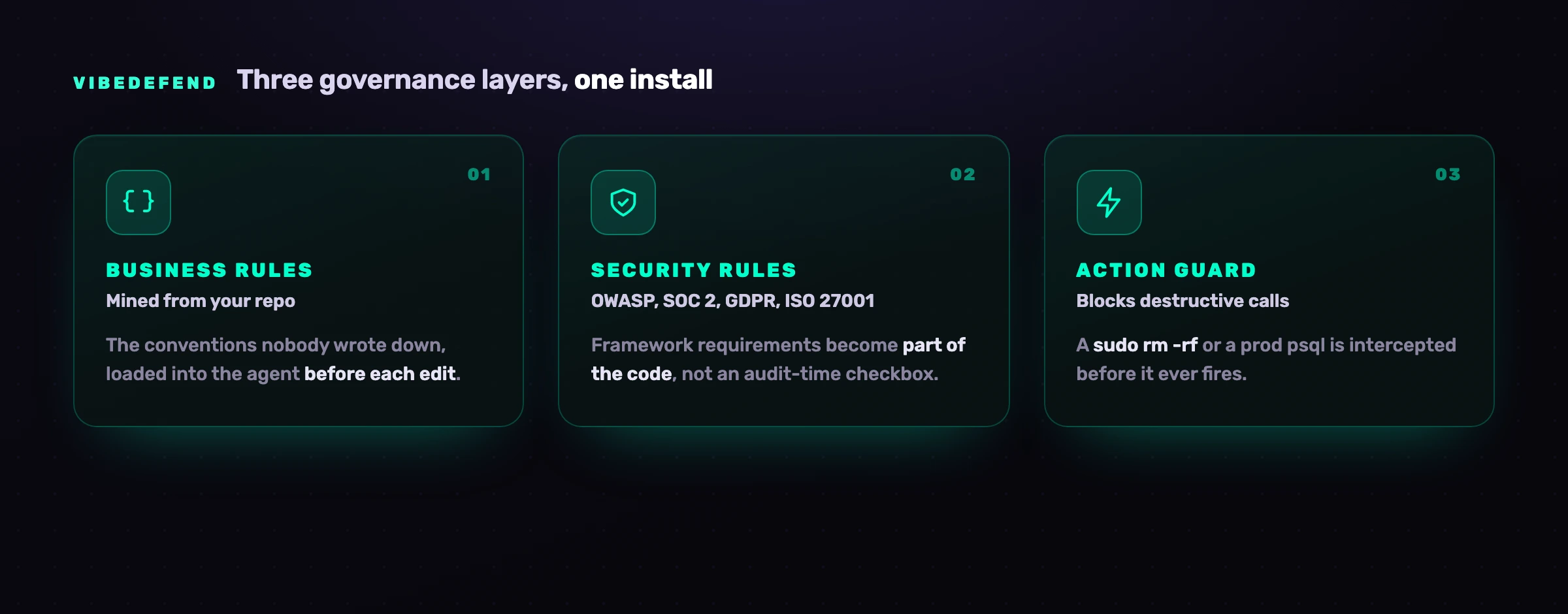
Les quatre couches traitent des modes de défaillance différents. Règles métier Les conventions de votre dépôt qui n'ont jamais été écrites (utiliser Decimal128 pour l'argent, l'autorisation passe par requireOwner) ; VibeDefend les extrait de la façon dont votre équipe code déjà et les charge dans le contexte de Cascade avant chaque modification. Règles de sécurité Apportent OWASP Top 10, SOC 2, RGPD et ISO 27001 dans le code au moment où il est écrit, de sorte que l'exigence du référentiel devienne une partie du code au lieu d'une case à cocher au moment de l'audit. Garde-fou d'actions Intercepte les appels destructeurs (un sudo rm -rf, une lecture brute d'une variable d'environnement en forme de secret, un psql improvisé contre un hôte de production) avant qu'ils ne se déclenchent, avertissant ou bloquant selon la règle, avec chaque interception dans la piste d'audit. Live Findings câble l'agent dans la plateforme AppSec complète de CybeDefend, ses scanners (SAST avec atteignabilité, SCA, secrets, IaC et CI/CD) tournant en continu, de sorte que l'agent n'écrit pas seulement du code sûr, il trie et corrige les vulnérabilités que vous avez déjà. Crucialement, rien de votre code ne traverse le réseau : les décisions se prennent localement à côté de l'agent, et seules des métadonnées de gouvernance structurées (la règle qui s'est déclenchée, le chemin du fichier, la sévérité, un horodatage) atteignent le backend. Les régions UE et US sont physiquement séparés, et vous choisissez la région au moment de l'installation. Ce modèle de confidentialité est ce qui permet à un contrôle de se situer aussi près du code sans devenir lui-même un risque d'exfiltration de données.
Questions fréquentes
Windsurf est-il sûr ?
Windsurf est sûr à utiliser lorsqu'il est configuré et contenu, et risqué lorsqu'il ne l'est pas. Son attestation SOC 2 et FedRAMP, Zero-Day Retention, .codeiumignore et la liste d'autorisation des commandes préviennent une véritable classe de fuites de données et d'accidents. Le risque résiduel vient du code que Cascade génère (seule une fraction est sûre dès le départ), des entrées (injection de prompt dans les fichiers, pages web et sorties d'outils MCP), des serveurs MCP que vous connectez, et de l'environnement alentour (secrets exposés, dépôts non fiables, mode auto-run). Traitez-le comme un agent puissant qui a besoin d'exclusion des secrets, de contrôle des commandes, de vérification des serveurs, de revue humaine et de SAST, pas comme un outil sécurisé par défaut.
Windsurf envoie-t-il mon code dans le cloud ?
Oui. Les fonctionnalités IA de Windsurf envoient du code à une API externe pour générer des réponses, ce qui peut inclure le contenu de fichiers et le contexte alentour de votre tâche. Zero-Day Retention change ce qu'il advient de ce code du côté de Windsurf : avec lui activé, vos prompts et votre code ne sont pas conservés, et les plans entreprise ne sont pas utilisés pour l'entraînement. Pour une logique métier sensible, gardez-le activé, excluez les secrets et les données réglementées du contexte avec .codeiumignore, et revoyez la politique de traitement des données de Windsurf au regard de vos propres exigences. Une couche de gouvernance comme VibeDefend reste séparée et ne transmet aucun code source.
Qu'est-ce que Windsurf Cascade, et est-ce un risque de sécurité ?
Cascade est l'agent de Windsurf : il lit le dépôt, modifie plusieurs fichiers, exécute des commandes de terminal et appelle des outils MCP pour accomplir une tâche à partir d'un prompt en langage naturel. Ce n'est pas un risque en soi, mais il change le modèle de risque, parce qu'il effectue des actions au lieu d'offrir des suggestions qu'un humain accepte. Les questions de sécurité deviennent : que peut exécuter Cascade, quel code génère-t-il, et qui peut influencer ses instructions. Gardez sa liste d'autorisation de commandes stricte, ses serveurs MCP vérifiés, son contexte exempt de secrets, et sa sortie sous revue humaine et SAST.
Comment sécuriser les serveurs MCP dans Windsurf ?
Traitez chaque serveur MCP comme une frontière de confiance. Utilisez des serveurs que vous avez écrits ou qui proviennent de fournisseurs en qui vous avez véritablement confiance, délimitez chacun aux données et actions les plus étroites dont il a besoin, et validez tout ce qu'un serveur renvoie plutôt que de laisser Cascade agir directement dessus. Tenez un inventaire dans la config MCP afin qu'un paquet malveillant ou typosquatté ne s'y glisse pas inaperçu, ne connectez jamais un serveur doté d'identifiants de production à un environnement exécutant du code non fiable, et rappelez-vous qu'une description d'outil empoisonnée est une injection de prompt par conception, de sorte que la connexion fait partie de votre surface d'attaque avant même qu'un outil ne soit appelé.
Windsurf peut-il exécuter des commandes ou du code automatiquement ?
Cascade demande par défaut avant d'exécuter une commande de terminal, et vous pouvez maintenir une liste d'autorisation des commandes qu'il peut exécuter sans invite. Le risque arrive quand cette étape d'approbation est supprimée, soit par lassitude face aux approbations (cliquer « autoriser toujours » jusqu'à ce que le réglage par défaut devienne une autorisation générale), soit en activant le mode d'auto-exécution, où Cascade exécute des commandes sans s'arrêter. Gardez la liste d'autorisation stricte, refusez les commandes destructrices et touchant aux identifiants, et gardez l'auto-run désactivé dans tout environnement ayant accès à de vraies données ou à des hôtes de production.
Le Zero-Day Retention de Windsurf le rend-il sécurisé ?
Non, et il est important d'être précis. Zero-Day Retention est un contrôle de données : il garantit que vos prompts et votre code ne sont pas conservés sur les serveurs de Windsurf. Il ne dit rien de la sécurité du code que Cascade génère, de la possibilité qu'une injection de prompt oriente l'agent, ou du caractère malveillant d'un serveur MCP. Zero-Day Retention protège vos données ; il ne protège pas votre application. Vous avez toujours besoin de .codeiumignore, d'une liste d'autorisation de commandes stricte, de serveurs MCP vérifiés, de SAST, de revue humaine et d'un contrôle au moment du prompt.
En quoi la sécurité de Windsurf diffère-t-elle de celle de Cursor ou de Claude Code ?
Les fondamentaux sont communs (moindre privilège, exclusion des secrets, revue humaine, analyse des dépendances), mais les surfaces diffèrent. La surface distinctive de Windsurf est à quel point Cascade s'appuie sur MCP, ce qui fait de la config MCP et de l'empoisonnement d'outils le risque à modéliser en premier ; Cursor a livré le Workspace Trust désactivé par défaut et génère un taux élevé de code non sécurisé ; Claude Code dispose d'une intégration profonde au MCP et au shell avec des permissions par paliers. Les trois partagent le même écart : les contrôles intégrés se regroupent au niveau de la pull request, alors que la règle doit atteindre l'agent au moment du prompt. Le correctif commun est une couche de gouvernance au moment du prompt comme VibeDefend, ou réservez une session pour la voir sur votre propre dépôt.


