

On this page
- Does Gemini CLI send my code to Google?
- Which ways of signing in still work in November 2026?
- Does Google train on code sent through Gemini CLI?
- How long does Google keep what Gemini CLI sends?
- What do Gemini CLI's usage statistics send?
- What does Gemini CLI keep on my own machine?
- Can Gemini CLI read my .env file?
- How do I set up Gemini CLI for company code?
- What no privacy setting covers
- Frequently asked questions
- Does Gemini CLI send my code to Google?
- Does Gemini CLI train on my code?
- Is Gemini CLI still free?
- How do I turn off Gemini CLI telemetry?
- Where does Gemini CLI store my chat history?
- Can I use Gemini CLI with EU data residency?
- Is Gemini CLI safe to use at work?
- What checks the code a coding agent writes?

Yes, Gemini CLI sends your code to Google. Each request carries your prompt, the conversation so far, and the content of the files and command output the agent pulled in, because that is how a coding agent works. What Google may do with it depends on how you sign in, and the list of sign-ins changed this year: since 18 June 2026 a personal Google account no longer works in Gemini CLI. What remains is a Gemini Code Assist licence, a Gemini API key or Vertex AI, each under its own terms. This guide answers each question from Google's own pages and from the code of Gemini CLI 0.70.0, which we installed and read on 19 November 2026. For the threat model behind these controls, start with our guide to AI coding agent security.
Does Gemini CLI send my code to Google?
Yes, everything the model needs to answer, which is more than your prompt. The documentation of Gemini CLI's core lists what it does: "sending user prompts, and receiving model responses", building prompts from "conversation history, tool definitions, and instructional context from GEMINI.md files", and "returning tool execution results to the Gemini model for further processing". That last line is how your code travels. When the agent reads a file, searches the repository or runs a command, the result goes back to the model with the next request.
What the agent may open without asking is wider than what it may change. The tools reference says "you must manually approve tools that modify files or execute shell commands", and the file tools reference marks file search and text search with "Confirmation: No". The same page keeps those tools inside one boundary: "All file system tools operate within a rootDirectory (the current working directory or workspace root) for security." A shell command you approve is not held to that folder, and whatever it prints is tool output like any other.
The code of version 0.70.0 names three hosts for those requests: cloudcode-pa for a Gemini Code Assist sign-in, generativelanguage for a Gemini API key, and aiplatform for Vertex AI. Three more doors open only if you use them. The web search tool sends the query the model wrote to Google Search, and "the Gemini API processes the search results". MCP servers are other people's programs: Google's own MCP page speaks of "arbitrary third-party MCP servers that might execute malicious code or log your environment". Extensions can bring MCP servers of their own.
What never leaves is what the agent never reads. The rest of this guide is about the two levers that follow from that: the terms you put the traffic under, and what the agent can reach.
Which ways of signing in still work in November 2026?
Fewer than older guides say. On 19 May 2026, Google's developer blog published the transition from Gemini CLI to Antigravity CLI: "On June 18, 2026, Gemini CLI and Gemini Code Assist IDE extensions will stop serving requests for Google AI Pro and Ultra, as well as those using it free of charge using Gemini Code Assist for individuals." Google's deprecation page, last updated on 9 October 2026, confirms it happened: "you can no longer use the Login with Google option to access the IDE extensions or Gemini CLI."
The README of the repository, which also ships inside the npm package, now opens on a notice: "Enterprise Code Assist only: Designed for Gemini Code Assist Standard / Enterprise licenses and Code Assist for GitHub on Google Cloud". It adds: "Free individual access and Google AI Pro / Ultra (Google One) moved to Antigravity CLI on June 18, 2026." Its table describes this repository as the tool for those organizations, "plus legacy paid API / Vertex keys". The transition post said the same of keys: "Gemini CLI will remain accessible via paid Gemini and Gemini Enterprise Agent Platform API keys." Gemini Enterprise Agent Platform is the name Google now gives Vertex AI.
| How you sign in | State on 19 November 2026 | Terms that apply | Does Google train on your code? |
|---|---|---|---|
| Google account with a Gemini Code Assist Standard or Enterprise licence | Works. No new subscriptions since 9 October 2026 | Google Cloud terms | Not without your permission |
| Gemini API key, paid | Works | Gemini API terms, Paid Services | No |
| Vertex AI | Works | Google Cloud terms | Not without your permission or instruction |
| Gemini API key, unpaid | Google's documentation site sends unpaid tier users to Antigravity CLI. We had no key to test | Gemini API terms, Unpaid Services | Yes, with human review. Not in the EEA, Switzerland or the UK |
| Personal Google account: free tier, Google AI Pro or Ultra | Ended on 18 June 2026 | Was the Gemini Code Assist for individuals notice | It could, until you opted out |
Two details for a team that plans around this table. The licence in the first row is on a clock: Google's page on Standard and Enterprise subscriptions, last updated on 10 November 2026, says "Starting October 9, 2026, you can no longer purchase new Gemini Code Assist Standard or Enterprise subscriptions", and sets out how long existing ones can be renewed. And the documentation has not caught up with the notice: the docs folder shipped inside version 0.70.0 still says "Gemini CLI offers a generous free tier" and still recommends "logging in with your personal Google account". If a guide tells you the free tier decides your privacy, check its date.
A developer who used the free tier is now sent to Antigravity CLI, under other terms. Google's Antigravity terms say it uses interactions "to evaluate, develop, and improve Google and Alphabet research, products, services and machine learning technologies", with a setting to change that. Our guide on whether Google Antigravity is safe covers what its sandbox blocks and what its settings collect.
Does Google train on code sent through Gemini CLI?
It depends on the sign-in, and for the three that are left for company code, Google's answer is no.
With a Gemini Code Assist Standard or Enterprise licence. Google's Code Assist FAQ asks the question in our words, "Does Gemini CLI use my data to train Gemini models when I use my Gemini Code Assist Standard or Enterprise license?", and answers: "Google doesn't use your data to train our models without your permission." The page on how Gemini products in Google Cloud use your data says it again: "Gemini doesn't use your prompts or its responses as data to train its models."
With a paid Gemini API key. The Gemini API terms, effective 23 March 2026, say of Paid Services: "Google doesn't use your prompts (including associated system instructions, cached content, and files such as images, videos, or documents) or responses to improve our products". They add that Google processes them under its Data Processing Addendum for products where it is a data processor. The key counts as paid on one condition: "only when accessing the API through a Cloud Project associated with an active billing account."
With Vertex AI. Google's page on the platform and zero data retention, updated on 19 November 2026, says: "Google won't use your data to train or fine-tune any AI/ML models without your prior permission or instruction." The Google Cloud service terms make the same commitment in a clause called Training Restriction.
With an unpaid Gemini API key. The same Gemini API terms say the opposite for Unpaid Services: "Google uses the content you submit to the Services and any generated responses to provide, improve, and develop Google products and services and machine learning technologies". They go on: "human reviewers may read, annotate, and process your API input and output." And they give the instruction themselves: "Do not submit sensitive, confidential, or personal information to the Unpaid Services." European readers get a different rule. In the European Economic Area, Switzerland or the United Kingdom, the terms apply the Paid Services data rules "to all Services, including Google AI Studio and unpaid quota in the Gemini API, even though they are offered free of charge."
The left column is not a guess about the past. The notice still ships in the code of version 0.70.0, where the /privacy command displays it: "When you use Gemini Code Assist for individuals with Gemini CLI, Google collects your prompts, related code, generated output, code edits, related feature usage information, and your feedback to provide, improve, and develop Google products and services and machine learning technologies." The next paragraph says human reviewers may read that data, that it is disconnected from your Google Account first, and that Google keeps "those disconnected copies for up to 18 months". The opt-out was a choice on that same screen. If your team ran the free tier on company code before June 2026, that is the text it ran under.
How long does Google keep what Gemini CLI sends?
Each sign-in has its own answer, and Google gives a figure for some and none for others.
How long the Gemini API keeps prompts and outputs for abuse monitoring, per Google's abuse monitoring page.
The longest Vertex AI keeps cached inputs and outputs, a cache you can disable.
How long reviewed copies were kept under the personal sign-in that ended on 18 June 2026.
How long Gemini CLI keeps each session on your own disk by default.
Code Assist Standard and Enterprise. Google's security, privacy and compliance page for these editions says: "Because Gemini Code Assist Standard and Enterprise are stateless Google Cloud services, they don't store prompts and responses in Google Cloud." You can choose to log them yourself in a Cloud Logging bucket. On location, the page is plain that Europe is not promised: processing typically happens in the data center closest to the request, "but regionality is not guaranteed." It lists ISO 27001, 27017, 27018 and 27701 and SOC 1, 2 and 3 for the service, which certify Google's controls and not your use of them.
Gemini API key. The abuse monitoring page of the Gemini API says: "Google retains the following data for fifty-five (55) days for the purposes of detecting and preventing violations of the Prohibited Use Policy", and that this data "is not used to train or fine-tune any AI/ML models besides those used specifically for policy enforcement." The paid terms word it without a number: prompts and responses are logged "for a limited period of time".
Vertex AI. The zero data retention page describes a cache of inputs and outputs that is "deleted no later than 24 hours after it's written", and says you can disable caching entirely. It also says prompts may be logged to detect abuse, for customers whose use of Google Cloud falls under the standard Google Cloud Platform terms. And it does not hand out zero retention by default: "To achieve zero data retention, customers must take specific actions within each of these areas." For where requests run, Gemini CLI reads GOOGLE, which its authentication guide describes as "the location of your Vertex AI resources or the location where you want to run your jobs". It is the only sign-in of the three where you name the region.
We found no retention period for flagged content on Vertex AI, and no number behind "a limited period" in the paid terms. If your auditor needs one, it comes from your contract with Google.
What do Gemini CLI's usage statistics send?
A second stream, separate from the model requests, on by default. Google describes it in the configuration reference: "we collect anonymized usage statistics". It lists the names of the tools called, whether they succeed and how long they take, the model and duration of each request, and the configuration of the CLI. It also lists what stays out: "We do not collect the arguments passed to the tools or any data returned by them", "We do not log the content of your prompts or the responses from the Gemini model", "We do not log the content of any files".
We installed the published package to see how that is built. We had no Google login and no API key, so this run shows the code and the defaults, not a live session:
$ npm i --ignore-scripts @google/gemini-cli
$ npx gemini --version
0.70.0

$ npx gemini --list-sessions
Please set an Auth method in your ~/.gemini/settings.json or specify
one of the following environment variables before running:
GEMINI_API_KEY, GOOGLE_GENAI_USE_VERTEXAI, GOOGLE_GENAI_USE_GCA

$ grep -rhoE "https://play\.googleapis\.com/[^\"']+" \
    node_modules/@google/gemini-cli/bundle | sort -u
https://play.googleapis.com/log?format=json&hasfast=true

$ grep -rh "usageStatisticsEnabled ??" \
    node_modules/@google/gemini-cli/bundle | sort -u
    this.usageStatisticsEnabled = params.usageStatisticsEnabled ?? true;
The output is as printed, with the path of our scratch home folder shortened to ~ and the long error line wrapped. It shows three things. Version 0.70.0, published on 19 November 2026, refuses to start a session without credentials. Its usage statistics go to one address, play. And the default is on: with no setting, usage is true.
Then comes who the events are tied to. The function that builds every event settles it, in the source of the same release:
// Should log either email or install ID, not both.
if (email) {
  logEvent.client_email = email;
} else {
  logEvent.client_install_id = this.installationManager.getInstallationId();
}
email is the Google account cached at sign-in. With an API key or Vertex AI there is none, and the event carries a random installation id. With a Google account, which is how a Code Assist licence signs in, the event carries the address. The reference says no personally identifiable information is collected, "such as your name, email address, or API keys". The code of the same release sets client_email. We could not sign in, so we captured no live event; this is the code as shipped.
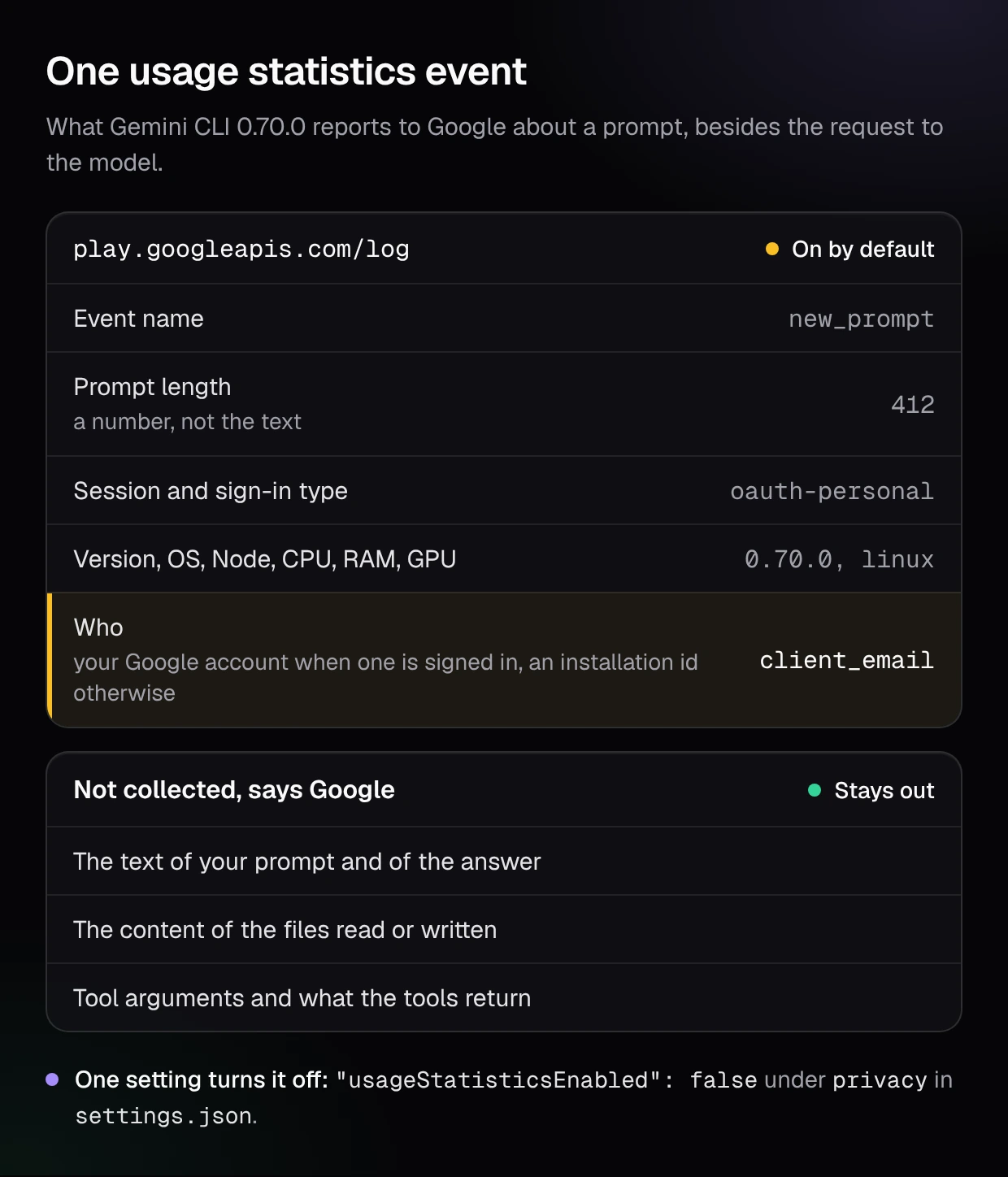
The same file shows what else rides along. A new prompt is reported by its length, a number. The session start event carries the names of your MCP servers and of their tools, the CPU model, the amount of RAM and the GPU. In a GitHub Actions run it adds a hash of the repository name and the workflow name. One event goes past counters: when the CLI routes a request between models, it adds the router's one-sentence reasoning about that request as long as telemetry keeps its default of true. Events are batched and sent once a minute.
The switch is one key in settings.json:
{
  "privacy": {
    "usageStatisticsEnabled": false
  }
}
Do not confuse it with the OpenTelemetry export, which is a different feature for your own observability. The telemetry page gives enabled a default of false, so nothing is exported until you configure it. But when a team turns it on, logPrompts defaults to true and prompts land in the collector. Google's enterprise guide says so itself: "Ensure that logPrompts is set to false in an enterprise setting to avoid collecting potentially sensitive information from user prompts."
What does Gemini CLI keep on my own machine?
A full copy of every session, in plain files, for 30 days. The session management page lists what is saved, "your prompts and the model's responses" and "all tool executions (inputs and outputs)", and where: "Sessions are stored in ~". It also gives the clock: "The default policy is to retain sessions for 30 days."
A tool output is whatever the tool returned. If the agent read config or you approved git log -p, that text sits in the session file for a month, where backup tools, sync clients and anyone with access to the laptop can find it.
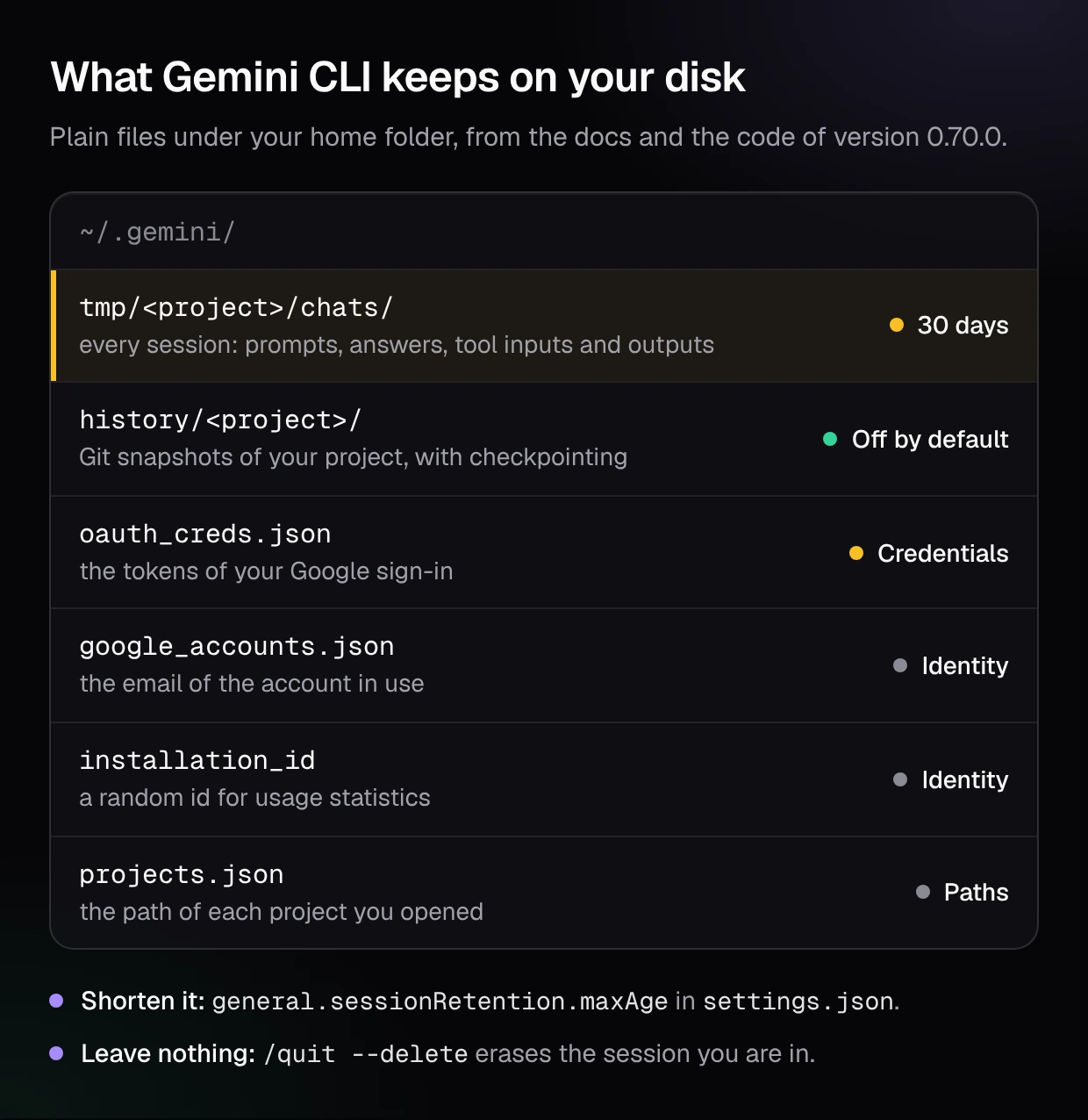
Four more things live in that folder:
- Credentials. A Google sign-in is cached in
~. The code writes it with owner-only permissions, and it is still a file a malicious package on your machine can read./ .gemini /oauth _creds .json - Identity.
googleholds the address of the account in use, and_accounts .json installation_idthe random id used by usage statistics. - Project paths. In our run,
gemini --list-sessionsin a folder namedacme-apiwrote~with the full path of that folder, before any sign-in./ .gemini /projects .json - Snapshots, if you ask for them. With checkpointing on, each file edit first commits "the complete state of your project files" to a shadow Git repository under
~/.gemini/history/. The page says "The Checkpointing feature is disabled by default" and that all of it "is stored locally on your machine".
Two controls shorten what stays. general takes a duration such as "7d", with a floor: minRetention defaults to one day. And for a one-off task on sensitive code, the commands reference documents /quit --delete, which exits and deletes "the current session's history and temporary files (chat recording, tool outputs)".
Can Gemini CLI read my .env file?
Yes, and by default the CLI loads it itself before the agent does anything. The configuration reference says: "The CLI automatically loads environment variables from an .env file", starting in the current directory and searching upwards. That file is meant for the CLI's own keys, and the values end up in the environment of the process.
From there the question is what the agent's commands inherit. The reference describes a redaction of variables whose names contain TOKEN, SECRET, PASSWORD or KEY when tools run, and calls it "best effort". The setting behind it, security, has a default of false in the same reference, and the shipped code returns the whole environment to shell commands when it is off, outside GitHub Actions. A command the agent runs can then print a DATABASE_URL, and what a command prints goes to the model.
Four documented controls narrow this, from the lightest to the heaviest:
.geminiignore. The ignore page says paths listed there are excluded "from tools that support this feature", and gives the@command as the example. Files matched by.gitignoreare skipped by search by default too. Neither page says a shell command such ascat .envis filtered. Shell commands need your approval in the default mode, so read what you approve.- Redaction on. Set
securityto.environment Variable Redaction .enabled true. - No local
.env.advancedmakes the CLI ignore.ignore Local Env .envfiles in the project directory. In an untrusted folder it already does: the trusted folders page says the CLI "will not load any.envfiles from the project" and that MCP servers do not connect. - The sandbox. The reference says "Sandboxing is disabled by default". With
--sandboxand Docker or Podman, tools run in a container that mounts your project folder and, in the words of the sandbox page, stays "isolated from the rest of your system": the keys in your home folder are out of reach. On macOS, the default Seatbelt profile confines writes to the project and still allows broad file reads. A.envinside the project stays readable in both.
The primary control is still a secret that is not in the tree. A key in a secrets manager, injected at runtime, cannot be read, redacted badly or approved by mistake. Editors differ on this point more than on any other, as our comparison of security features across six AI code editors shows.
How do I set up Gemini CLI for company code?
Decide the sign-in first, then cut the second stream, then shrink what stays and what the agent can reach. Gemini CLI reads a system settings file that overrides the user's and the project's: /etc on Linux, /Library on macOS, C: on Windows.
Force the sign-in
The setting: security, set to vertex-ai, gemini-api-key or oauth-personal (the Google account that carries a Code Assist licence). What it does: a developer with another method is asked to switch, and a headless run exits with an error. To keep personal Gmail accounts out, Google's guide adds a proxy header, X-Goog.
Turn off usage statistics
The setting: privacy. What it does: no events to play, so no account address, MCP server names or hardware details leave beside the model requests.
Keep prompts out of your own telemetry
The setting: telemetry. What it does: if you export OpenTelemetry for auditing, the collector gets tool calls and timings without the text of the prompts.
Shorten what stays on the laptop
The setting: general, and /quit --delete for one-off work. What it does: session files with file contents and command output do not sit under ~/.gemini for a month.
Take the secrets out of reach
The setting: security, advanced, a .geminiignore, and no live keys in the repository. What it does: the agent's commands stop inheriting credentials, and the file tools skip what you listed.
Contain the tools
The setting: tools.sandbox, and an allowlist of MCP servers with mcp.allowed. What it does: commands run in a container, and only the servers your organization named can receive what the agent sends them.
Put together, a system file for a team on Vertex AI looks like this. Every key comes from Google's configuration reference:
{
  "security": {
    "auth": { "enforcedType": "vertex-ai" },
    "environmentVariableRedaction": { "enabled": true }
  },
  "privacy": { "usageStatisticsEnabled": false },
  "telemetry": { "logPrompts": false },
  "general": { "sessionRetention": { "enabled": true, "maxAge": "7d" } },
  "tools": { "sandbox": "docker" }
}
Know what this file is worth. Google's enterprise guide warns that these patterns "should not be considered a foolproof security boundary", because a developer with local admin rights can get around them. Organizations with a Code Assist licence get a stronger layer: the enterprise admin controls "are enforced globally and cannot be overridden by users locally", and they ship with MCP and extensions disabled until an admin turns them on.
The same three questions, sign-in, second stream and local files, have different answers in each agent. We answered them for Claude Code and Anthropic, for Codex and OpenAI, and for Cursor and its Privacy Mode.
What no privacy setting covers
Every control above governs what Gemini CLI reads, sends and keeps. None of them looks at what the agent writes, and the code it writes is a privacy surface of its own. An agent that hard-codes a token it saw in a fixture, logs a full request body with a customer's email in it, or returns records a caller was never allowed to see has created a data protection problem that no retention period fixes. The leak is now in your repository and your production logs.
That is the part CybeDefend Open Source is built for. One command in your coding agent, /cybedefend, runs a full audit. First the open source AppSec scanners, for code, dependencies, secrets, infrastructure as code, CI/CD and containers. Then the AI scanner, run by your coding agent, which goes after the flaws static scanners cannot see, business logic, access rights and data that crosses tenants, and proves each flaw with an exploit test. No extra model and no API key: the AI is the coding agent you already run. Every finding lands in one queue, our agentic ASPM platform, which is yours to host on your servers.
We are open sourcing our whole platform, and it opens soon. To run it on your own code when it does, join the CybeDefend Open Source waitlist.
Frequently asked questions
Does Gemini CLI send my code to Google?
Yes. Each request carries your prompt, the conversation history and what the tools returned, including the content of files the agent read and the output of commands it ran. A file the agent never opens is not sent. Which Google service receives the request, and under which terms, depends on how you signed in.
Does Gemini CLI train on my code?
With a Gemini Code Assist Standard or Enterprise licence or with Vertex AI, Google says it does not train on your data without your permission, and with a paid Gemini API key it does not use your prompts or responses to improve its products. With an unpaid Gemini API key, the terms allow it, with human review, except in the EEA, Switzerland and the UK.
Is Gemini CLI still free?
No. Free individual access and the Google AI Pro and Ultra plans stopped working in Gemini CLI on 18 June 2026 and moved to Antigravity CLI. Google's README now describes Gemini CLI as a tool for organizations with a Gemini Code Assist Standard or Enterprise licence, plus paid Gemini API keys and Vertex AI.
How do I turn off Gemini CLI telemetry?
Set usage to false under privacy in settings.json, at user level or in the system settings file for a whole team. That stops the usage statistics sent to Google. The OpenTelemetry export is separate and off by default; if you turn it on, set telemetry to false.
Where does Gemini CLI store my chat history?
Under ~ on your own machine, with prompts, answers and the inputs and outputs of every tool, kept 30 days by default. Change the period with general, or leave with /quit --delete to erase the current session.
Can I use Gemini CLI with EU data residency?
Only one sign-in lets you name a region: Vertex AI, through the GOOGLE variable. For Gemini Code Assist Standard and Enterprise, Google says processing typically happens close to the request "but regionality is not guaranteed". Check the model you need in the region you pick before you commit.
Is Gemini CLI safe to use at work?
It can be, with the right setup: a Code Assist licence, a paid key or Vertex AI, enforced for everyone, usage statistics off, secrets out of the repository, the sandbox on and short local sessions. What remains is the code the agent writes, which needs its own checks before it reaches a commit.
What checks the code a coding agent writes?
No privacy setting does: they govern what is read, sent and kept. The code needs scanners for the known patterns and a proof for each flaw they cannot see. CybeDefend Open Source does both with one command in your coding agent, and it opens soon. Join the CybeDefend Open Source waitlist.