

On this page
- What does Cursor send, and to whom?
- Does Cursor store my code?
- Privacy Mode or Privacy Mode (Legacy): what is the difference?
- Does Cursor train on my code?
- Which models keep your data even with Privacy Mode on?
- Is Cursor GDPR compliant?
- Which plan should a company use?
- What Privacy Mode does not cover
- Frequently asked questions
- Does Cursor store my code?
- Does Cursor train on my code?
- What is the difference between Privacy Mode and Privacy Mode (Legacy)?
- Is Privacy Mode on by default?
- Does Cursor have zero data retention?
- Is Cursor GDPR compliant?
- Is Cursor SOC 2 compliant?
- Does using my own API key keep my code away from Cursor?
- Do Cloud Agents keep my code?
- Can Cursor read my .env file with Privacy Mode on?
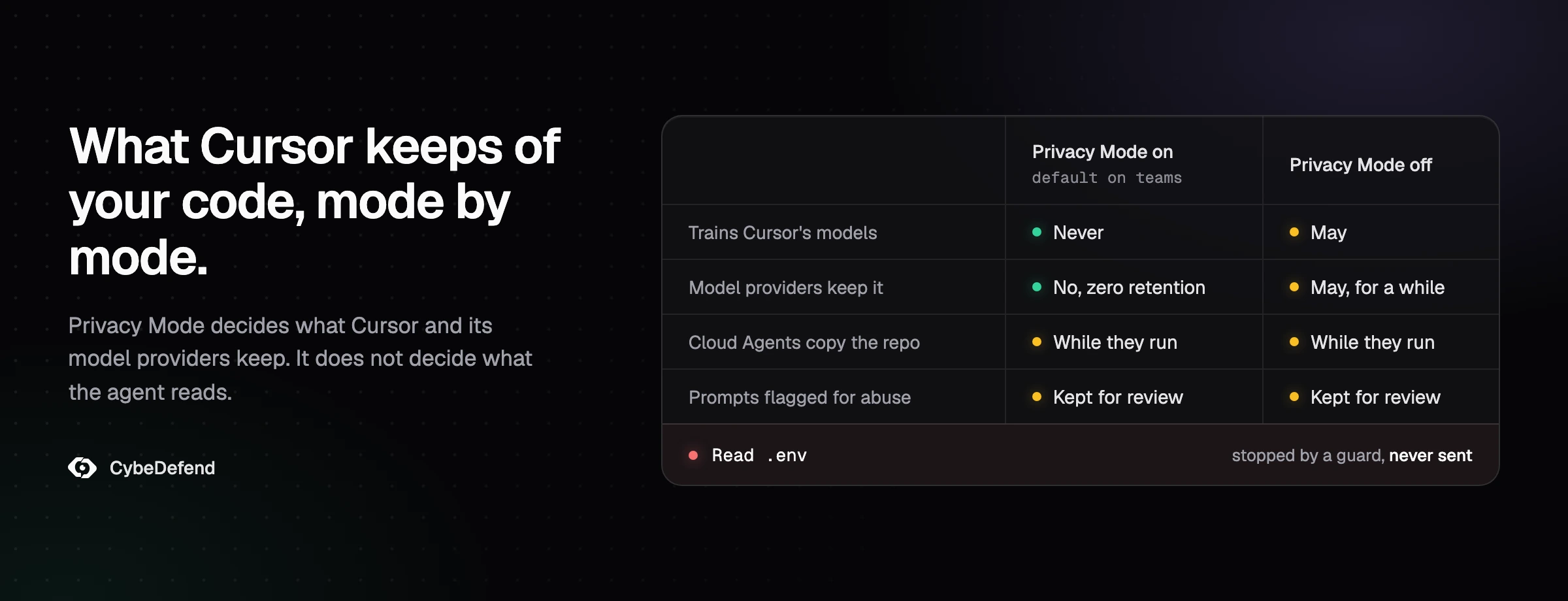
Cursor sends your code to its own servers and to model providers every time you use an AI feature, because that is how it builds the prompt. Whether it keeps that code, and whether it can train on it, depends on one setting and a few features. With Privacy Mode on, Cursor does not train on your code and its model providers do not store it, with named exceptions. With Privacy Mode off, Cursor may store and train on it, and Cursor, which SpaceX bought in August 2026, builds its Grok models with SpaceX's AI unit. Cloud Agents store a copy of your repository while they work. And none of that decides what the agent can open on your disk. This guide answers each question from Cursor's own pages and SpaceX's filings, read on 21 October 2026.
What does Cursor send, and to whom?
Two flows leave your machine, and Cursor's privacy and data governance page names them: LLM requests and Cloud Agents. The first is the one every developer generates: "When you use AI features, we send prompts and code context to language model providers like OpenAI, Anthropic, and Google. If you are using Cursor's custom models (e.g. Composer), your data may also be processed by our inference providers."
The detail people miss is the hop in the middle. Cursor's data use page, last updated on 3 September 2026, says it plainly: "Even if you use your API key, your requests will still go through our backend! That's where we do our final prompt building." Bringing your own key changes who serves the model, not who sees the request. It also takes you out of Cursor's zero data retention agreements: the privacy help page says ZDR "doesn't apply when you use your own API keys", and your provider's policy applies instead.
Who is on the other end has changed this year. Cursor's list of sub-processors names SpaceXAI, in the United States, as an inference provider, next to OpenAI, Anthropic, Google, Meta and the hosts of Cursor's own models, and four inference sub-processors were added between 11 September and 8 October 2026. On the Free and Plus plans, the available models page says only Cursor's own models are offered: Grok 4.7, 4.6 and 4.5, built with SpaceXAI, and Composer 2.5. OpenAI, for its part, announced on 28 August 2026 that it intends to wind down its contract with Cursor, with a proposed shutoff on 12 November 2026.
Code context means more than the file you are editing. It is whatever the agent puts in the request: the files it opened, the results of its searches, the output of the commands it ran. A file the agent never reads does not travel, and search no longer builds a copy of your code in the cloud: Cursor's search documentation says Instant Grep indexes on your machine and that Cursor "does not store embeddings of your codebase for search". Cursor also caches file contents on its servers to save bandwidth, says the data use page: "The files are encrypted using unique client-generated keys, and these encryption keys only exist on our servers for the duration of a request. All cached file contents are temporary, never permanently stored."
Two things leave through doors of their own. Your MCP servers and connectors, and the @Web search, are "separate services, each with its own region", in the words of the data governance page, under their own terms. And Grok Bot, the agent launched in August 2026 that Cursor accounts can use, "runs on a separate product surface with its own data flows", per the privacy help page. Its security page adds that Privacy Mode applies to it, that its computers run in the United States and keep files on a durable disk across sessions, and that "the team model allowlist does not govern Grok Bot".
Does Cursor store my code?
Cursor does not store your code for ordinary requests when Privacy Mode is on, apart from a temporary encrypted cache and two exceptions: Cloud Agents, and prompts flagged for abuse. With Privacy Mode off, it may store and train on it.
The data governance page is unambiguous about the main exception: "Cloud Agents are the only feature that requires Cursor to store code. Unlike LLM requests, Cloud Agents need access to your repository over time to make changes." The Cloud Agents security overview then gives the retention of each kind of data:
| Data a Cloud Agent produces | Where it lives | How long |
|---|---|---|
| The checked-out repository and build artifacts | The isolated agent VM | Recycled after the run goes idle |
| VM snapshots, cloned code included | Encrypted snapshot layer | Rolling 30 days of inactivity, then deleted |
| Prompts, responses, tool calls, diff context | Cursor backend, per-agent keys | Kept indefinitely by default, deletable on demand |
| Secrets and tokens you configure | Encrypted credential store | Until you remove them |
The conversation of a Cloud Agent, which carries diffs and the code it discussed, stays until you delete it through the Delete Agent API, and snapshots "can't be deleted on demand". Enterprise teams can cap conversation retention with a retention policy. If your policy forbids code storage, the governance page gives the answer itself: "Cloud Agents are optional. If your security policy prohibits code storage, don't enable Cloud Agents."
The second exception applies in every mode. "If your prompts or conversations trigger abuse detectors your data may be stored for investigation and deleted in accordance with their retention policies", says the data use page, for Cursor as well as its model providers.
With Privacy Mode off, the same page allows much more: Cursor "may use and store codebase data, prompts, editor actions, code snippets, and other code data and actions to improve our AI features and train our models", and some inference providers "may temporarily access and store model inputs and outputs".
Privacy Mode or Privacy Mode (Legacy): what is the difference?
Legacy is the old promise, and most answers you will read about Cursor still describe it. Until June 2025, Cursor had a single Privacy Mode, and its privacy page said that with it on, "none of your code will ever be stored or trained on by us or any third-party". In June 2025, Cursor's privacy overview split it in two: a "Privacy Mode with storage" appeared on 13 June, and on 19 June it took the name "Privacy Mode". It keeps the no-training rule but adds that "Cursor may store some code data to provide extra features". The old mode became "Privacy Mode (Legacy)", and the no-storage sentence moved with it. Today's data use page no longer mentions Legacy at all.
| Privacy Mode | Privacy Mode (Legacy) | |
|---|---|---|
| Cursor trains on your code | No | No |
| Model providers store it | No, zero retention agreements | No, zero retention agreements |
| Cursor may store code for features | Yes | No |
| Cloud Agents, Remote Control, the iOS app, Grok Bot | Available | Blocked |
| Can you choose it today | Yes | No, if you have left it |
The switch is one way. Cursor's mobile documentation warns that when you opt in to Privacy Mode to use Cloud Agents, "you can't switch back to Legacy Privacy Mode afterward". On Cursor's forum, a staff member answered on 25 July 2026 that "individual accounts can't switch back", and another wrote on 1 July 2026 that Legacy "is now reserved for enterprise accounts". Accepting the iOS app or a Cloud Agent is therefore a privacy decision: it moves the whole account to the mode that stores code.
To see which mode you are on, open Cursor Settings (Cmd or Ctrl + Shift + J), then General, and read the Privacy Mode setting; on a team, the setting lives in the team dashboard. If your security review was written before June 2025, or quotes the old promise, it describes a mode you may no longer have.
Does Cursor train on my code?
Cursor does not train on your code when Privacy Mode is on. "Customer Data will not be used for training by Cursor", says the data use page, and model providers "will not store or train on your data". With Privacy Mode off, Cursor may train its models on your code, prompts and editor actions.
What changed in 2026 is who builds those models. SpaceX completed its acquisition of Cursor on 14 August 2026, for $60.0 billion in stock according to its filing with the SEC, and Cursor has trained its Grok models jointly with SpaceXAI, SpaceX's AI unit, formerly xAI, since a partnership announced in April 2026. Cursor's post on Grok 4.5 of 8 July 2026 says "training included trillions of tokens of Cursor data which capture a wide-range of user interactions with codebases and software tools", and the model cards of Grok 4.5, 4.6 and 4.7 mention "anonymized Cursor workflow data". SpaceX's prospectus, filed on 12 June 2026, is just as direct: "We expect that access to this data will enhance our model training and inference, including with respect to Grok."
Cursor's answer for Privacy Mode users is categorical. Its privacy help page says Privacy Mode "works the same for Grok 4.5 as for every other model" and that "with Privacy Mode enabled, your code is never used for training". The model cards do not say which accounts the training data came from. The practical reading is simple: with Privacy Mode on, Cursor commits that your code is not training data; with Privacy Mode off, your sessions are the kind of data Cursor says these models were trained on.
One report is worth knowing about. On 15 October 2026, The Information reported that Cursor staff had investigated whether confidential data reached SpaceX for AI training while Grok Bot was being developed. We found no public statement from Cursor on it.
Which models keep your data even with Privacy Mode on?
Even with Privacy Mode on, a few models keep your data with their provider, and the ones Cursor names are Claude Fable 5 and 5.1. Most models run under Cursor's zero data retention agreements, but the data governance page warns that "a few models require data retention with the provider and fall outside these agreements". For Fable, the reason is stated: "Anthropic stores their inputs and outputs to run automatic and human harm-prevention reviews. This data is not used for training or product improvement."
Cursor puts a gate in front of them. With Privacy Mode on, on an individual account as well as on a team, "requests to these models fail until the model's data retention policy is approved from the dashboard", and "opting in applies to the whole team". Approving Fable for one engineer approves it for everyone on the team, so the decision belongs to whoever owns your data policy. On Anthropic's side, the policy on covered models keeps the prompts and outputs of these models for 30 days on every platform that offers them. With Privacy Mode off, the gate disappears: Cursor's Fable 5.1 page says the model is on by default for individual and team accounts without Privacy Mode, and that Anthropic stores its inputs and outputs whatever your Privacy Mode setting.
Two more cases fall outside ZDR by construction: your own API key, as above, and any model you reach through a custom base URL or a gateway, which carries that gateway's terms.
Is Cursor GDPR compliant?
Cursor can be used in line with the GDPR on a Teams or Enterprise plan, which comes with a DPA; no tool is compliant on its own, and what a regulator looks at is your use of it. The facts your data protection officer will ask for:
- Who is responsible. On a Teams or Enterprise plan, Anysphere, Cursor's publisher, acts as your processor under its Data Processing Addendum, last updated on 5 November 2025, which applies through the Master Services Agreement. On an individual plan, "the DPA does not apply; your data handling follows the Privacy Policy", says the privacy help page, and the privacy policy, updated on 11 October 2026, governs how Anysphere uses your data.
- What the DPA contains. The Standard Contractual Clauses of 2021 (Module Two, controller to processor, and Module Three for sub-processors), the Irish Data Protection Commission as competent supervisory authority, Irish law, notice of a personal data breach within 48 hours, deletion or return of personal data within 30 days of a request at the end of the service, and the EU-US Data Privacy Framework as a possible transfer mechanism.
- Where data goes. Mainly to the United States. Cursor's sub-processor list says its infrastructure is "primarily hosted on AWS US region with some latency critical services in Europe and Singapore", and the privacy policy tells users in the European Economic Area that their data "may be transferred to our United States servers". The data governance page offers US-only data residency to Enterprise customers; "EU + UK inference-only coverage is available on request", and broader EU support is "in active development". There is no EU storage option today.
- What Cursor is certified for. Its security page lists AIUC-1, ISO/IEC 27001:2022 and ISO/IEC 42001:2023 certifications and a SOC 2 Type II attestation, with reports on request at its trust portal, and Cursor signs HIPAA business associate agreements on Enterprise only. Those certify Cursor's controls, not your use.
European regulators have said what they expect from the deploying side. Germany's data protection conference (DSK), in its guidance on AI and data protection of 6 May 2024, prefers applications that do not use inputs for training and suggests configuring employee accounts so that no input trains a model. France's CNIL, in its first guidance on deploying generative AI of 18 July 2024, asks deployers to determine how far the provider may reuse the data sent to it. Spain's AEPD published guidance on agentic AI in February 2026. Applied to Cursor, the German and French texts point at the same two switches: a commercial plan with a DPA, and Privacy Mode enforced.
In practice the GDPR question is rarely about the source code itself. It is about the personal data next to it: customer records in fixtures, a production dump in a scratch folder, emails in a log, keys to databases full of people. Those are the files to keep out of the agent's reach.
Which plan should a company use?
A company should run Cursor on a Teams or Enterprise plan, with Privacy Mode enforced and personal accounts locked out of company machines. In order:
- Put company code on a team. "For teams, Privacy Mode is enabled by default for all team members", says the privacy help page, and the DPA only exists under a team or enterprise contract.
- Enforce Privacy Mode. In the team dashboard, Settings, then Privacy Mode, then "enforce it so members can't disable it". New members inherit the team's setting.
- Close the personal-account door. The data governance page recommends the Allowed Team IDs device policy, which "prevents users from logging into personal accounts (which might not have Privacy Mode enabled) on corporate devices".
- Decide on Cloud Agents explicitly. They store code, conversations stay until deleted, and Legacy Privacy Mode "is not supported for Cloud Agents". If you enable them, restrict their network access and set a retention policy.
- Approve retention models on purpose. Keep Fable 5 and 5.1 off until your data policy says they can run, then limit them to the groups that need them with model access control.
- Turn off what you do not use. Remote Control, which lets you drive local agents from Cursor's iOS app, has been on by default since 6 October 2026 "for everyone except Enterprise organizations", per Cursor's changelog, on the plans that include it. The changelog says the agent keeps running on your computer; the documentation adds that "the agent loop runs in Cursor's cloud" and that Cursor sends "the conversation state and model context needed to continue the session". If nobody needs it, switch it off in the agent settings; Enterprise admins control it under Org settings, Security and identity.
- Keep secrets out of the tree. A secrets manager injected at runtime beats any ignore file. What is not on disk cannot be read, sent or kept.
What Privacy Mode does not cover
Cursor's Privacy Mode governs what Cursor and its providers keep. It does not govern what the agent reads, and everything the agent reads goes into a request. A .env file, an SSH key, a cloud credentials file: if the agent opens it, its content travels to Cursor's backend and to the model with the next turn, Privacy Mode or not. Zero retention means the provider does not keep it. It does not mean the secret never left your laptop.
Cursor's own exclusion file has a known limit. .cursorignore hides files from the agent's file tools, Tab and @ mentions, but Cursor's ignore file reference states that "the terminal and MCP server tools used by Agent cannot block access to code governed by .cursorignore". A command run outside the sandbox can still cat .env. Our article on Cursor's YOLO mode and Auto-run explains which run modes leave that door open, and the guide to Cursor security risks covers the rest of the editor's controls.
This is where a guard belongs. VibeDefend, the layer CybeDefend installs in Claude Code, Cursor and Codex, runs its guards as a Cursor hook before every tool call, whatever the run mode. By default they refuse reads of .env and .env.* files (templates such as .env.example excepted), private keys and ~/.ssh, AWS, Google Cloud, Azure, Kubernetes and Docker credentials, and files named like secrets, through the agent's file tools and through the usual shell readers such as cat, grep, jq, cp, node -e or python -c. The decision is taken on your laptop before the tool runs, so a refused read sends nothing to the model. In CybeDefend's controlled study of 24 August 2026, one agent working thirty tickets had 1,769 shell commands checked and seventeen refused: one real catch, when the agent reached into the keychain with git credential fill to pull out a stored GitHub token on its own initiative, three correct policy calls, and thirteen false positives.
A guard that matches paths and command text is a seatbelt, not a wall. It knows the readers it lists, not every interpreter, and it decides only where it is installed. The primary control is still a secret that is not in the tree.
Since this article is about where code goes, here is where ours goes. The guards decide on your laptop. To serve the business and security rules that fit the line being written, VibeDefend sends a short excerpt of that code to the CybeDefend backend, and the scan before the commit sends the changed files, both in the EU or US region you pick at install. Your code is never used to train a model. The security page says what is kept and where.
If your team runs several agents, the same question has its own answers for Claude Code and Anthropic and for Codex and OpenAI, and the guide to AI coding agent security puts them side by side. An MCP server you connect to Cursor receives context too, under its own terms, which is one more reason to vet it like code. And if you are rolling out Cursor on code that cannot leave the building, talk to us.
Frequently asked questions
Does Cursor store my code?
Cursor does not store your code for ordinary requests with Privacy Mode on, beyond a temporary encrypted cache. Cloud Agents store an encrypted copy of your repository while they run, keep VM snapshots for 30 days of inactivity and keep their conversations until you delete them. With Privacy Mode off, Cursor may store your code and use it for training. Prompts flagged for abuse can be kept in any mode.
Does Cursor train on my code?
Not with Privacy Mode on: Cursor does not train on customer data and its model providers work under zero data retention agreements. With Privacy Mode off, Cursor may use your code, prompts and editor actions to train its models, including the Grok models it builds with SpaceXAI, the AI unit of SpaceX, which acquired Cursor on 14 August 2026.
What is the difference between Privacy Mode and Privacy Mode (Legacy)?
Both keep your code out of training and both rely on zero data retention agreements with model providers. Privacy Mode (Legacy), the original mode, also promises that Cursor stores none of your code, which is why it blocks Cloud Agents, Remote Control, the iOS app and Grok Bot. The current Privacy Mode, introduced in June 2025, lets Cursor store code for those features. Leaving Legacy is one way.
Is Privacy Mode on by default?
On teams, yes: Cursor says Privacy Mode is enabled by default for all team members and on by default for Enterprise, and admins can enforce it. For an individual account, Cursor does not state the default. Open Cursor Settings, then General, and check it before you open code that is not yours.
Does Cursor have zero data retention?
Yes, through its agreements with model providers, when Privacy Mode is on. Three things fall outside it: your own API key, where your provider's policy applies; models that require retention, such as Claude Fable 5 and 5.1, which must first be approved in the dashboard; and prompts flagged by abuse detectors, which can be kept for investigation.
Is Cursor GDPR compliant?
Cursor can be used in a GDPR-compliant way on a Teams or Enterprise plan, which comes with a DPA based on the 2021 Standard Contractual Clauses, under Irish law and the Irish Data Protection Commission. Individual plans have no DPA. Data goes mainly to the United States, and Cursor offers no EU data residency today.
Is Cursor SOC 2 compliant?
Cursor holds a SOC 2 Type II attestation and AIUC-1, ISO/IEC 27001:2022 and ISO/IEC 42001:2023 certifications, with reports available on request through its trust portal. These cover Cursor's own controls. Your auditor will still ask how your team configures it: which plan, Privacy Mode enforced or not, which models approved.
Does using my own API key keep my code away from Cursor?
No. Requests made with your own key still go through Cursor's backend, where the prompt is built, and they leave Cursor's zero data retention agreements, so your provider's retention policy applies.
Do Cloud Agents keep my code?
Yes, by design. A Cloud Agent clones your repository into an isolated VM, keeps encrypted snapshots for 30 days of inactivity and keeps its conversation, diffs included, until you delete it. Snapshots cannot be deleted on demand. If your policy forbids code storage, do not enable Cloud Agents.
Can Cursor read my .env file with Privacy Mode on?
Yes. Privacy Mode decides what is kept, not what is read. .cursorignore hides .env from the agent's file tools, but a terminal command outside the sandbox can still read it, and whatever the agent reads is sent with the request. Keep live secrets out of the project and refuse those reads with a guard.