

On this page
- What does Codex actually send to OpenAI?
- Does OpenAI train on my Codex code?
- What does Codex keep on my own machine?
- Does Codex "steal" your code?
- How do I keep secrets and regulated code out of Codex's reach?
- What no privacy setting covers
- Frequently asked questions
- Does Codex send my code to OpenAI?
- Does OpenAI use my Codex code to train its models?
- How do I stop Codex from training on my code?
- Does Codex store my code locally?
- Can Codex read my .env file?
- Does Codex offer EU data residency?
- Is Codex safe for proprietary code?
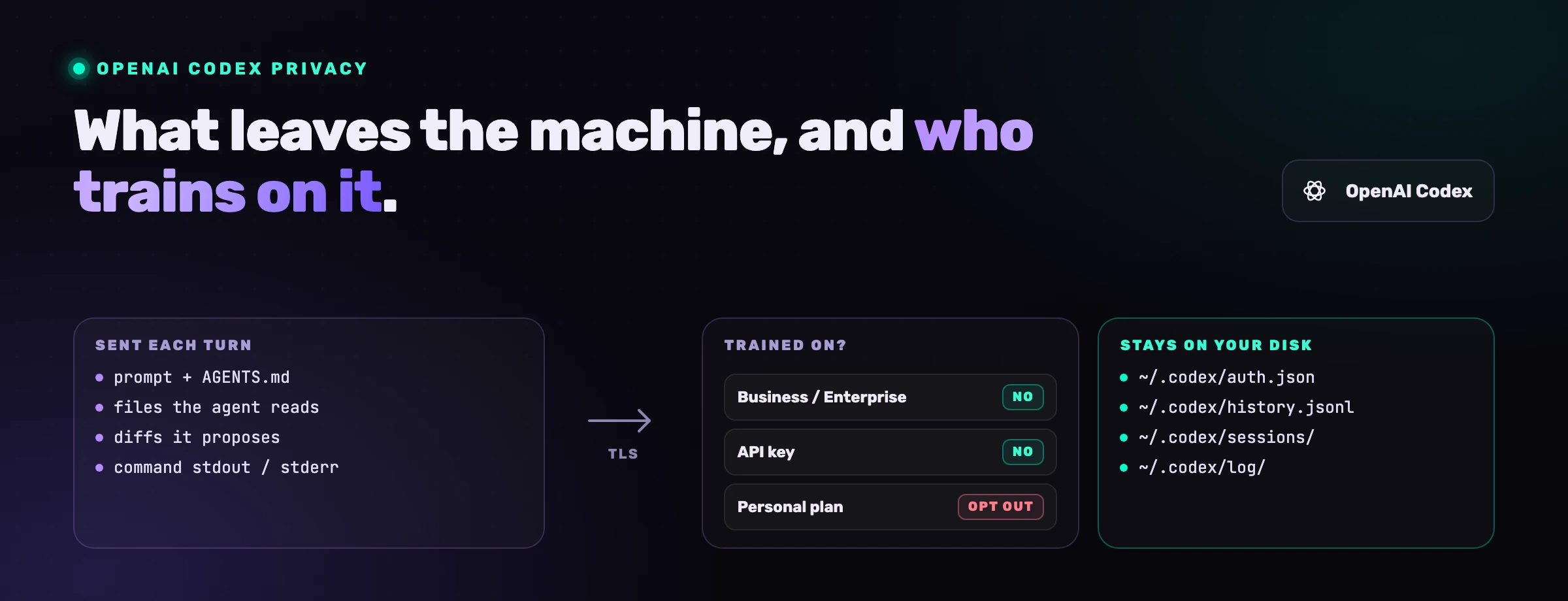
Yes, OpenAI Codex sends code to OpenAI: the prompt, the files it decides to read, the diffs it proposes and the output of the commands it runs all travel to OpenAI's models, because that is how the agent works. The real questions are narrower and more useful. What exactly leaves the machine, what stays in ~/.codex on your disk, whether OpenAI trains on it (the answer depends on how you signed in), what is retained and for how long, and which switches keep secrets and regulated code out of the agent's reach. This guide answers each one with the setting that controls it.
What does Codex actually send to OpenAI?
Codex sends everything it needs to reason about the task, and nothing it never opened. OpenAI's own walkthrough of the Codex agent loop shows the request the CLI sends to the Responses API on each turn: the prompt you typed, instruction files such as AGENTS.md, a short description of the environment (working directory and shell), and the output of every tool call so far. That last part is how the contents of the files the agent chose to read, the diffs it proposes, the stdout and stderr of the commands it ran, and whatever those commands print about the repository (paths, git status, structure) all travel. In the cloud surface, Codex creates a container and checks out your repository on OpenAI's side, so anything in the checkout is in scope. What is not sent is a file the agent never read, which is why the practical privacy lever is reach: what the agent can open, and what it is told not to.
| Surface | What leaves the machine | Where the model runs | Whose terms apply |
|---|---|---|---|
| CLI or IDE extension, signed in with ChatGPT | Prompt, files read, diffs, command output, metadata | OpenAI, under your ChatGPT workspace | Your ChatGPT plan (personal or Business/Enterprise/Edu) |
| CLI or SDK, with an API key | Same, plus optional telemetry you configure | OpenAI API | API data controls (no training by default) |
| Codex cloud | The task, plus the whole repository, checked out from your Git host into the container | OpenAI-hosted sandbox | Your ChatGPT plan |
Local codex exec in CI | Same as CLI, unattended | OpenAI | Whatever credential the runner uses |
Two things ride along that people do not expect. Environment variables are visible to the shell the agent runs commands in, so a DATABASE_URL or an AWS exported in that shell can surface in command output and travel with it. Codex's shell decides which variables reach that shell, and it strips nothing until you tell it to: according to OpenAI's config reference, variables whose names contain KEY, SECRET or TOKEN are kept by default. And when web_search is set to live (the --search flag), search queries the model composes go out too. The default cached mode uses an OpenAI-maintained index without external web access, but the same reference notes that --yolo or another full-access sandbox setting switches that default to live.
Does OpenAI train on my Codex code?
It depends on how you signed in, not on which Codex surface you use. OpenAI's data-usage policy treats Codex like the rest of the product line, services for individuals on one side and services for businesses on the other, with one Codex-specific switch.
| How you use Codex | Trained on by default? | How to change it |
|---|---|---|
| ChatGPT Business, Enterprise or Edu workspace | No, per OpenAI's enterprise privacy page | Workspace admin controls; opt-in only |
| API key (Codex CLI or SDK) | No. OpenAI's API data controls state: "As of March 1, 2023, data sent to the OpenAI API is not used to train or improve OpenAI models (unless you explicitly opt in to share data with us)" | Opt-in only |
| Personal plan (Free, Go, Plus, Pro) | It may be, unless you opt out | ChatGPT Settings, Data Controls, "Improve the model for everyone", or OpenAI's privacy portal; either one is enough |
| Codex full environments (personal plans) | Separate control | Codex Settings, the full-environment training switch |
The last row is the one that trips people up. OpenAI's Data Controls FAQ states that on a personal plan the "Improve the model for everyone" setting also applies to your Codex tasks, and that Codex has a separate setting for training on full environments, managed in Codex Settings; changing your ChatGPT setting or opting out through the privacy portal does not change it. Neither page says what that Codex setting defaults to, so a developer on a Plus plan who turned off "Improve the model for everyone" years ago should not assume it followed. Check both.
One exception survives the opt-out, and the data-usage policy linked above spells it out: if you send feedback on a response, a thumbs up or down for instance, the whole conversation attached to it may be used for training.
What does Codex keep on my own machine?
Codex writes more to your disk than most people realise, and the files are worth knowing by name. OpenAI's advanced configuration guide lists what lives under ~/.codex: config.toml (your settings), auth.json (cached credentials when the file-based store is used, your OS keychain otherwise), history.jsonl (what the guide calls session transcripts, saved by default) and the logs in log/. Next to them sits sessions/, where Codex persists every thread as a file it can replay and resume. history.jsonl and sessions/ are the ones that matter for privacy: between them they hold your prompts, the agent's responses and the output of its commands, including any code or secret that appeared there, and they stay on disk until you delete them.
These config.toml tables govern what stays local and what is exported:
# Do not write session transcripts to ~/.codex/history.jsonl
[history]
persistence = "none"

# No OpenTelemetry export of logs; never export raw prompts
[otel]
exporter = "none"
log_user_prompt = false

# Strip credentials from the shell the agent uses
[shell_environment_policy]
ignore_default_excludes = false  # also drop names containing KEY, SECRET or TOKEN

[shell_environment_policy.filters]
"AWS_*" = "exclude"
"DATABASE_URL" = "exclude"

# Machine-level analytics
[analytics]
enabled = false
Three details from OpenAI's documentation are worth keeping next to that block. history stops history.jsonl and nothing else: the session files under sessions/ are a separate mechanism, the config reference documents no key for them, and the documented way to skip them is codex exec --ephemeral, which runs without writing them. The filters table is the current form of shell; the older exclude array still works, but the reference now marks it legacy, and Codex rejects a mix of the two. And OpenTelemetry export of logs is disabled by default, so nothing is exported unless you configure it, with otel as an explicit opt-in to include raw prompts.
Two channels remain, both on by default: the anonymous usage and health metrics that OpenAI says contain no personally identifiable information, which analytics turns off, and the /feedback command (feedback.enabled). None of these settings changes what the model receives; they change what your machine writes and forwards.
Since version 0.157.0 of 25 September 2026, one more process runs on your machine. Opening an interactive session now starts Codex's background app server automatically: the release notes call it "automatic background-server startup for eligible interactive sessions". A user's report on issue #48195, opened the same day, describes what that means in practice: a daemon that keeps running after you close every Codex window, its own copy of the Codex package under ~/.codex/packages/, and an updater that checks for new releases every hour. Version 0.161.0 of 7 October then turned analytics on by default for app servers launched that way. The workaround given in that issue is codex features disable daemon, followed by codex app-server daemon stop.
Does Codex "steal" your code?
No, and the question deserves a precise answer rather than a reassuring one. Codex transmits your code to OpenAI under the terms of the plan you signed in with, and those terms are public; that is a data flow you agreed to, not theft. The two incidents that gave the question its search volume were not Codex taking code. One was codexui-android, a working remote web UI for Codex on npm, actively developed and pulled a few thousand times a week. As The Hacker News reported on June 1, 2026, for about a month its published builds had read ~/.codex/auth.json on every run and sent it to an attacker's server, with code that never appeared in the GitHub repository. The other was a command-injection flaw in the Codex cloud environment, found by BeyondTrust Phantom Labs and covered by The Hacker News in March 2026: a crafted branch name could steal the GitHub token Codex uses, and BeyondTrust lists the ChatGPT website, Codex CLI, SDK and IDE extension as affected. OpenAI has since remediated it.
The pattern in both is the same: the theft targeted the credentials around Codex, and the attacker was a third party. That is where your attention belongs. OpenAI's authentication guide says to treat ~/.codex/auth.json like a password, and cli moves the tokens into your OS credential store so that the file is no longer there to read. Vet what you install, knowing that a clean repository proves nothing about the package the registry actually serves, and treat any Codex add-on with the suspicion you would give a browser extension asking for your password.
The third path to losing code is the one no incident report is filed for: a prompt injection in a repository you cloned, telling the agent to curl your files somewhere, in a session where network access was open. Codex's workspace-write sandbox keeps the network closed by default for exactly this reason, as OpenAI's sandbox and approvals guide puts it: "By default, the agent runs with network access turned off." Our guide to Codex's sandbox and approval flags explains which flags open it and when that is acceptable.
How do I keep secrets and regulated code out of Codex's reach?
Reduce what the agent can open, and make what it opens uninteresting. In order of impact:
- Never put secrets in files the agent can read.
.envwith live keys,configwith a database password, a/production .yml credentials.jsonin the tree: if it is in the workspace, the agent may read it and it may end up in a transcript. Use a secrets manager and inject at runtime. - Strip the shell.
shellwith_environment _policy ignoreand_default _excludes = false filtersentries set toexcludefor keys, tokens and connection strings, so command output cannot leak them. - Keep the network closed. Leave
sandboxat_workspace _write .network _access false; when a task truly needs the registry, enable it for that run with-c. - Mark untrusted repositories as untrusted. With
projects, OpenAI's config reference says Codex skips the repository's own."<path>" .trust _level = "untrusted" .codex/layers, "including project-local config, hooks, and rules", so a cloned project cannot reconfigure the agent against you. - Turn off local transcripts on shared or regulated machines.
history, plus a scheduled clean-up of.persistence = "none" ~/.codex/sessions/, which that key does not cover. In CI, runcodex exec --ephemeral. - Choose the surface by the data. For code under NDA, a regulated codebase, or anything with customer data in fixtures, use a Business or Enterprise workspace or an API key. For API usage with stricter obligations, OpenAI's API data controls document three things. Abuse-monitoring logs are retained "for up to 30 days" by default, longer where the law requires it. Zero Data Retention excludes customer content from those logs on eligible endpoints including
/v1/responses, and OpenAI grants it on prior approval, not on request. Data residency is also subject to eligibility: its Europe region (EEA and Switzerland) requires Zero Data Retention or another of OpenAI's reduced-retention controls, and it does not cover system data such as account and usage metadata. - Scan for secrets before the agent sees them. A committed key that a scanner flags today is a key the next session will not read into context.
What no privacy setting covers
Every control above governs what Codex reads and transmits. None of them governs what Codex writes back, and the code it writes is a privacy surface of its own. An agent that hard-codes a token it saw in a fixture, logs a full request body with a card number in it, or returns a user record with fields the caller was never authorised to see has created a data-protection problem that no retention policy will fix, because the leak is now in your repository and your production logs.
That is the layer VibeDefend adds at agent-time. It sits in the Codex loop and checks the diff the agent is about to write against your rules, so the hard-coded secret, the over-broad log line and the missing authorisation check are rewritten before they land. Its guard decides on your machine. To serve the rules it sends a short excerpt of the code being written, and the scan before the commit sends the changed files, both to the EU or US region you pick at install, where the analysis runs on self-hosted models with no third-party LLM API and no training on your code. In our controlled study, the agent with the layer applied the exact rule 89% of the time (57 of 64 graded rules), against 12% with no tool and 13% with a hand-maintained rules file in the repository.
For the broader picture, including the sandbox, supply-chain and autonomy risks, read the full guide to OpenAI Codex security. The same question for Claude Code has its own answers. So does Cursor, where Privacy Mode decides what is kept. If your team is adopting Codex on code that cannot leave the building, talk to us: we have done this configuration many times.
Frequently asked questions
Does Codex send my code to OpenAI?
Yes. Each turn sends the prompt, the files the agent reads, the diffs it proposes, the output of commands and repository metadata to OpenAI's models, and in the cloud surface the whole repository is checked out into an OpenAI-hosted container. A file the agent never opens is never sent, which is why limiting its reach is the main privacy lever.
Does OpenAI use my Codex code to train its models?
Not by default if you use Codex through a ChatGPT Business, Enterprise or Edu workspace, or through an API key. On a personal plan it may, unless you opt out: your ChatGPT "Improve the model for everyone" setting applies to Codex, and Codex has a separate full-environment training switch in its own settings that you must also check.
How do I stop Codex from training on my code?
On a personal plan, turn off "Improve the model for everyone" under Data Controls (or use OpenAI's privacy portal), then open Codex Settings and turn off the full-environment training control, because the first does not change the second. Or sign in through a Business or Enterprise workspace or an API key, where training is off by default.
Does Codex store my code locally?
It stores session transcripts in ~ by default, along with credentials in ~/.codex/auth.json (unless you use the OS keychain), a replayable file per session in ~/.codex/sessions/ and logs in ~/.codex/log/. Setting history in config.toml stops history.jsonl only; the session files need their own clean-up, or codex exec --ephemeral for scripted runs.
Can Codex read my .env file?
If the file is in the workspace and the sandbox mode allows reads, yes: read-only and workspace-write both allow reading, and only writes are confined. Keep live secrets out of the tree, and use shell to strip them from the shell the agent runs commands in.
Does Codex offer EU data residency?
For API usage, OpenAI documents data-residency regions that include Europe (EEA and Switzerland), alongside a Zero Data Retention option on eligible endpoints and a default abuse-monitoring retention of up to 30 days. Both are subject to eligibility and OpenAI's approval, the Europe region requires a reduced-retention control such as Zero Data Retention, and residency does not cover system data. Where your ChatGPT workspace data is processed depends on your workspace agreement; confirm it with OpenAI for regulated workloads.
Is Codex safe for proprietary code?
It can be, with the right identity and configuration: a no-training surface (Business, Enterprise or API key), secrets kept out of the workspace, the network left closed, untrusted repositories marked as such, and local transcripts disabled where the machine is shared. What remains is the code the agent writes, which needs a review layer of its own.