


On this page
- Can you really secure an app in 5 minutes?
- What you need before you start
- The flow, end to end
- Step 1: Create your CybeDefend account
- Step 2: Connect your repo and run the first scan
- Step 3: Install VibeDefend in your agent
- Step 4: Prompt the agent to triage and fix
- What "secured in 5 minutes" really means
- How to keep it secure after the first pass
- Frequently asked questions
- Can you really secure an app in 5 minutes?
- What are the exact steps?
- Do I have to run the scan myself?
- How does the agent know what to fix?
- Is it safe to let an AI agent fix vulnerabilities?
- Does this work with Claude Code, Cursor and the others?
- What happens after the first pass?
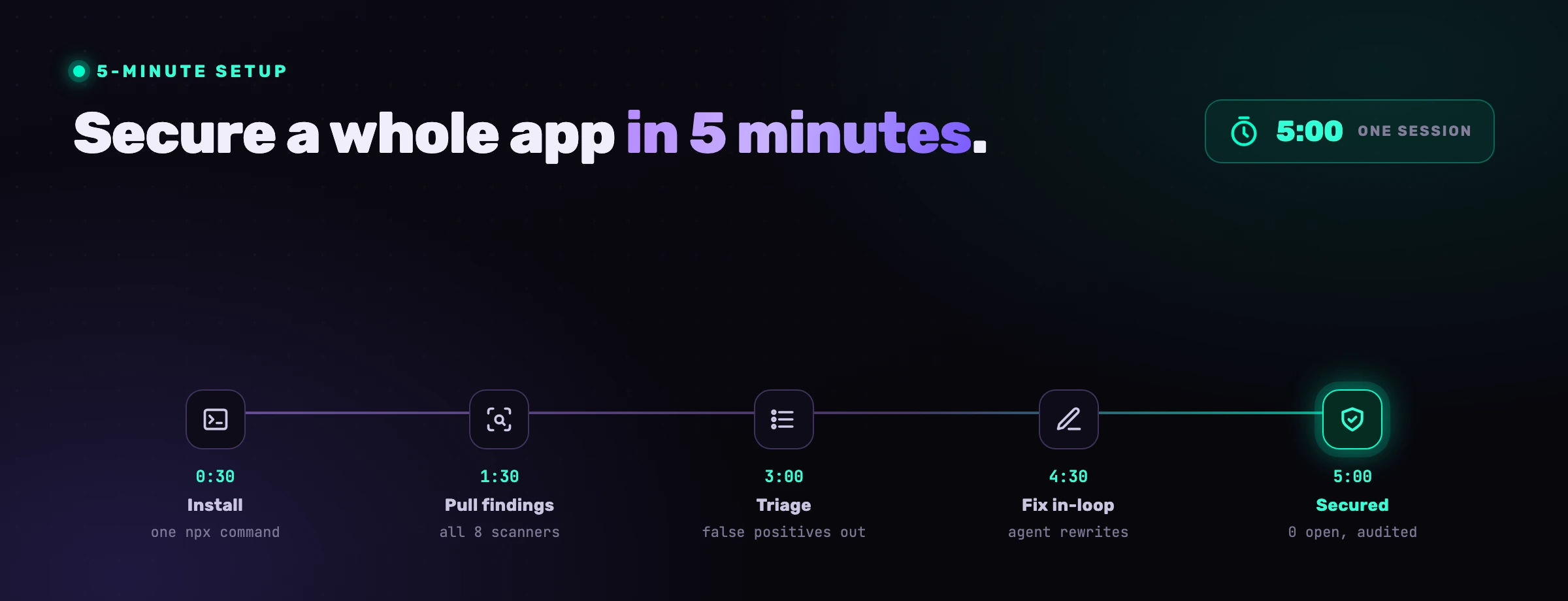
Securing an application usually sounds like a quarter-long program, and the deep version is. But the first, highest-leverage pass is fast, because CybeDefend does the slow parts for you: the first scan of an average repository completes in about five minutes, and your AI coding agent does the fixing. The flow is four steps: create a CybeDefend account, connect your repo so it gets scanned, install VibeDefend in your agent with one CLI command, and prompt the agent to triage and fix what the scan found. This is that walkthrough, with the honest scope of what five minutes buys you.
Can you really secure an app in 5 minutes?
Yes, for the part that matters most and is usually neglected: getting your code scanned and the reachable, high-severity findings fixed. The five minutes is mostly the scan, which CybeDefend runs for you. While it finishes you install the agent integration, and then your AI coding agent remediates what the scan ranked as exploitable. What you are not doing is the slow work: deploying a scanner, building a pipeline, or triaging a thousand raw alerts by hand.
Be clear about scope so the claim stays honest. Five minutes will not threat-model your architecture or fix logic flaws nobody has specified yet. It will get a real application scanned, ranked by exploitability, and its dangerous, reachable backlog fixed by an agent with you approving the diffs. For a repo that had no AppSec and no agent governance, that is a large step in one sitting. We cover the broader model in AI coding agent security; this is the hands-on version.
for the first scan of an average repo, building the Security Code Knowledge Graph ranked by exploitability
unified findings list across every scanner the agent fixes, ranked by exploitability
of AI-generated code was vulnerable in independent testing, so the backlog the scan surfaces is real (NYU, Asleep at the Keyboard)
What you need before you start
Three things. First, a CybeDefend account, which is free and needs no credit card. Second, a repository you can connect through GitHub, GitLab, Bitbucket or Azure DevOps. Third, an AI coding agent: Claude Code, Cursor, Windsurf, OpenAI Codex or VS Code Copilot. No CI change, no infrastructure to deploy, no security background required. If you can authorize a repo and read a diff, you can run this.
One note on safety before you let an agent fix code: it proposes, you approve. Every fix is a diff you review, destructive commands are blocked by default, and no source code is sent anywhere by the agent integration. That division is what makes a fast remediation pass safe on a real codebase.
The flow, end to end
Four steps, roughly five minutes, most of which is the scan running while you set up the agent.
Step 1: Create your CybeDefend account
Sign in at eu.cybedefend.com or us.cybedefend.com, picking the region your data should live in. The free tier needs no credit card. Create a project; its dashboard is where the scan results appear. This is the only account you need, and the region you choose here is the one your region and agent integration use throughout.
Step 2: Connect your repo and run the first scan
Authorize your Git provider (GitHub, GitLab, Bitbucket or Azure DevOps) and pick the repository you want to secure. The first scan starts immediately and completes in about five minutes for an average repo. There is no CI step to add and nothing to deploy. CybeDefend runs its scanners over the code and resolves them into a single Security Code Knowledge Graph, then ranks every finding by exploitability:
- SAST with reachability, so a real reachable injection outranks a thousand that are not.
- SCA for vulnerable dependencies, secrets detection, and license compliance.
- IaC (Terraform, CloudFormation, Ansible, Kubernetes), container image scanning, CI/CD pipeline analysis, and an AI-BOM mapped to the EU AI Act and NIST AI RMF.
When the scan finishes, you have a ranked, deduplicated list of confirmed findings, not raw noise. That ranking is what makes the next steps fast: the agent works the exploitable findings first. Why that exploitability ranking is the whole game is covered in why most SAST findings are noise.
Step 3: Install VibeDefend in your agent
While the scan runs, wire your coding agent to the project. One command, in your repo:
npx -y @cybedefend/vibedefend@latest install
It auto-detects your agent (Claude Code, Cursor, Windsurf, OpenAI Codex, VS Code Copilot), asks for your region, and wires the regional MCP server and the rule hooks into it, linked to the project you just created. That is the whole integration: no container, no YAML, no pipeline. The agent can now read your project's findings (the Live Findings layer) and is governed by your business and security rules as it writes, with an Action Guard blocking destructive calls. For the full picture of that connection, see AI vulnerability remediation.
Step 4: Prompt the agent to triage and fix
With the scan done and the agent wired, you remediate in plain language. Triage first:
> List this project's open findings, highest exploitability first, grouped by type.
The agent pulls the ranked findings from CybeDefend rather than guessing from open files, so you see real issues with a location, a severity and a reachability verdict. Then fix, one group at a time, approving as you go:
> Fix the reachable critical findings. Show me each diff before applying.
The agent rewrites each site to fit your codebase, the unparameterized query parameterized, the vulnerable dependency upgraded, the exposed IaC resource locked down, the leaked secret rotated and removed, and reports each fix back so the finding closes. You read diffs and approve; you do not author fixes. Because the agent sees what is already open in a file before it edits, it does not recreate the issue it just fixed. In a couple of minutes a typical repo's reachable, high-severity backlog is closed, every change in your version control and every action in an audit trail.
What "secured in 5 minutes" really means
What you get is concrete: a real application scanned and ranked by exploitability, its dangerous reachable findings fixed by your agent with your approval, and the agent now governed so the next code it writes meets your rules instead of adding to the pile. For a codebase that started with no AppSec and no agent control, that is a genuine step in one sitting.
What it is not is the end of the program. Five minutes will not threat-model your system, resolve findings that need a human design decision, or replace your scanners and CI gates. Think of it as scanning the app, draining the most exploitable part of the backlog, and installing the control that keeps it from refilling, not as a final state.
How to keep it secure after the first pass
The first pass is the start of a loop. Leave the integration on so the project keeps scanning (the findings list stays current for the next remediation session) and the agent stays governed as it writes new code. Concretely, let CybeDefend scan on every push so new findings surface, keep a SAST gate in CI as the backstop, route generated code through pull-request review, and run a short remediation pass whenever the reachable backlog grows. CybeDefend finds and ranks; the agent fixes the volume; the human approves and steers.
VibeDefend is the integration that makes steps three and four one command. It installs in seconds and wires Claude Code, Cursor, Windsurf, OpenAI Codex and VS Code Copilot into four governance layers inside the agent loop.
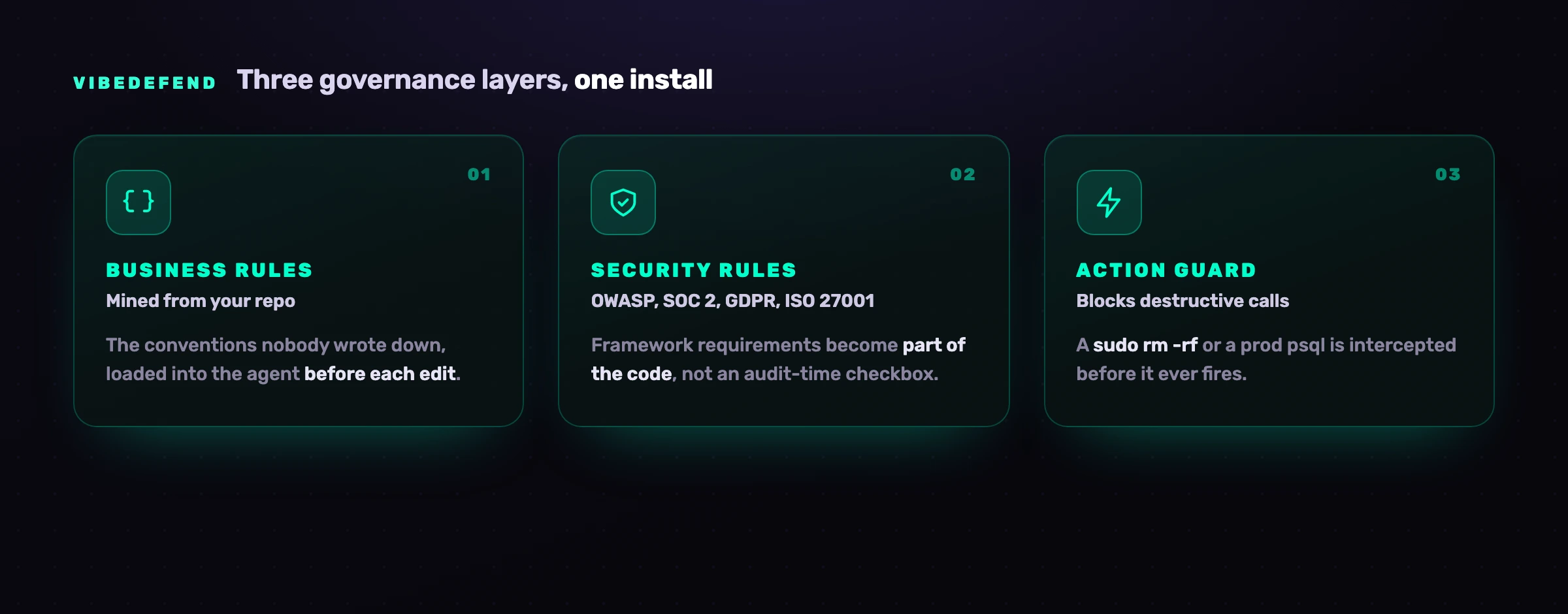
Three layers govern what the agent writes: Business Rules mined from your repo, Security Rules from OWASP, SOC 2, GDPR and ISO 27001, and an Action Guard that blocks destructive calls before they fire. The fourth, Live Findings, is the one this walkthrough leans on: it connects the agent to your scanned project on CybeDefend's code security platform, so the agent triages and fixes the vulnerabilities the scan already found. Nothing about your code crosses the wire from the agent; only structured governance metadata does, on EU or US regions kept physically separate.
Frequently asked questions
Can you really secure an app in 5 minutes?
You can get it scanned and its most exploitable findings fixed. The first scan of an average repo completes in about five minutes; while it runs you install the agent integration, and then your AI coding agent fixes the reachable findings with diffs you approve. It does not replace threat modeling, continuous scanning, CI gates or human review, which keep the app secure afterward. It scans the app and drains the dangerous backlog in one sitting.
What are the exact steps?
Four. Create a free CybeDefend account at eu.cybedefend.com or us.cybedefend.com. Connect your repository (GitHub, GitLab, Bitbucket or Azure DevOps) so the first scan runs and ranks findings by exploitability. Install VibeDefend in your AI agent with npx -y @cybedefend/vibedefend@latest install. Then prompt the agent to triage and fix the reachable findings.
Do I have to run the scan myself?
No. You connect the repository through your Git provider and CybeDefend runs the scan in the cloud, no CI step to add and nothing to deploy. The first scan completes in about five minutes for an average repo and produces a Security Code Knowledge Graph ranked by exploitability. The agent then reads those findings through the VibeDefend integration.
How does the agent know what to fix?
After you install VibeDefend, the agent reads your project's ranked findings from CybeDefend (the Live Findings layer) instead of guessing from open files. Each finding carries a location, a severity and a reachability verdict, so the agent fixes what is actually exploitable first and fits the fix to your codebase. This is the difference between AI vulnerability remediation and a generic "fix my code" prompt.
Is it safe to let an AI agent fix vulnerabilities?
Yes, when the agent proposes and you approve. Every fix is a diff you review before it applies, destructive commands are blocked by default by an Action Guard, and no source code is sent anywhere by the agent integration. The agent supplies throughput on confirmed, reachable findings; you supply judgment on the diffs.
Does this work with Claude Code, Cursor and the others?
Yes. The same npx install wires Claude Code, Cursor, Windsurf, OpenAI Codex and VS Code Copilot into the same governed loop, so steps three and four are identical regardless of which agent your team uses. Per-agent specifics are in our guides to Claude Code and Windsurf security.
What happens after the first pass?
The integration stays on: CybeDefend keeps scanning the project so the findings list stays current, and the agent stays governed as it writes new code. Keep scans running on every push, keep a SAST gate in CI, review generated code in pull requests, and run a short remediation pass whenever the reachable backlog grows. The first pass is the first turn of a loop, not a destination.


