

On this page
- What does Codex danger-full-access actually do?
- What does --dangerously-bypass-approvals-and-sandbox remove?
- Are -a never, --full-auto and "unsafe mode" the same thing?
- What is "Approve for me" in Codex?
- Is Codex full access safe?
- How does the Codex sandbox work on macOS, Linux and Windows?
- When is full access the right call?
- What should you use instead of --yolo?
- The gap no flag closes
- Frequently asked questions
- Is danger-full-access the same as --yolo?
- What does codex --yolo do?
- Is -a never dangerous on its own?
- What is Codex "unsafe mode"?
- What does --dangerously-bypass-hook-trust do?
- How do I let Codex use the network without full access?
- Does the Codex sandbox work on Windows?
- Does the sandbox stop prompt injection?
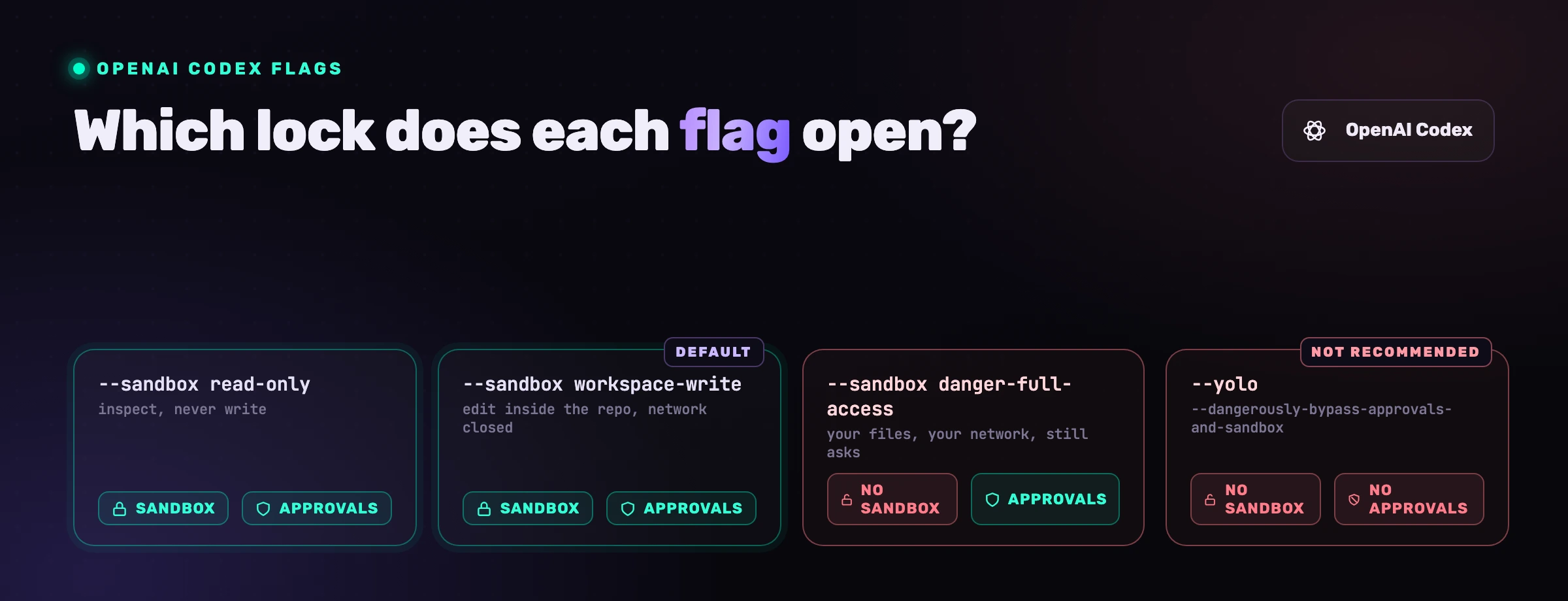
danger-full-access, --dangerously-bypass-approvals-and-sandbox, --yolo, -a never and "Approve for me": OpenAI Codex has several ways to loosen its own guardrails, and their names are not interchangeable. --full-auto, which many guides still cite, was removed in version 0.147.0. Some remove the operating-system sandbox, some remove the approval prompts, one removes both. This guide explains exactly what each flag disables, how the sandbox is enforced on macOS, Linux and Windows, when full access is a reasonable choice, and the configuration that gives you a fast agent without giving it your machine.
What does Codex danger-full-access actually do?
danger-full-access is one of the three values of Codex's --sandbox flag, and it turns the sandbox off entirely. OpenAI's sandboxing documentation describes it in one sentence: "The agent runs without sandbox restrictions. This removes the filesystem and network boundaries." Every shell command the model generates then runs as your user, with your permissions, on your real filesystem, with your real network.
The other two values are the ones that matter for daily work:
--sandbox value | File reads | File writes | Network | Enforced by |
|---|---|---|---|---|
read-only | Yes | No | No | OS sandbox |
workspace-write (default) | Yes | Workspace, /tmp and $TMPDIR | Off unless enabled | OS sandbox |
danger-full-access | Everything your user can read | Everything your user can write | Unrestricted | Nothing |
Two details of workspace-write are worth knowing before you decide it is too restrictive. First, the writable set is not only the current directory: /tmp and $TMPDIR are writable by default, and you can add paths with sandbox in config.toml (the config reference also exposes exclude_slash_tmp and exclude if you want them out). Second, network access has its own switch, sandbox, so "I need npm install to work" is an argument for one boolean, not for full access.
Inside every writable root, a few folders stay read-only: .git, .agents, .codex and, since Codex 0.159.0 (29 September 2026), .aws. The pull request gives the reason: "AWS profiles can select credential helpers that the application executes", so an agent able to edit .aws/config could plant a command for the next AWS call. The protection stops writes, not reads.
What danger-full-access does not do is silence Codex. Approval prompts are governed by a separate flag, which is the source of most of the confusion in the next section.
What does --dangerously-bypass-approvals-and-sandbox remove?
--dangerously-bypass-approvals-and-sandbox, aliased as --yolo, removes both protections at once: the OS sandbox and the approval prompts. OpenAI's CLI reference describes it as "Run every command without approvals or sandboxing. Only use inside an externally hardened environment." That second sentence is the whole policy. The flag exists for a container or a virtual machine that is itself the boundary, not for a laptop with your SSH keys, your cloud credentials and your production .env on it.
The distinction between the two mechanisms is simple once you see them side by side:
- The sandbox decides what a command can touch: which paths are writable, whether sockets can be opened. It is enforced by the operating system, so a command the model did not intend to run is contained just as much as one it did.
- Approvals decide when Codex pauses to ask you. They are a human checkpoint, and they only work if a human is reading them.
danger-full-access alone still leaves you the checkpoint. --yolo leaves you nothing but the model's judgment, and the model's judgment is exactly what a prompt injection in a README, a test fixture or a dependency's error message is designed to bend. That is not theoretical: our guide to AI coding agent sandbox escapes walks through how repository content becomes commands, and the pattern applies to Codex unchanged.
Are -a never, --full-auto and "unsafe mode" the same thing?
No. They loosen different layers, one of them is not a flag at all, and --full-auto has been removed. Here is the full map, newer flags included:
| What people type | What it really is | Sandbox | Approvals |
|---|---|---|---|
--sandbox danger-full-access, "full access" | A sandbox mode | Off | Unchanged |
--ask-for-approval never, -a never | An approval policy | Unchanged | Off |
--dangerously-bypass-approvals-and-sandbox, --yolo | A bypass flag | Off | Off |
--approve-for-me, "Approve for me" | A reviewer setting (auto-review) | workspace-write | Answered by a reviewer agent |
--dangerously-bypass-hook-trust | Skips the review of new or changed hooks, for one run | Unchanged | Unchanged |
--full-auto | Removed in 0.147.0; use --sandbox workspace-write | On | Legacy behaviour |
| "unsafe mode", "dangerous mode", "run dangerously" | Not a Codex flag | Depends what was meant | Depends what was meant |
--ask-for-approval now takes two values: on-request (the default: the model asks when it wants to escalate, reach the network or leave the workspace) and never. untrusted was retired in Codex 0.149.0 (20 August 2026), and a config that still sets it can stop Codex from starting. Older releases also accepted on-failure, which ran everything inside the sandbox and only asked when a command failed there; --full-auto was the shorthand for that combination. Deprecated in 0.128.0, it is gone since 0.147.0 (7 August 2026).
The "Full access" preset you see in the interactive picker is the combination of danger-full-access and never, and OpenAI labels it "not recommended" in its own approvals documentation. It is --yolo with a friendlier name.
What is "Approve for me" in Codex?
"Approve for me" is the Codex permissions mode in which a reviewer agent, not you, answers the approval prompts, while the workspace-write sandbox and the on-request policy stay in place. OpenAI's sandboxing guide says it "keeps the same workspace-write sandbox as Ask for approval, but eligible approval requests are routed through automatic review instead of showing a prompt for manual approval." You pick it in the permissions menu under the composer, with /permissions in the CLI, or with --approve-for-me at launch, a flag added in Codex 0.147.0 (7 August 2026). In config.toml it is approvals; the default value, user, is you.
It is not another approval policy: approval_policy decides when Codex stops, the reviewer decides who answers. OpenAI's auto-review page calls it "a reviewer swap, not a permission grant": writable roots, network access and protected paths do not move, and actions the sandbox already allows are never reviewed. It also needs prompts to exist: with -a never there is nothing to review, and under danger-full-access or --yolo an action can run without ever raising the request the reviewer reads. OpenAI adds that auto-review "is not a deterministic security guarantee"; it does interrupt the turn after three denials in a row.
Is Codex full access safe?
Codex full access is safe exactly as long as the environment around it is, and unsafe the moment it is not. Inside a fresh container with no credentials, a scratch clone and an egress rule, danger-full-access is a reasonable trade: the container is the sandbox, and Codex's own would only slow it down. On a developer workstation it means a model with your identity can curl anything, write anywhere, and read every token in your home directory, and the only thing standing between a hostile instruction and that outcome is the model deciding not to comply.
The data we have on unguarded agents is not reassuring. In our previous study, where agents built a platform from scratch against a live application database, two unguarded arms ran DROP SCHEMA on that database seven and eleven times, eighteen in all, and one of them ran rm -rf on an absolute path outside its own project. The guarded arm tried the same schema drop once and was refused. In our controlled study of 24 August 2026, the command guard checked 1,769 shell commands and refused seventeen. The breakdown matters more than the total: one real catch, an agent reaching for a stored credential; three correct applications of the policy, on commands that carried little risk there; and thirteen false positives, each of which cost the agent a turn. A guard that matches patterns in the text of a command is a tripwire, not a boundary. It can refuse the one command that matters, and it will also fire on harmless ones. That is why the sandbox counts: the operating system confines a command without having to guess what it means.
DROP SCHEMA runs against a live database by unguarded agents, in our previous study
shell commands checked by the guard in our controlled study of 24 August 2026
commands refused: 1 real catch, 3 correct policy calls, 13 false positives
Note what full access does not protect you from even when the environment is clean: the code. A sandbox contains commands; it has no opinion on whether the authorization check the model just wrote is correct. We return to that at the end.
How does the Codex sandbox work on macOS, Linux and Windows?
Codex enforces its sandbox with the operating system, not with the model, which is why it holds even when the model is being manipulated. On macOS it uses Apple's Seatbelt framework, the same sandbox-exec policy mechanism that confines system daemons, and it works out of the box. On Linux and under WSL2 it uses bubblewrap (bwrap) with seccomp filters; earlier releases used Landlock and seccomp directly. On Windows it uses a native Windows sandbox, elevated or unelevated, when run from PowerShell, and the Linux mechanism when run under WSL2.
Two practical consequences follow. If bwrap is missing on a Linux box, Codex cannot build its sandbox there, so install it before assuming you are protected. And if a command is being refused and you do not know why, codex sandbox runs a command under the current policy for debugging, with --log-denials on macOS to print what Seatbelt blocked. That is the right tool for "Codex cannot write here", and a much better answer than reaching for danger-full-access.
Seatbelt also settles a question we see in search a lot: "Codex seatbelt" is not a feature you turn on. It is what read-only and workspace-write are made of on a Mac.
When is full access the right call?
Full access is the right call when something else is already the boundary. The pattern that works:
Three checks before you flip the flag:
- What can the process read? If
~/.ssh,~/.aws,~/.codex/auth.jsonor a.envwith live keys is reachable, the answer is not full access. The Codex credential file has already been the target of a malicious npm package; do not make it easier. - Where can it send data? Unrestricted network plus a prompt injection is an exfiltration channel. If you cannot restrict egress, keep
network_accessoff and let Codex ask. - Who reads the output? In
codex execpipelines nobody is watching the approvals anyway, which is a reason to lean on the sandbox harder, not to remove it.
If any of the three fails, use the configuration below instead.
What should you use instead of --yolo?
For almost every task, workspace-write with on-request approvals, the network closed and the project marked trusted gives you a fast agent that still cannot leave its lane. In ~:
sandbox_mode = "workspace-write"
approval_policy = "on-request"

[sandbox_workspace_write]
network_access = false
writable_roots = ["/Users/you/scratch"]

[projects."/Users/you/work/payments-api"]
trust_level = "trusted"
trust tells Codex to apply the project's own .codex/ configuration; untrusted projects skip those project-scoped layers, which is exactly what you want for a repository you just cloned from a stranger. If prompts are the pain, tighten what triggers them rather than switching them off: newer builds expose a granular approval_policy and an approvals option that routes approvals to an automatic reviewer. Treat auto-review as a convenience, not a boundary: it is a model judging a model.
For CI and codex exec, keep the sandbox and drop only the prompts: --sandbox workspace-write -a never on a runner that has no production credentials is a coherent posture. --yolo on the same runner is not, because the sandbox was costing you nothing.
The gap no flag closes
Every flag in this article governs what Codex may run. None of them governs what Codex writes, and the code is where most of the risk now lives. A workspace-write sandbox will happily let the agent commit an endpoint with no authorization check, a refund handler with no cap, or a query built by string concatenation, because none of those is a command. They are diffs.
That is the layer VibeDefend adds at agent-time. It sits in the Codex loop, checks the diff the agent is about to write against your own rules, rewrites the unsafe version before it lands, and guards the shell commands with the same policy that produced the seventeen refusals above, false positives included. In our controlled study of 24 August 2026, the arm with the layer implemented 57 of 64 graded rule specifics exactly (89%), against 7 of 55 (13%) with a hand-maintained rules file in the repository and 8 of 65 (12%) with nothing. The sandbox keeps Codex off your machine; the guard keeps its code out of your incident queue.
If you run Codex in --yolo on purpose, in a container, with a guard on the diff, you have a defensible setup. If you run it in --yolo on your laptop because the prompts were annoying, read the full Codex security guide, compare with Cursor's YOLO mode, now Run Everything, and then talk to us.
Frequently asked questions
Is danger-full-access the same as --yolo?
No. --sandbox danger-full-access removes the OS sandbox and keeps the approval prompts. --dangerously-bypass-approvals-and-sandbox (--yolo) removes the sandbox and the prompts. The "Full access" preset in the picker is the second one.
What does codex --yolo do?
It runs every command the model generates immediately, with your user's permissions, on your real filesystem, with unrestricted network, and never asks. OpenAI's reference limits it to an "externally hardened environment", meaning a container or VM that is itself the boundary.
Is -a never dangerous on its own?
Less than people assume, as long as the sandbox stays on. --ask-for-approval never removes the human checkpoint, but workspace-write still confines writes and the network stays closed unless you enabled it. It becomes dangerous the moment it is paired with danger-full-access.
What is Codex "unsafe mode"?
There is no flag by that name. People use "unsafe mode", "dangerous mode" and "run dangerously" to mean danger-full-access, --yolo or -a never, which are three different things. Check which one a tutorial actually means before copying the command.
What does --dangerously-bypass-hook-trust do?
It runs your enabled hooks without the trust review, for one invocation. Since Codex 0.129.0 (7 May 2026), a new or modified hook is skipped until you approve its exact definition in /hooks; this flag, added in 0.131.0 (18 May 2026), lifts that check for headless runs such as CI. Nothing is saved to config.toml, disabled hooks stay disabled, and Codex prints a warning at startup. OpenAI's CLI reference keeps it for "automation that already vets hook sources". A hook is a script that runs on your machine, so on a repository you did not write, keep the review.
How do I let Codex use the network without full access?
Set network under [sandbox in config.toml, or pass -c sandbox for one run. Writes stay confined to the workspace; only the network opens.
Does the Codex sandbox work on Windows?
Yes. From PowerShell it uses a native Windows sandbox, elevated or unelevated; under WSL2 it uses the Linux mechanism (bubblewrap and seccomp). The --sandbox values and the config.toml keys are the same on every platform.
Does the sandbox stop prompt injection?
It contains what an injected command can touch; it does not stop the injection. A malicious README can still steer the model into writing insecure code, or into asking for an escalation that a tired human approves. Keep the sandbox on, and add a layer that checks the code and the commands, not just the file paths.