


On this page
- Was Cursor YOLO mode removed?
- What do Cursor's auto-run modes allow?
- How do I turn on YOLO mode in Cursor now?
- What does the Cursor sandbox actually block?
- Is Cursor's Run Everything (YOLO) mode safe?
- Why isn't the allowlist a security boundary?
- Why is Cursor auto-run or my allowlist not working?
- Does .cursorignore protect .env in Cursor?
- Which Cursor run mode should you use?
- Do Cursor hooks still run in Run Everything mode?
- The gap no run mode closes
- Frequently asked questions
- Was Cursor YOLO mode removed?
- How do I enable YOLO mode in Cursor?
- What is Cursor Auto-review?
- What is the difference between Auto-review and Run Everything?
- Is Run Everything safe?
- What does the Cursor sandbox block?
- Why is my Cursor allowlist ignored or auto-run not working?
- Does auto-run apply to MCP tools?
- Does .cursorignore stop Cursor from reading my .env file?
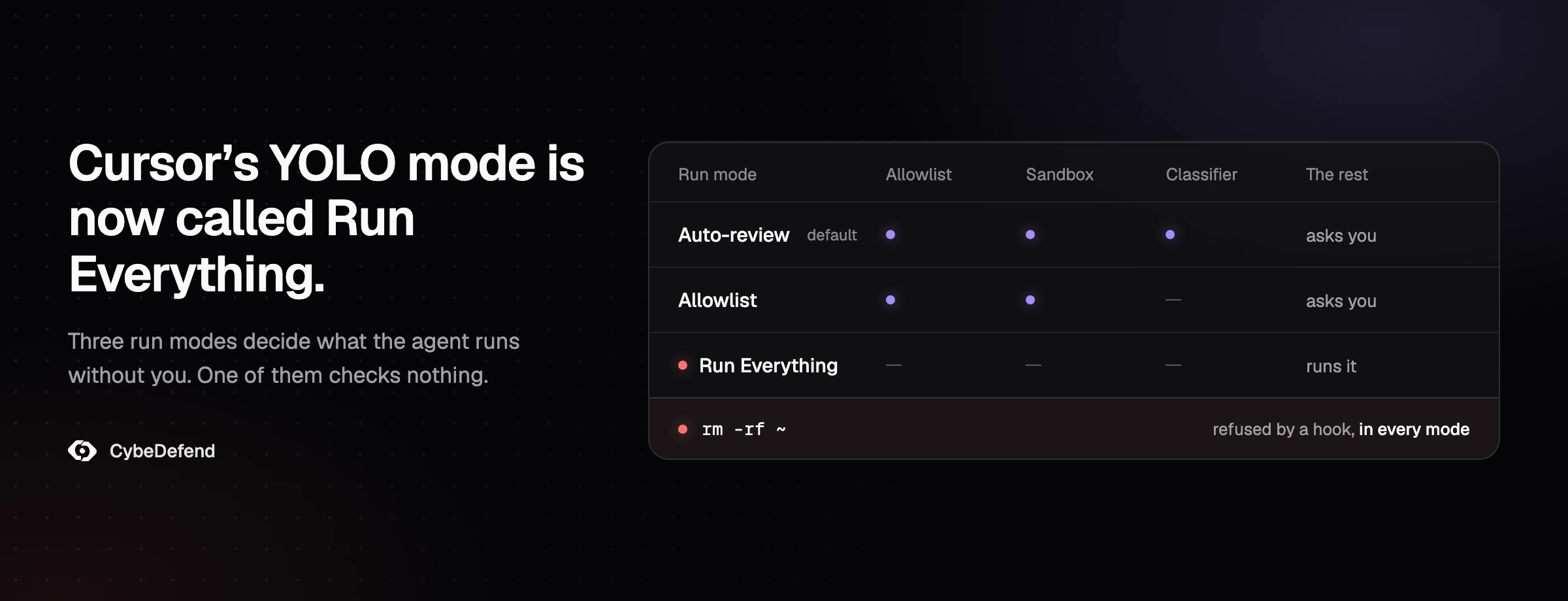
Cursor's YOLO mode was not removed: it was renamed Auto-run in March 2025 and lives on as the Run Everything mode, while the default since Cursor 3.6 is Auto-review. Cursor has reshaped these settings several times since, and most of what ranks for "Cursor YOLO mode" today describes a panel that no longer exists. This guide maps the old names to the current modes, says exactly what Auto-review, Allowlist and Run Everything let the agent do, what the sandbox blocks and what it leaves open, and the configuration that keeps the speed without handing the agent your machine. Every fact here was checked against Cursor's documentation, changelog, security advisories and staff answers on its forum on 17 and 18 October 2026, up to Cursor 3.25.
Was Cursor YOLO mode removed?
No. Cursor's YOLO mode, introduced in version 0.44 in December 2024, was renamed Auto-run in March 2025 and survives as the Run Everything mode, under Settings > Agents > Approvals & Execution. The default since Cursor 3.6 (May 2026) is Auto-review, which is why the old YOLO checkbox is gone. The full path, from Cursor's changelog:
| Cursor version | Date | What changed |
|---|---|---|
| 0.44 | 17 Dec 2024 | YOLO mode: the agent can auto-run terminal commands, with a free-text prompt, an allowlist and a denylist |
| 0.46 | 19 Feb 2025 | YOLO mode extends to MCP tools |
| 0.47 and 0.48 | March 2025 | Renamed Auto-run; in 0.48 (23 March) the free-text prompt removed "due to reliability issues" and auto-run switched off for everyone who had it on |
| 1.3 | 29 Jul 2025 | Denylist removed "in favor of allowlists" |
| 1.7 | 29 Sep 2025 | Sandbox (beta) and hooks |
| 2.0 | 29 Oct 2025 | Three modes: Run in Sandbox, Ask Every Time, Run Everything |
| 3.5 | 22 May 2026 | Ask Every Time deprecated; Run in Sandbox folded into Allowlist |
| 3.6 | 29 May 2026 | Auto-review, the new default |
| 3.23 | 1 Oct 2026 | Read access: a Workspace mode that asks before reading outside the project |
Sources: Cursor's changelog and run-mode documentation, checked on 18 October 2026.
If you followed a 2025 tutorial and cannot find the "YOLO" or "Auto-run" toggle, that is why. The modes now live under Settings > Agents > Approvals & Execution.
What do Cursor's auto-run modes allow?
Cursor now has three run modes, the successors of the Auto-run setting. Auto-review runs allowlisted calls and sandboxable shell commands, and a classifier model judges the rest. Allowlist runs only what is on your list and asks for everything else. Run Everything runs every tool call with no sandbox, no classifier and no approval. All three apply to shell commands, MCP tool calls and web fetches.
| Mode | Runs without asking | Sandbox | Who decides the rest |
|---|---|---|---|
| Auto-review (default since 3.6) | Allowlisted calls, then shell commands that can run in the sandbox | Yes, for shell commands (macOS, Linux) | A classifier model: allow, try another way, or ask you |
| Allowlist | Only the commands and MCP tools on your list | Optional, for commands not on the list | You, through an approval prompt |
| Run Everything (the old YOLO) | Every tool call | No | Nobody |
The table hides three details that decide how safe each mode is in practice.
First, allowlisted calls skip the sandbox. Cursor's run-mode documentation is explicit: allowlisted shell, Fetch and MCP calls run outside it. A broad entry such as npx, zsh or even find hands the agent full permissions for everything that starts with it. Cursor's own staff used those three as examples when they explained why they built the sandbox instead of a finer allowlist.
Second, the classifier is a model judging another model. In Auto-review, Cursor sends anything not allowlisted and not sandboxable to a classifier (Cursor names Gemini 3.5 Flash Lite, with Haiku as fallback). Cursor reports it blocks about 4% of actions. Its documentation adds two sentences worth keeping in mind: "Auto-review is not a security boundary" and "The classifier can make mistakes."
Third, Ask Every Time still exists for some users. New users cannot pick it since 3.5; the equivalent is Allowlist with an empty list. Users who had it keep it, and Cursor staff were still recommending it in October 2026 after a drive wipe.
How do I turn on YOLO mode in Cursor now?
To enable YOLO mode in Cursor, open Settings > Agents > Approvals & Execution and choose Run Everything. That is the YOLO behavior: no prompts, no sandbox, no classifier. If the option is missing, a team admin has probably disabled it (Enterprise admins can hide Run Everything and lock the mode), or your Cursor version predates the current modes.
In the Cursor CLI, --yolo (alias --force) and the /auto-run command switch on Run Everything; since February 2026 --yolo auto-approves "consistently across trust, MCP, and command approvals". --auto-review and /auto-review select Auto-review instead.
Read the next two sections before you switch it on: the protections that sound relevant to Run Everything cover less than their names suggest.
What does the Cursor sandbox actually block?
On macOS and Linux, Cursor's sandbox confines shell commands to writing inside the workspace and blocks network access except the domains your settings allow. It write-protects files such as .git/hooks and .cursor/*.json. By default it does not limit reads, and allowlisted commands skip it entirely. Native Windows shells have no sandbox as of October 2026.
The sandbox is enforced by the operating system, not by the model, which is why it holds when the agent is being manipulated. On macOS, Cursor uses Seatbelt through sandbox-exec. On Linux it uses Landlock and seccomp, and needs kernel 6.2 or later with unprivileged user namespaces; on an older kernel Cursor falls back to asking before every command. On native Windows, Cursor staff stated in July and again in October 2026 that terminal commands do not run in a sandbox; the documented path is WSL2 or a dev container.
What a sandboxed command can and cannot do, with Cursor's defaults:
- Writes: inside the workspace only. Some paths stay write-protected even there:
.cursor/*.json,.git/hooks/,.git/config,.vscode/and.cursorignore. - Network: blocked, then opened by your network setting. The default setting adds Cursor's list of developer domains, which includes
github.com,*.googleapis.comandregistry.npmjs.org. Private addresses and the cloud metadata endpoint stay blocked. - Reads: the default read boundary is the whole system, and Cursor's reference states that
~/.sshis "always readable" under it. Only since 3.23 can you set the boundary to the workspace. - Temp files:
/tmpand the platform's temp directories are writable unless you turn that off.
And three ways out of it, all documented:
- The allowlist, as above: allowlisted calls never enter the sandbox.
- The retry. When a command fails on a sandbox restriction, the agent can rerun it outside. In Auto-review the classifier reviews that rerun; in other modes you are asked.
- A repository's own config. A project's
.cursortakes priority over yours, and/sandbox .json "type":disables the sandbox entirely. Team admin policies cannot be weakened by local files, but a solo developer has no admin."insecure _none"
The sandbox has also had real escapes, all fixed: writing git hooks to run code outside it (CVE-2026-26268, fixed in 2.5), a working directory and symlinks that pointed outside the workspace (CVE-2026-50548 and CVE-2026-50549, fixed in 3.0), and a Python virtualenv wrapper run by an editor extension (CVE-2026-73217, fixed in 3.1.2). Keep Cursor updated. Our guide to sandbox escapes in coding agents covers the pattern across tools.
Is Cursor's Run Everything (YOLO) mode safe?
Not on a machine you care about. Run Everything has no sandbox and no classifier, so the agent acts with your identity, your tokens and your files, and the only thing between a bad command and its effect is the model choosing not to run it. Cursor's forum holds reports of whole drives deleted in this mode in October 2026. It is reasonable on a machine you can throw away, and risky anywhere else.
Cursor's own forum shows what that looks like. Between March and October 2026, at least six Windows users reported losing a drive or most of their files to an agent command, several of them to the same pattern: a cmd whose quoting broke, so the path collapsed to the drive root. Staff said it matched "an issue we're already tracking". Two of those reports came in the same week of October 2026: on 13 October a user lost a drive in Auto-review, and staff answered that Auto-review "should have stopped a recursive command like that and asked first"; on 17 October a user lost a 1 TB drive in Run Everything, where, in staff's words, "all tool calls run automatically, with no approval, sandbox, or classifier". In April 2026, The Register reported that a Cursor agent deleted a startup's production database and its backups by calling a hosting API with a token it found in an unrelated file. The article does not say which run mode was on.
Two protections that sound like they would have helped, and did not:
- File-Deletion Protection covers the agent's own file-delete tool. Staff confirmed in October 2026 that it does not apply "to terminal commands like rd or rmdir". Deletions made from the terminal are also "NOT covered by Cursor checkpoints or local history", so there is no undo.
- External-File Protection stops the agent from creating or changing files outside the workspace through its file tools. It "doesn't block reading files outside the workspace", and it does not govern what a terminal command does.
Cursor has been tightening: since August 2026 Auto-review blocks recursive and force deletions instead of auto-running them, and the CLI of 8 October 2026 asks before deletes "whose target could resolve differently than written". The 13 October report shows why the docs call it best-effort.
Our own data on unguarded agents points the same way. In our previous study, where agents built a platform against a live application database, two unguarded setups ran DROP SCHEMA on that database eighteen times in total.
Windows drives or folders wiped by a Cursor agent, reported on its forum from March to October 2026
share of actions Cursor says the Auto-review classifier blocks
DROP SCHEMA runs against a live database by unguarded agents, in our previous study
Why isn't the allowlist a security boundary?
The allowlist matches the text of a command, and the same command can be written many ways. Cursor's documentation says it plainly: "The allowlist is best-effort, not a security boundary. Determined agents or prompt injection might bypass it." How matching works today:
- Entries are prefixes and case-sensitive:
gitmatchesgit statusbut notgitk.npm:install*separates the command from an argument pattern. There is no regex. - A chain is checked command by command:
cd api && npm test | tail -20auto-runs only ifcd,npmandtailare each on the list. - Allowlisted commands run outside the sandbox, so one broad entry undoes the sandbox for everything it prefixes.
The history of bypasses is long and public. Chained commands slipped past both lists in the YOLO era, which is why Cursor dropped the denylist in 1.3. Since then, Cursor has published security advisories for an allowlist bypass through backticks and $(...) (CVE-2025-54131), for shell built-ins that ran without appearing on the list (CVE-2026-22708), and for command execution under "Use AllowList" through prompt injection from a website (CVE-2026-31854). In August 2026 a user showed two PowerShell forms that auto-ran arbitrary commands behind an allowlisted entry; staff passed them to the team, and in late September said script blocks now always ask for approval.
Why is Cursor auto-run or my allowlist not working?
If Cursor keeps asking for approval or seems to ignore your allowlist, one of these is usually the cause:
- A non-empty
terminalAllowlistin~locks the mode to Allowlist and makes Auto-review unavailable (Cursor staff, August 2026)./ .cursor /permissions .json - A chained command runs without a prompt only if every command in it is on the list.
- On Linux, the sandbox needs kernel 6.2 or later with unprivileged user namespaces. Without them, Cursor asks before every command.
- A team admin has locked the run mode or hidden Run Everything.
- In the old Run in Sandbox mode, the allowlist was not applied at all, because "Sandbox is meant to replace the allowlist".
Does .cursorignore protect .env in Cursor?
Only partly: a terminal command run outside the sandbox can still cat .env. .cursorignore hides files from the agent's file tools, Tab and @ mentions, and Cursor's default ignore list already includes .env*. But the documentation is direct about the rest: "The terminal and MCP server tools used by Agent cannot block access to code governed by .cursorignore." Inside the sandbox, files listed in .cursorignore are unreadable, so list .env* there yourself rather than counting on the default list. Outside the sandbox, which means Run Everything, allowlisted commands, approved escapes and native Windows, cat .env works.
If a file must never reach the model, keep it out of the workspace or stop the read itself, which is what the next two sections do. For the same question in Claude Code, see what Claude Code sends to Anthropic.
Which Cursor run mode should you use?
On a developer machine today, this is the setup we would use:
- macOS or Linux: Auto-review with the sandbox on. Keep the allowlist to read-only commands (
git status,git diff,ls) and put it in the settings UI rather than inpermissions.jsonif you want Auto-review to stay available. - Close the reads and the network in
~(the read boundary needs Cursor 3.23 or later), and choose the network setting that uses/ .cursor /sandbox .json sandbox.jsononly if you do not want Cursor's default domains:
{
  "readBoundary": "workspace",
  "networkPolicy": {
    "default": "deny",
    "allow": ["registry.npmjs.org", "pypi.org", "files.pythonhosted.org"]
  }
}
If a toolchain needs a file outside the project, add it to additionalReadPaths rather than reopening the whole system.
3. Native Windows: Allowlist with an empty list, or move the project into WSL2 or a dev container where the sandbox exists.
4. Teams: enforce it centrally. Cursor's own hardening guide recommends setting the organization's run mode "to Auto-review (not Run Everything)" with sandboxing enabled, and distributing hooks from the dashboard. Note that in organization groups the loosest sandbox setting wins.
5. Run Everything only where the machine is disposable:
Cursor's Cloud Agents follow this model already: each runs in its own microVM and never asks for approval, with internet access on by default unless you restrict it.
Do Cursor hooks still run in Run Everything mode?
Yes, and that makes them the one control that survives every run mode. A hook is a script Cursor calls before an action; it can answer deny, and the action does not run. Asked on 17 October 2026 how to protect a Run Everything setup from recursive deletes, Cursor staff answered: "The main safeguard there is the hook."
A minimal user-level hook that refuses recursive deletes in every shell Cursor uses. In ~:
{
  "version": 1,
  "hooks": {
    "beforeShellExecution": [
      { "command": "node ./hooks/block-recursive-delete.mjs", "timeout": 5, "failClosed": true }
    ]
  }
}
And ~ (user hook paths resolve from ~/.cursor/):
let raw = "";
for await (const chunk of process.stdin) raw += chunk;
const { command = "" } = JSON.parse(raw || "{}");

const RECURSIVE_DELETE = [
  /\brm\s+(-[a-zA-Z]*[rR][a-zA-Z]*|--recursive)\b/, // rm -rf, rm -r, rm --recursive
  /\b(rmdir|rd)\s+\/s\b/i,                         // cmd: rmdir /s, rd /s
  /\bdel\s+(\/\w\s+)*\/s\b/i,                      // cmd: del /s
  /\bRemove-Item\b[^|;&]*-Recurse\b/i,             // PowerShell
];

if (RECURSIVE_DELETE.some((re) => re.test(command))) {
  console.log(JSON.stringify({
    permission: "deny",
    user_message: `Blocked a recursive delete: ${command}`,
    agent_message: "Recursive deletes are blocked on this machine. Delete files by explicit path, or ask the user to run the command.",
  }));
} else {
  console.log(JSON.stringify({ permission: "allow" }));
}
Three limits to know before you rely on it, all from Cursor staff:
- Only
denyis enforced. In March 2026 staff wrote that "hooks only enforce the deny permission. Both allow and ask are basically ignored." That is why the script answersallowfor everything else: it leaves the decision to your run mode. Do not count onaskto bring back a prompt. - A known race can drop a deny. In July 2026 staff confirmed that a
preToolUsehook returning deny can lose to a race and the command runs, adding: "please don't rely on a deny hook alone as a hard block." It was still open in September. - Hooks cannot see the run mode. The script cannot tighten itself only in Run Everything.
And one limit of the method: a pattern is a tripwire, not a boundary. It catches the forms you wrote down, misses a delete hidden in a script file or spelled another way, and fires on harmless commands too: we ran it against a set of sample commands and it refused rm -rf node_modules and git rm -r --cached along with the real wipes. Keep the sandbox under it.
The gap no run mode closes
Every setting in this guide governs what Cursor may run. None of them governs what Cursor writes, and most of the risk in AI-written code is in the diff, not the terminal. Auto-review will happily let the agent save an endpoint with no authorization check, a refund handler with no cap, or a query built by string concatenation, because none of those is a command. Those are business logic flaws, and a terminal setting cannot see them. Agents also start every session without your team's rules, unless something puts those rules in front of them at the moment they write.
That is the layer VibeDefend adds inside Cursor. One command installs it on the machine: it serves your business and security rules to the agent while it writes, checks the diff before the commit, and runs its guards as a Cursor hook before every tool call, whatever the run mode. By default they refuse reads of .env files, SSH keys and cloud credentials, rm -rf on a root or home directory, force-pushes, DROP statements and downloads piped into a shell. The guard is the same kind of tripwire as the hook above, maintained for you, with the same limits: in our controlled study of 24 August 2026, it checked 1,769 shell commands and refused seventeen, one real catch, three correct policy calls and thirteen false positives. On the code itself, the setup with the layer implemented 57 of 64 graded rule specifics exactly (89%), against 7 of 55 (13%) with a hand-kept rules file and 8 of 65 (12%) with nothing.
If you run Cursor in Run Everything on purpose, in a container, with a guard in the hook, you have a defensible setup. If you run it that way on your laptop because the prompts were annoying, read our Cursor security guide, compare with what Codex's --yolo removes and Claude Code's --dangerously-skip-permissions, then talk to us.
Frequently asked questions
Was Cursor YOLO mode removed?
No. YOLO mode was renamed Auto-run in March 2025. Its "run everything without asking" behavior is now the Run Everything mode, under Settings > Agents > Approvals & Execution. Since Cursor 3.6 the default mode is Auto-review.
How do I enable YOLO mode in Cursor?
Open Settings > Agents > Approvals & Execution and choose Run Everything. In the Cursor CLI, use --yolo (alias --force) or /auto-run. If the option is missing, a team admin has probably disabled it, or your Cursor version predates the current modes.
What is Cursor Auto-review?
Auto-review is Cursor's default run mode since version 3.6 (29 May 2026). Allowlisted calls run at once, shell commands that can be sandboxed run in the sandbox, and a classifier model allows, redirects or asks you about the rest. It covers shell, MCP and Fetch calls. Cursor's documentation says it is not a security boundary.
What is the difference between Auto-review and Run Everything?
Auto-review runs allowlisted calls, runs shell commands in the sandbox when it can, and sends everything else to a classifier model that can allow it, suggest another approach or ask you. Run Everything runs every tool call with no sandbox and no classifier.
Is Run Everything safe?
Only on a disposable machine: a fresh container or VM with no long-lived credentials and limited network. On a workstation it lets the agent act with your identity, and Cursor's forum has reports of whole drives deleted in this mode in October 2026.
What does the Cursor sandbox block?
On macOS and Linux it confines shell commands to writing inside the workspace, blocks the network except the domains your settings allow, and protects files such as .cursor/*.json and .git/hooks. By default it does not restrict reads outside the workspace; Cursor 3.23 added a Workspace read boundary. Native Windows shells have no sandbox as of October 2026.
Why is my Cursor allowlist ignored or auto-run not working?
The common causes: a non-empty terminalAllowlist in ~ locks the mode to Allowlist and disables Auto-review; a chained command auto-runs only if every command in it is allowlisted; on Linux, a kernel older than 6.2 or without unprivileged user namespaces makes Cursor ask before every command; and in the older Run in Sandbox mode the allowlist was not applied at all.
Does auto-run apply to MCP tools?
Yes. MCP tool calls follow the same run modes as terminal commands. In Auto-review, allowlisted MCP tools (server:tool entries, wildcards allowed) run at once and the rest go to the classifier. In Run Everything they all run.
Does .cursorignore stop Cursor from reading my .env file?
Not from the terminal. .cursorignore hides files from the agent's file tools and mentions, and .env* is on Cursor's default ignore list, but Cursor's documentation states that terminal and MCP tools cannot block access to ignored files. A sandboxed command cannot read files listed in .cursorignore; an allowlisted command, Run Everything or a native Windows shell can.