

On this page
- Why is GitHub Actions a security risk?
- What is zizmor?
- Which GitHub Actions risks does zizmor detect?
- How do you run zizmor locally and in CI?
- Should you pin GitHub Actions to a commit SHA?
- What does an auditor look for in your CI/CD pipeline?
- Where does zizmor fit in an open-source AppSec stack?
- Frequently asked questions
- Is zizmor free?
- What is the difference between zizmor and actionlint?
- Does zizmor fix the problems it finds?
- Is pullrequesttarget always dangerous?
- How do I see what zizmor would report on my repository?

GitHub Actions security comes down to four habits: pin every action to a commit, give the workflow token only the permissions a job needs, never expand untrusted text into a shell, and treat pull_request_target as dangerous. zizmor, an MIT-licensed static analyser, checks all four in your workflow files, along with credential leaks, cache poisoning and spoofed commits. It is the CI/CD layer of an open-source AppSec stack, next to the open-source SAST tools we checked on GitHub. We read zizmor's documentation and release on 24 November 2026: version 1.33.1, 42 audits, 38 of them working with no network access.
Why is GitHub Actions a security risk?
A workflow runs code with your secrets and a token that can write to your repository. Anything that changes what runs, a moved tag, an issue title, a fork's pull request, can steal both. GitHub's own secure use guide asks you to give the GITHUB_TOKEN "the minimum required permissions" and to avoid pull_request_target when it is not needed.
The attack that made this concrete hit tj-actions in March 2025. GitHub's advisory for CVE-2025-30066 says attackers "retroactively modified multiple version tags to reference a malicious commit". Between 14 and 15 March 2025, that commit read secrets from the runner's memory and printed them in the workflow logs. The advisory counts over 23,000 repositories using the action. Every workflow that referenced it by tag ran the new code without a single change on its side.
Repositories using tj-actions/changed-files, per GitHub's advisory for CVE-2025-30066.
Audits listed in zizmor's documentation, read on 24 November 2026.
zizmor audits that work offline, with no GitHub token.
What is zizmor?
zizmor is an open-source static analysis tool for GitHub Actions. It reads workflow files, composite actions and Dependabot configuration, and reports the patterns that lead to code injection, credential leaks and supply chain attacks. It is written in Rust, released under the MIT licence, and installs with Homebrew, pip, pipx, uvx or cargo.
On 24 November 2026 its latest release was v1.33.1, published on 22 November, and its repository counted a little over 7,000 stars. It never runs your workflows: it reads the YAML and reasons about what GitHub would do with it. That makes it safe to run on any repository, including one you do not trust yet.
Which GitHub Actions risks does zizmor detect?
zizmor's 42 audits cover four families: code injection, over-scoped credentials, unpinned or spoofed dependencies, and dangerous triggers. Four of them need the GitHub API, because they compare your references with the real state of the action's repository: impostor-commit, known-vulnerable-actions, ref-confusion and stale-action-refs. The others work offline.
Template injection
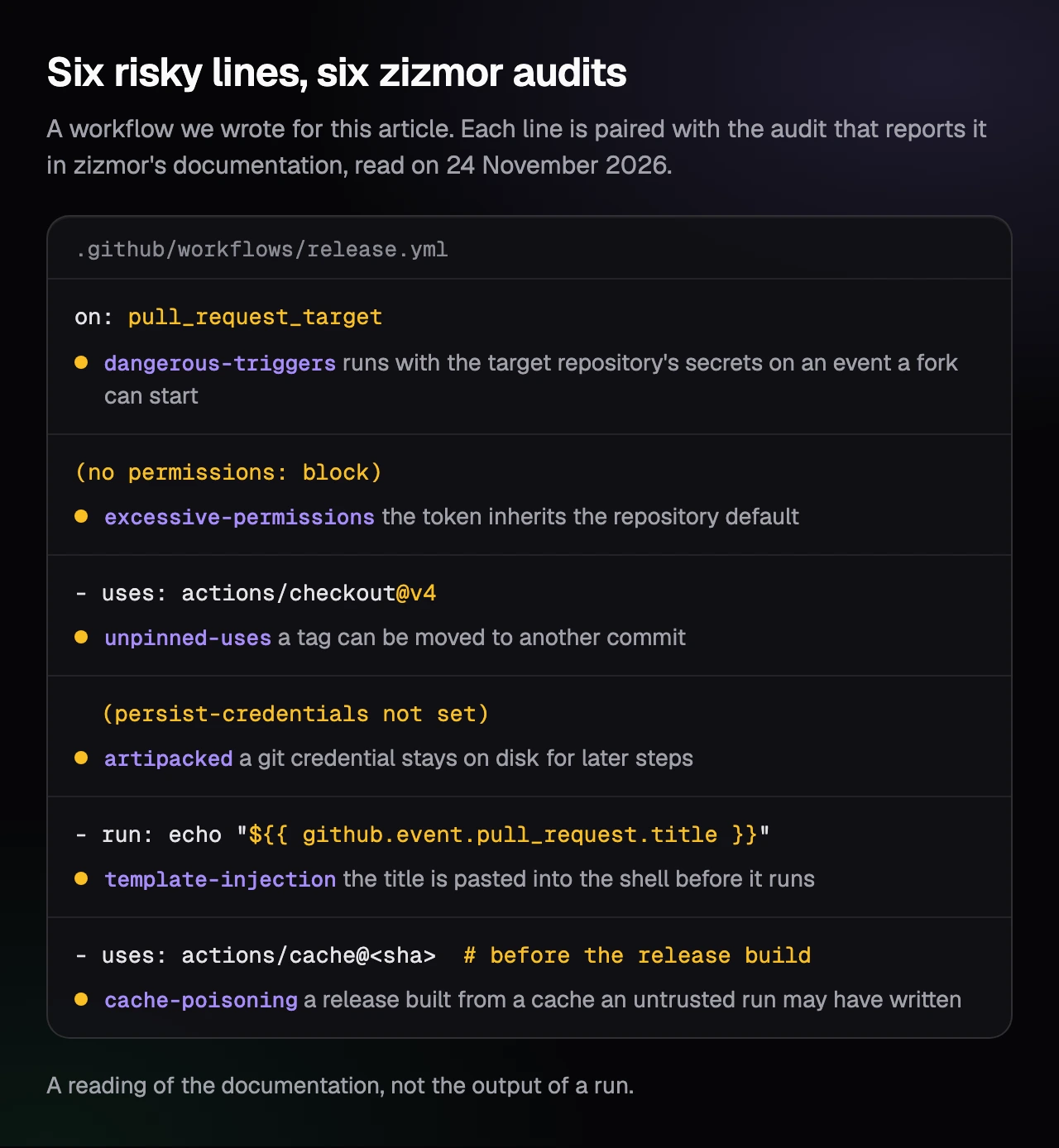
The audit: template-injection. The risk: a ${{ github inside a run: step is pasted into the shell before it runs, so a title like "; curl … | sh becomes a command. The fix: pass the value through an environment variable, as GitHub's guide recommends, and quote it in the script.
Dangerous triggers
The audit: dangerous-triggers, which flags pull_request_target, workflow_run and, since v1.31.0, issue_comment. The risk: these run in the target repository's context, with its secrets, on events a stranger can start. The fix: use pull_request where you can, and never check out the fork's code in a privileged job.
Excessive permissions
The audit: excessive-permissions. The risk: a workflow with no permissions: block inherits the repository default, which can be read and write on everything. The fix: set permissions: at the top, then grant each job only what it needs.
Unpinned and spoofed actions
The audits: unpinned-uses, impostor-commit, ref-confusion. The risk: a tag or a branch can move, as it did for tj-actions, and a SHA can come from a fork in the same network. The fix: pin to a full commit SHA taken from the action's own repository.
Credentials left behind
The audits: artipacked, secrets-inherit, overprovisioned-secrets. The risk: actions/checkout persists a git credential on disk by default, and an artifact upload can publish it. The fix: persist-credentials: unless a later step needs to push.
Cache poisoning
The audit: cache-poisoning. The risk: a release workflow restores a cache that an untrusted run could have written. The fix: no cache restore in jobs that build what you ship.
The figure below is a workflow we wrote for this article, with each risky line next to the audit that, according to zizmor's documentation, reports it. It is a reading of the documentation, not the output of a run.
How do you run zizmor locally and in CI?
Install it, point it at the repository, and read the findings by severity. Locally, zizmor . audits every workflow under .github. In CI, the same command with --format=sarif writes a file that code scanning or any SARIF dashboard reads, and a non-zero exit code can block the merge.
# install (one of)
brew install zizmor
pipx install zizmor

# audit the current repository, offline
zizmor --offline .

# with a token, the four online audits run too
GH_TOKEN=$(gh auth token) zizmor .

# for CI: SARIF out, only medium severity and above
zizmor --format=sarif --min-severity=medium . > zizmor.sarif
zizmor runs offline unless it finds a GH_TOKEN, GITHUB_TOKEN or ZIZMOR_GITHUB_TOKEN in the environment, and ZIZMOR_OFFLINE forces offline mode. With SARIF output, zizmor exits 0 even when it finds something, because SARIF consumers read the results from the file. Use the plain format if you want the exit code to fail the job.
Should you pin GitHub Actions to a commit SHA?
Yes, for every action you do not own. A tag or a branch can be moved by whoever controls the repository, which is what happened to tj-actions. GitHub's secure use reference says to "pin references to actions to a commit SHA" and to check that the SHA comes from the action's repository, not from a fork.
The same page now ranks one measure above that. "The best measure is to lock your workflow dependencies with a lockfile", it says, because a lockfile records "the exact commit for every action your workflows depend on, including transitive dependencies". Where your repository can adopt it, it supersedes SHA pinning. Where it cannot, pin by SHA and let Dependabot or Renovate update the pins, with a comment that keeps the version readable.
What does an auditor look for in your CI/CD pipeline?
An auditor looks for proof that changes reach production through a controlled path: reviewed, tested, and built by a pipeline that cannot be changed on the side. SOC 2's change management criterion, CC8.1, asks that changes to software be tested and approved before they are implemented. A workflow that a stranger's issue title can rewrite is not a controlled path.
The pipeline is where that control lives. A zizmor report on every pull request, kept with its history, shows three things an auditor samples: who changed a workflow, what the scanner said about it, and what was fixed before the merge. We map the full set of controls in what ISO 27001 and SOC 2 ask of a team whose code AI agents write, and the scanning side in what open-source scanners give a SOC 2 auditor.
Coding agents make this sharper. An agent asked to fix a failing build will edit .github/workflows like any other file, and a reviewer reads a YAML diff faster than a code diff. Running zizmor on the pull request catches an agent that adds permissions: to get a step to pass. Our guide to the security checks for an AI agent's pull request puts that gate in the review.
Where does zizmor fit in an open-source AppSec stack?
zizmor covers the pipeline, one layer out of several. Code needs a SAST scanner, dependencies an SCA tool, and secrets a scanner of their own: we tested six open-source secret scanners on one seeded repository and ran open-source SCA tools on a repository of outdated dependencies. Each of them writes its own SARIF file.
The work starts after the scan: the same finding from two tools, a dismissed alert back on the next run, no history for the auditor. That is the step CybeDefend Open Source is built for. One command in your coding agent runs a full audit: the open-source AppSec scanners first, zizmor among them for CI/CD, then the AI scanner, run by your coding agent, which goes after the flaws static scanners cannot see and proves each one with an exploit test. Everything lands in one agentic ASPM dashboard on your own servers. It is part of our list of open-source alternatives to Snyk.
Frequently asked questions
Is zizmor free?
Yes. zizmor is open source under the MIT licence and free to run, locally or in CI. It needs no account. A GitHub token is optional and only enables the four audits that query the GitHub API.
What is the difference between zizmor and actionlint?
actionlint checks that a workflow is valid: syntax, expression types, shell scripts through ShellCheck. zizmor checks whether a valid workflow is safe: injection, permissions, triggers and pinning. Many teams run both, actionlint for correctness and zizmor for security.
Does zizmor fix the problems it finds?
Some of them. The documentation marks which audits offer auto-fixes, and --fix applies them; impostor-commit has a full auto-fix, and several others, such as template-injection and unpinned-uses, have partial ones. Review each change, since a fix to a workflow changes what runs with your secrets.
Is pull_request_target always dangerous?
Not always, but it is risky by default. It runs with the target repository's secrets and a write token on events a fork can start. GitHub's guide says workflows using it "must not explicitly check out untrusted code". If you only need to label or comment, keep the job free of any checkout of the pull request.
How do I see what zizmor would report on my repository?
Run zizmor --offline . from the repository root. It reads .github/workflows, composite actions and dependabot.yml, and prints each finding with its severity, its confidence and the line it points to. Add a GitHub token to run the online audits as well.